
Run multiple app instances
Create separate launch shortcuts for supported macOS apps, each with its own label and Dock icon. Where the target app allows it, instances can use different accounts, profiles, and data.

Parall is a native macOS utility for creating separate launch shortcuts for supported apps, websites, files, folders, and command-line tools. It helps users keep compatible accounts, profiles, data paths, and Dock identities distinct, with support varying by target app.
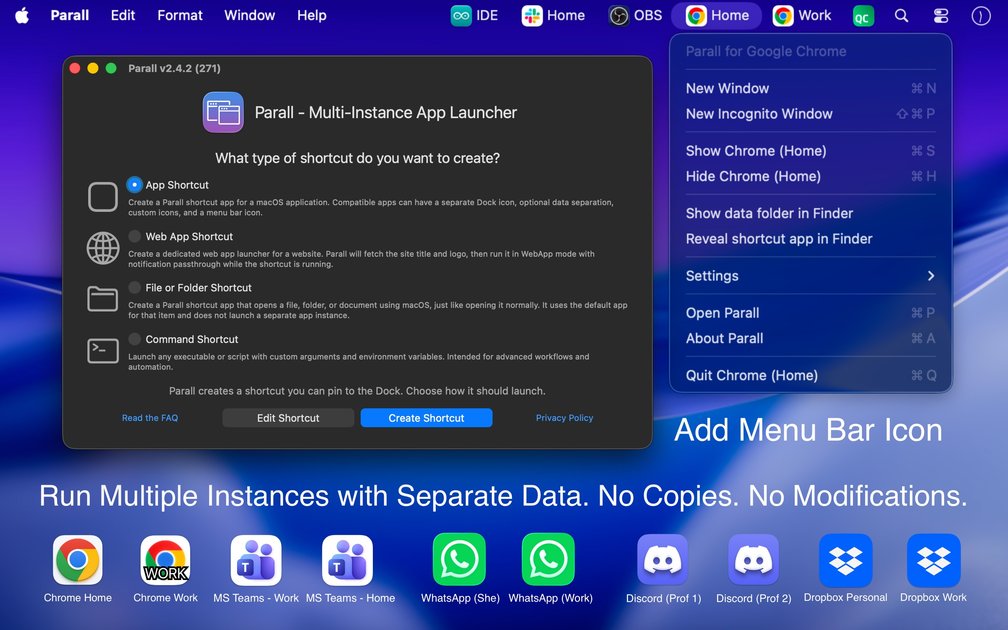
Parall is a native macOS multi-instance launcher for running supported applications as separate shortcuts. Each shortcut can have its own name and Dock icon, while compatible apps may also receive separate accounts, profiles, settings, and data locations. Parall launches the original installed application rather than modifying or copying its app bundle.
Beyond installed apps, Parall can turn website URLs into Web App Shortcuts with separate Dock identities and storage paths. It also supports shortcuts for files, folders, and command-line tools, with advanced launch configuration for cases that require custom arguments or environment variables.
The product is intended for Mac users who need distinct workspaces for multiple accounts, profiles, projects, displays, or web services. Support is app-specific: the compatibility list distinguishes verified, partial, limited, and Web App Shortcut modes, so not every target supports full instance or data separation.
Create separate launch shortcuts for supported macOS apps, each with its own label and Dock icon. Where the target app allows it, instances can use different accounts, profiles, and data.
Assign separate data paths to supported apps and Web App Shortcuts. The compatibility profile determines whether an app's data can be separated fully.
Turn any website URL into a native Web App Shortcut with its own Dock identity and storage path. Predefined web targets include WhatsApp and Microsoft Teams web versions.
Configure file, folder, and command shortcuts with custom arguments, environment variables, and HOME overrides for compatible applications.
Customize how shortcuts appear and behave in macOS with extracted or custom icons, labels, Light or Dark appearance overrides, optional menu bar icons, Dock effects, and animation options.
Launches continue to use the original installed app rather than a modified copy. The site states that Parall does not use private APIs, code injection, binary patching, or system-file modification, and that shortcuts work locally without automatic telemetry or background daemons.
Create separate shortcuts for work and personal accounts in compatible communication, productivity, or cloud applications, avoiding repeated sign-out and sign-in cycles.
Give different projects or client environments their own app data, profiles, and Dock entries when the target application supports separate storage.
Save frequently used services as distinct Web App Shortcuts with separate website storage, allowing different logins or site states where supported.
Run display-specific configurations in compatible utilities such as Philips Hue Sync by assigning separate instances and data for different setups.
Create focused launchers for scripts, command-line tools, files, or folders and expose them through recognizable Dock shortcuts with custom arguments or environment variables.
Parall creates lightweight shortcuts for supported macOS apps, websites, files, folders, and command-line tools. For an app shortcut, configure the target app and its launch settings, then assign options such as a name, icon, data path, environment variables, or HOME override where supported.
Compatibility varies by app. The compatibility list identifies verified, partial, limited, and Web App Shortcut modes. Verified apps can support separate instances and data, while partial or limited entries may not provide all functions. Any website can be created as a Web App Shortcut, subject to the website's support for stored state.
If using a Parall shortcut together with the original app, launch the original app first. To remove that launch-order dependency, create two Parall shortcuts and use those instead; they can then be started in either order.
Browser-based authorization flows for apps such as Cursor or Codex require the original app and every other instance of that app to be fully closed. The site also states that Safari must be the default browser during authorization; after sign-in returns to the target instance, other instances can be reopened.
Parall operates locally and the site states that it has no automatic telemetry, background daemons, or bundled Chrome engine. It does not modify the original app bundle, system files, or app code; however, app and website behavior still depends on the target's compatibility profile.

Goldfish is an AI memory app for macOS that helps you reply, write, summarize, and continue using the context already on your Mac. It stores memory locally and writes in your tone.

ArtDeck is a visual reference board app for iPhone, iPad, and Mac that lets artists collect mixed reference material on one canvas and study it with ToolBox lenses. It works offline, supports optional iCloud sync, and is sold as a one-time purchase with no account required.

Biji es una plataforma versátil diseñada para mejorar la productividad a través de herramientas y características innovadoras.

Malyatko is a baby tracker for logging feeding, sleep, growth, teething, and milestones in one app. It works on iPhone, Apple Watch, and widgets, with no sign-up, offline use, and family sharing through iCloud.

Redline is a budgeting tool for Claude Code that paces sessions to stay within time, token, cost, or plan-percentage limits. It uses Claude Code’s native hooks and statusline to help sessions finish with a usable result instead of stopping abruptly.

Claude Overlay is a Windows desktop overlay for Claude Code that reads your screen so you can ask questions, inspect content, and request edits without leaving the current app. It runs on your existing Claude subscription through the Claude CLI, so no separate API key is required.