
RevenueCat business metrics
Connect RevenueCat to follow recurring revenue and paid subscribers across your app business.

ShipHQ is an iPhone productivity app that gives app owners a visual headquarters for tracking RevenueCat revenue and subscribers, Google Analytics traffic, daily activity, and milestones. It supports up to two apps for free, with optional memberships for larger workspaces and scheduled reports.
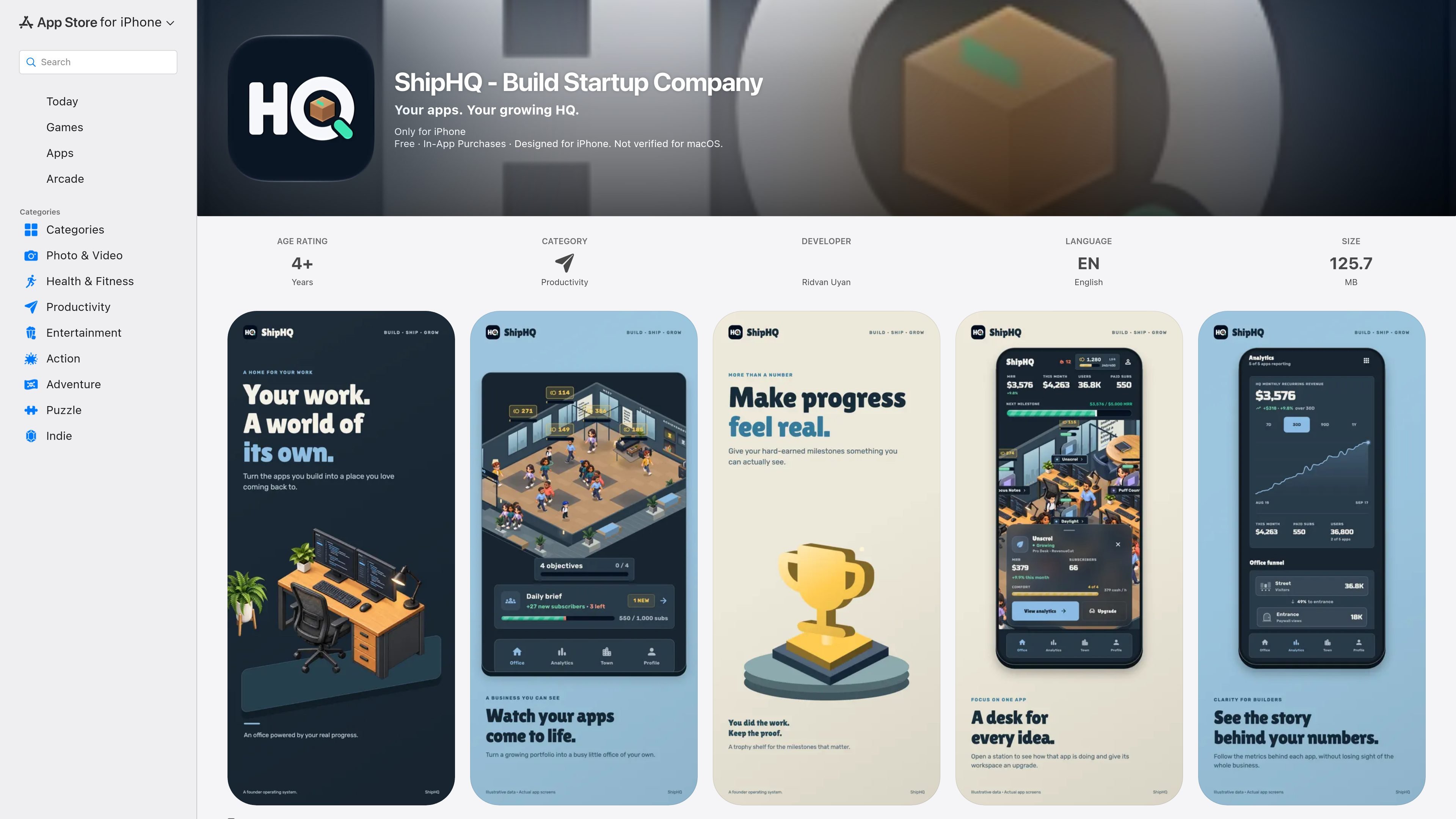
ShipHQ is an iPhone productivity app for managing an app business as a visual headquarters. It brings app-level information into an office-style workspace where connected apps appear as workstations and business progress is represented through milestones.
The app reads recurring-revenue and subscriber information from RevenueCat and traffic information from Google Analytics, then presents charts, recent changes, daily briefs, and milestone progress. Users can begin with a sample office or guest experience, and can save their HQ with Apple or Google. Available metrics depend on what the connected sources report; ShipHQ says it does not modify their configurations.
Connect RevenueCat to follow recurring revenue and paid subscribers across your app business.
Add Google Analytics to review traffic information alongside app-business data.
View connected apps as workstations, inspect reported numbers, and follow the next business milestone in one office-style workspace.
Review new users and recent changes in a Daily Brief designed to provide a regular snapshot of activity.
Explore revenue charts and traffic views with labels indicating when a connected source has not reported a metric.
Track progress through activity, milestones, achievements, and workspace customization. Paid memberships can also add scheduled AI analytics or growth reports, depending on the plan.
An app owner can check recurring revenue, paid subscribers, traffic, new users, and recent changes from a single phone-based headquarters instead of switching between the connected services for every review.
A developer preparing the next release or business target can use milestone tracking and revenue-based desk progression to keep attention on the next reported business threshold.
A founder or operator can use the Daily Brief as a recurring check-in for new users and recent changes, supporting a lightweight daily review routine.
Someone evaluating the workflow can open a sample office or continue as a guest before deciding whether to save a workspace and connect services.
An owner managing more than two apps can use a paid membership to expand the app capacity and, depending on the selected plan, receive scheduled analytics or growth reports.
ShipHQ is free for up to two apps. Optional auto-renewing Mini, Growth, and HQ memberships increase the app limit and add different levels of scheduled AI reports. Memberships are available monthly or annually, with prices shown in the App Store listing.
You can start with a sample office, continue as a guest, or save your HQ using Apple or Google. To connect business data, ShipHQ requires permission to read the connected services.
ShipHQ connects to RevenueCat for recurring revenue and paid-subscriber information and to Google Analytics for traffic data. It reads data from these services and does not change their configurations.
Available metrics depend on what the connected sources report. The app labels cases where a source has not reported a metric, so the dashboard should not be treated as a complete view of every business measure.
The listing describes saving an HQ with Apple or Google and adding apps to an office, but it does not document team roles, shared workspaces, or collaboration permissions. Team support should therefore be confirmed before adoption.

PromptScout tracks how ChatGPT, Gemini, Google AI Overviews, and Perplexity mention your brand or competitors, then pairs those results with source analysis and website audits. It helps teams decide what to fix in content, positioning, or site readiness next.

Goldfish is an AI memory app for macOS that helps you reply, write, summarize, and continue using the context already on your Mac. It stores memory locally and writes in your tone.

SaveMRR is a Stripe retention tool for SaaS teams that scans billing data for churn and MRR leaks, then automates recovery through dunning, cancel-save offers, win-back emails, and onboarding nudges. It is built for founders and bootstrapped teams using Stripe.

Hype is a web tool for finding trending YouTube topics by category, time range, and scoring mode. It helps creators spot emerging ideas, inspect source videos, and decide what to cover next.

ArtDeck is a visual reference board app for iPhone, iPad, and Mac that lets artists collect mixed reference material on one canvas and study it with ToolBox lenses. It works offline, supports optional iCloud sync, and is sold as a one-time purchase with no account required.

Biji es una plataforma versátil diseñada para mejorar la productividad a través de herramientas y características innovadoras.