
Real-time traffic reports
View visitors, sessions, pageviews, views per session, bounce rate, and session duration in real-time reports with trend charts.

Statable is a privacy-focused, cookieless web analytics platform for site owners and teams that need real-time traffic, acquisition, audience, and conversion reporting. It supports GA4 history imports, EU-hosted processing, and lightweight installation across websites and common frameworks.
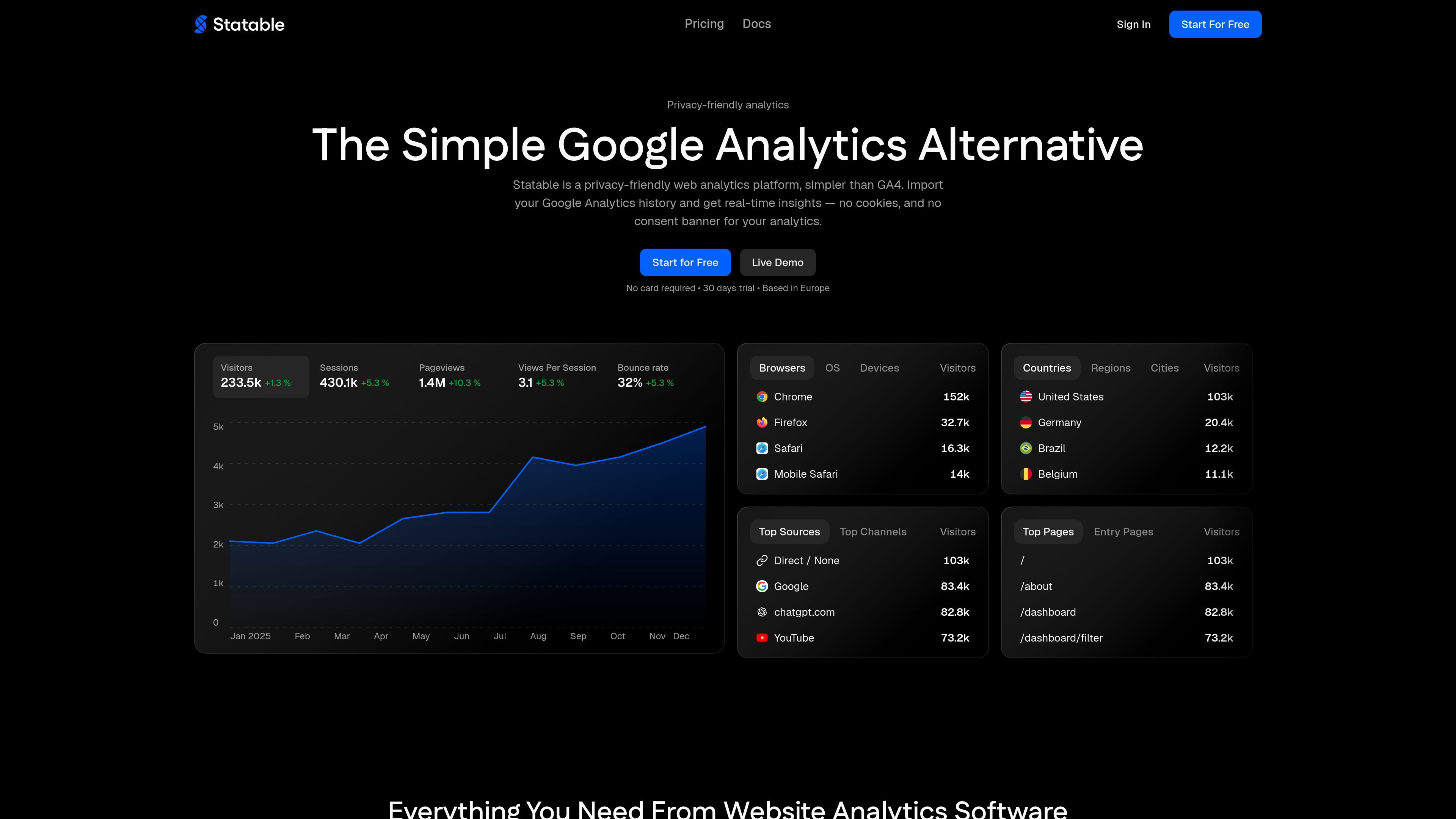
Statable is a privacy-focused web analytics platform and Google Analytics alternative for measuring website traffic without cookies, localStorage, fingerprinting, or cross-site tracking. It provides real-time visibility into visitors, sessions, pageviews, traffic sources, technology, locations, and on-site actions.
The service is designed for teams that need usable analytics while limiting data collection on visitors' devices. It is hosted and processed in the EU, uses a short-lived daily identifier rather than a persistent visitor profile, supports GA4 history imports, and can be installed with a small script or the official WordPress plugin.
View visitors, sessions, pageviews, views per session, bounce rate, and session duration in real-time reports with trend charts.
Classify visits by search, social, advertising, AI assistants, and UTM campaigns to identify the sources bringing traffic.
Break down audiences by browser, operating system, device type, country, region, and city without creating cross-site visitor profiles.
Measure signups, downloads, sales, and other actions with goals, custom events, custom properties, and funnels that show where users leave a process.
Apply filters to views and use saved segments to focus reporting on relevant sessions and visitor behavior.
Connect Google Analytics through OAuth to import available GA4 history, and connect Google Search Console so search queries appear alongside traffic data.
Replace or supplement GA4 when a site owner wants traffic, acquisition, and conversion reporting without placing analytics cookies or adding an analytics consent banner in most cases.
Connect a GA4 property and bring available historical pageviews, sources, countries, devices, and top pages into a new dashboard instead of starting with an empty timeline.
Install the script on a marketing site, SaaS product, blog, or small business website to monitor live traffic and understand which channels, pages, and devices deserve attention.
Track signups, downloads, sales, or other actions with goals and custom events, then use funnels to locate the step where visitors abandon a conversion path.
Publish live visitor, country, map, or globe widgets on a site to provide public traffic context for visitors, partners, or advertisers.
Add Statable's approximately 2 KB script before the closing head tag. It works with websites and frameworks including Next.js, WordPress, and Webflow, without a tag manager, SDK, or build step. WordPress users can install the official plugin, which places the script and displays statistics in wp-admin.
Yes. Connect a Google account through OAuth, grant the read-only analytics scope, and select a GA4 property. Statable imports available GA4 history without changing the site's tracking setup or overwriting data it has already collected.
Statable does not set cookies, write to localStorage, fingerprint visitors, or track them across sites. It uses the IP address on servers in the Netherlands to calculate a daily visitor identifier, then discards the address; the identifier changes daily and is scoped to one site.
Every account starts with a free 30-day trial without a credit card. Pricing is based on monthly pageviews and custom events across all sites in an account, and every paid plan includes the full feature set and unlimited websites. Annual billing is available, while traffic above 10 million monthly pageviews uses custom pricing.
The tracking script checks Do Not Track and Global Privacy Control before sending data. If either signal is present, the visit is not measured and no request about it reaches Statable.

PromptScout tracks how ChatGPT, Gemini, Google AI Overviews, and Perplexity mention your brand or competitors, then pairs those results with source analysis and website audits. It helps teams decide what to fix in content, positioning, or site readiness next.

SaveMRR is a Stripe retention tool for SaaS teams that scans billing data for churn and MRR leaks, then automates recovery through dunning, cancel-save offers, win-back emails, and onboarding nudges. It is built for founders and bootstrapped teams using Stripe.

Hype is a web tool for finding trending YouTube topics by category, time range, and scoring mode. It helps creators spot emerging ideas, inspect source videos, and decide what to cover next.

Sleek Analytics is a privacy-friendly web analytics tool with real-time visitor tracking, Core Web Vitals, and revenue attribution. It helps site owners understand traffic and conversions without cookie banners or a heavy setup.

Struere is an AI-native platform for turning spreadsheet data into structured operational software with dashboards, alerts, and automations. It is aimed at teams that want to replace manual spreadsheet workflows without building custom tools from scratch.

ClayHog es una plataforma de visibilidad en AI search para seguir cómo aparecen las marcas en ChatGPT, Gemini, Perplexity, Claude y Google AI Overviews. Centraliza citas, competidores, sentimiento y oportunidades de contenido.