
Descriptive data models
Attach warehouse tables and fields to a model with descriptions, data types, and primary and foreign keys, giving the agent explicit structural context.

Upsolve Data Models gives AI analytics agents structured context for warehouse tables, keys, metric definitions and business vocabulary. It helps data teams standardize agent-generated answers without requiring dbt or an existing semantic layer.
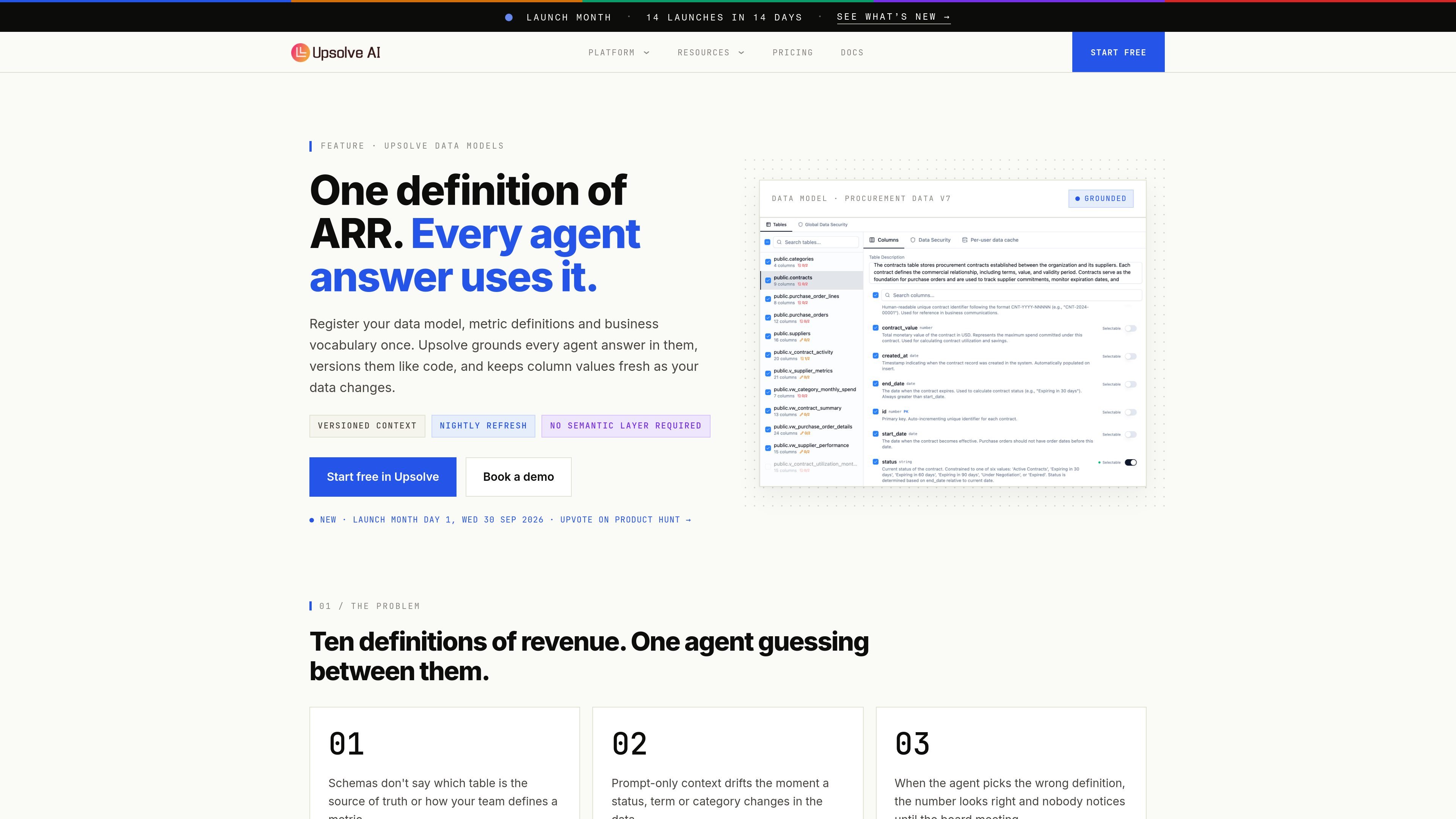
Upsolve Data Models is a context and governance layer for AI analytics agents. It links warehouse tables and fields with descriptions, data types, primary and foreign keys, canonical metric definitions, analysis approaches and output formats so an agent has one maintained definition of business data.
Models and system prompts are versioned like code, with drafts and rollback support for context changes. Selectable column values are pre-cached and refreshed nightly by default or on a chosen schedule, helping the agent use current business categories and statuses when generating answers.
The feature is designed for teams that want to start from existing warehouse tables rather than adopt dbt or another semantic layer first. It is one layer of Upsolve's wider platform, which also includes data connections, analytics agents, observability and evaluation capabilities; the exact operational workflow beyond model registration is not fully documented in the supplied source.
Attach warehouse tables and fields to a model with descriptions, data types, and primary and foreign keys, giving the agent explicit structural context.
Store canonical metric definitions, analysis approaches and output formats in a versioned system prompt alongside the data model.
Create drafts and versions for system prompts and models, making it possible to change context and roll back without replacing the active definition immediately.
Mark columns as selectable so Upsolve pre-caches their values, with nightly refresh by default or a schedule chosen by the user.
Build the model directly on warehouse tables without requiring dbt or an existing semantic layer, then add definitions as gaps are discovered.
Document ARR, revenue or other KPI definitions alongside the tables and keys needed to calculate them, reducing ambiguity when an agent answers recurring business questions.
Encode contract statuses, payment terms and other categorical business vocabulary as selectable values so generated analysis uses the organization's terminology.
Start with a warehouse's current schema and add descriptions or definitions only where agents encounter gaps, rather than redesigning the stack around a new semantic layer.
Use drafts and versions to test changes to prompts or model context, then roll back when a definition needs to be revised.
No. You can build a data model directly in Upsolve on top of existing warehouse tables and add definitions over time; dbt or another semantic layer is not required.
A system prompt stores business practices and instructions, while the data model stores the underlying data context: tables, keys, descriptions, canonical definitions and live column values. Upsolve uses both.
Values are refreshed nightly by default, or on a cadence selected by the user, so the agent's view of selectable column values stays current.
Data Models can be used with Upsolve's broader analytics-agent platform. The pricing page lists 50+ data connections across plans, while specific connection availability and workflow details may vary by configuration.

PromptScout tracks how ChatGPT, Gemini, Google AI Overviews, and Perplexity mention your brand or competitors, then pairs those results with source analysis and website audits. It helps teams decide what to fix in content, positioning, or site readiness next.

SaveMRR is a Stripe retention tool for SaaS teams that scans billing data for churn and MRR leaks, then automates recovery through dunning, cancel-save offers, win-back emails, and onboarding nudges. It is built for founders and bootstrapped teams using Stripe.

Hype is a web tool for finding trending YouTube topics by category, time range, and scoring mode. It helps creators spot emerging ideas, inspect source videos, and decide what to cover next.

Sleek Analytics is a privacy-friendly web analytics tool with real-time visitor tracking, Core Web Vitals, and revenue attribution. It helps site owners understand traffic and conversions without cookie banners or a heavy setup.

Struere is an AI-native platform for turning spreadsheet data into structured operational software with dashboards, alerts, and automations. It is aimed at teams that want to replace manual spreadsheet workflows without building custom tools from scratch.

ClayHog es una plataforma de visibilidad en AI search para seguir cómo aparecen las marcas en ChatGPT, Gemini, Perplexity, Claude y Google AI Overviews. Centraliza citas, competidores, sentimiento y oportunidades de contenido.