
AI-written titles
Uses Apple Intelligence to generate titles for notes, making captured material easier to identify at a glance.
NoteWorthy is an Apple-focused note-taking and organization product that uses Apple Intelligence to write note titles, summaries, and filing information. It is positioned as private, on-device AI for iPhone, iPad, and Mac users.
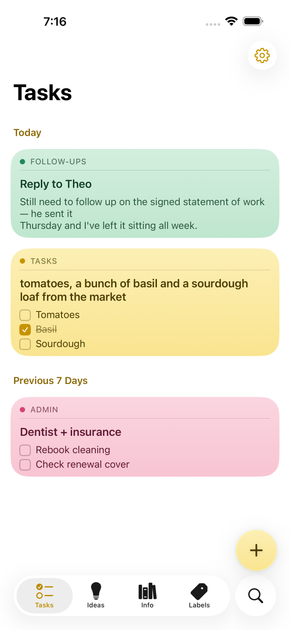
NoteWorthy is a note-taking and organization product for Apple devices. Its central workflow uses Apple Intelligence to write note titles, summaries, and filing information, reducing the amount of manual organization required after a note is created.
The product is described as private, on-device AI and is available across iPhone, iPad, and Mac. The available source does not provide further details about note capture methods, search, synchronization, exports, pricing, or device and operating-system requirements.
Uses Apple Intelligence to generate titles for notes, making captured material easier to identify at a glance.
Creates summaries with Apple Intelligence so users can review the main points of a note more quickly.
Applies AI-assisted filing to help organize notes within the product's note workflow.
Designed to use Apple Intelligence directly on supported Apple hardware, according to the product positioning.
The product is presented for use across iPhone, iPad, and Mac, providing an Apple-device note workflow.
Create notes on an Apple device and use AI-generated titles to make them easier to recognize later.
Use generated summaries to review longer notes without rereading every detail.
Rely on AI-assisted filing to reduce manual categorization as notes accumulate.
Use the same product concept across an iPhone, iPad, and Mac-based workflow, subject to the product's unspecified setup and synchronization details.
NoteWorthy is described as using Apple Intelligence to write note titles, summaries, and filing suggestions on the user's iPhone, iPad, or Mac. The available source does not specify setup steps or device and operating-system requirements.
The product description says that its titles, summaries, and filing are written by Apple Intelligence on Apple devices. The available source does not provide additional technical details about processing, synchronization, or data handling.
NoteWorthy is positioned for people who want AI-assisted note organization on Apple devices. The source does not document specific workflows such as meetings, journaling, study, or research.
The available source identifies iPhone, iPad, and Mac as supported device categories. It does not state the required operating-system versions, supported languages, or Apple Intelligence availability requirements.

Flunkey is a voice-first productivity layer for Windows that converts speech into text, AI-assisted outputs, and remembered context. It is built for users who want to capture ideas and actions without leaving the app they are working in.

Contextbergは、画面・入力・ブラウザ・AIエージェントの利用履歴をローカルで記録し、MCP経由でClaude CodeやCursorなどに作業コンテキストを渡すデスクトップアプリです。中断した作業の再開、過去ログの検索、日次レビューに利用できます。

Yattayo: Slider To-Do Board is a productivity app that turns tasks into a physical-style slider board with sticky notes, widgets, reminders, and iCloud sync. It helps people who want a more tactile way to manage to-dos and, in Premium, recurring habits.

recall is an AI flashcard app that turns reading and notes into study cards through Claude, ChatGPT, or another MCP client. It uses one-time lifetime access pricing and spaced repetition review.

at8pm is an iPhone journaling app that locks each day’s entry after a chosen time so it can’t be edited later. It supports text, voice, photos, locations, and quick video notes, with private iCloud syncing and optional Face ID lock.

Notewarp is an AI note-taking tool that turns voice notes, uploads, or pasted text into cleaner notes, transcripts, summaries, and action items. It helps people capture rough ideas quickly and then edit, export, or share the result.