
Level- and interest-matched video picks
LingoLingo selects YouTube videos based on the learner’s target-language level and stated interests, providing a guided alternative to choosing content manually.

LingoLingo turns YouTube videos into language-learning sessions with level- and interest-matched recommendations, interactive exercises, translations, and pronunciation practice. It supports learners studying 13 target-language configurations through the mobile app and a transcript-based Chrome extension.
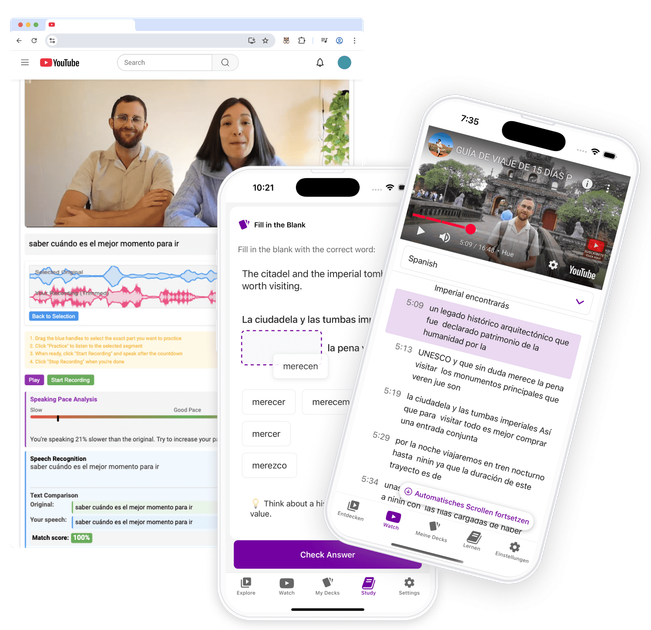
LingoLingo is a language-learning app built around YouTube videos. It recommends videos according to a learner’s language level and interests, then adds interactive exercises intended to support comprehension, vocabulary, grammar, and video-based learning.
Learners can start with the app’s recommendations or paste a YouTube link of their own. During study, they can translate transcript text, look up less conventional terms through web search, and practice pronunciation by recording their voice and comparing it with native speakers. LingoLingo is available for 13 target-language configurations and offers an interface in more than 31 languages.
LingoLingo selects YouTube videos based on the learner’s target-language level and stated interests, providing a guided alternative to choosing content manually.
Exercises appear while a video is playing to reinforce understanding of vocabulary, grammar, and the video’s content.
Learners can select text in the transcript to translate it inside the app. Web search is also available for items such as names and slang that may not be covered by a dictionary.
Users can record their voice, compare it with native speakers, and receive immediate pronunciation feedback.
Any YouTube video link can be pasted into the app to generate exercises, translations, and learning materials for that specific video.
The original Chrome extension supports transcript-based text selection, saved words, Anki export with video snippets, and a study mode with AI-generated exercises.
Choose a target language and let LingoLingo surface videos aligned with your current level and interests, creating a more directed way to learn through everyday video content.
Paste a video you already want to watch and use generated exercises, translations, and learning materials to turn that specific content into a study session.
Pause on unfamiliar transcript text, translate it in context, and use web search for proper names, slang, or other terms that need broader context.
Record spoken phrases and compare them with native speakers to focus practice on pronunciation rather than comprehension alone.
Use the Chrome extension to save words from transcript-based videos, export them with video snippets to Anki, and review them in the extension’s study mode.
Install LingoLingo from the App Store or Google Play, choose a target language, and press “start watching.” The app then presents videos matched to your language level and interests, with exercises appearing during playback.
You can paste any YouTube video link into the app. LingoLingo generates interactive exercises, translations, and other learning materials for that video.
LingoLingo supports 13 target-language configurations: Chinese (Simplified and Traditional), English, French, German, Greek, Italian, Japanese, Korean, Portuguese (Portugal), Russian, Spanish, and Turkish. The interface is available in more than 31 languages.
You can try LingoLingo for free, and the site says a subscription is required afterward. It also mentions a free trial when signing up, but does not provide plan prices on the available pricing page.
The app lets you select transcript text for in-app translation, use web search for names or slang, and record your voice to compare it with native speakers for pronunciation feedback.

LangPanda is a browser extension for learning languages from streaming video and other supported sites. It combines instant subtitle lookup, flashcard creation, vocabulary tracking, and spaced-repetition review for 36 languages.

Asụsụ Ọma is a free guided Igbo learning app for beginners, with short lessons, native-speaker audio, memory practice, games, and speaking rehearsal. It is designed for adult and young-adult learners, diaspora learners, children, and families studying Igbo at home or abroad.

Talkpal is an AI-powered language learning web and mobile app for practicing speaking, listening, writing, and pronunciation. It offers guided courses, roleplays, and call-style conversation practice across 130+ languages.

Microsoft Translator is a Bing translation web app for translating short text between English and more than 100 languages. It also supports image capture translation and basic output actions like listen and copy.

YABAI is a 308-word Japanese slang and culture dictionary that explains meanings, social tone, example usage, and word histories across eight categories. It helps Japanese learners and readers understand how expressions sound and when they fit, with a paid Android app offering 13 languages and device read-aloud support.

Toku Reader - 読 is an iPhone app for reading Japanese and Chinese with tap-to-define lookups, reading support, and study tools. It works across texts, websites, videos, and podcasts, with offline core features and a free plan that includes 50 word lookups per day.