

AgentOS
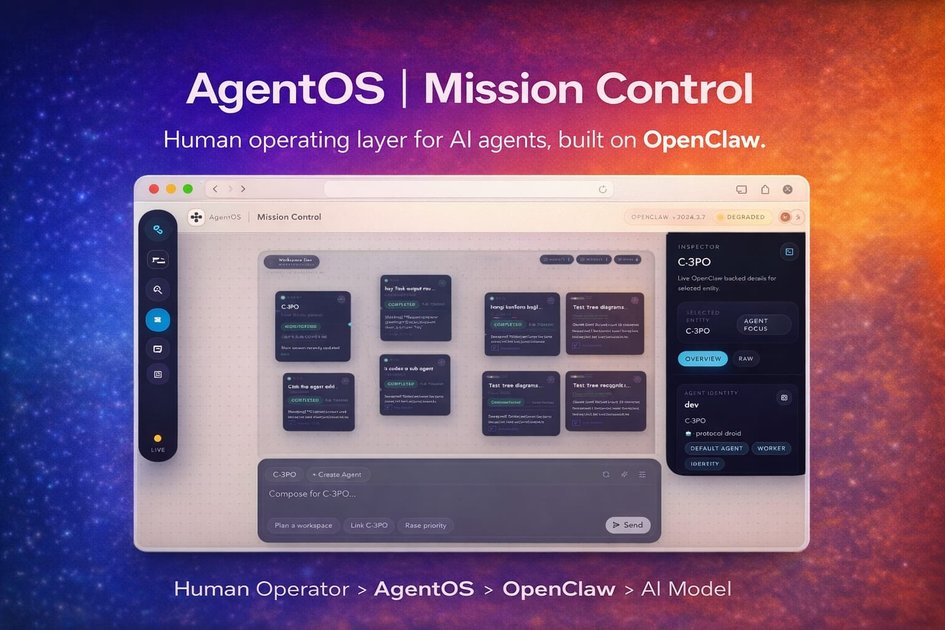
AgentOS is a local-first control surface for OpenClaw to manage workspaces, agents, tasks, jobs, approvals, and runtime visibility in one interface.
What is AgentOS?
AgentOS is a local-first human operating layer for OpenClaw. It sits on top of the OpenClaw runtime and gives operators a clearer way to manage workspaces, agents, tasks, jobs, approvals, and runtime visibility from one control surface.
The product is aimed at people running complex agent operations who need a guided interface rather than a raw runtime. Its focus is on making the underlying system legible and operable through onboarding flows, wizards, review gates, and live status views.
Key Features
- Guided onboarding that helps users get from a fresh install to a working system faster, with a simpler setup flow on top of OpenClaw.
- Workspace, agent, and task wizards for creating operational structures through guided flows while keeping OpenClaw’s flexibility underneath.
- Human control surface for running agents, missions, and operations from a single interface designed for operators.
- Runtime visibility that shows agent activity, changes, sessions, models, transcripts, presence, and gateway state in real time.
- Approval layer for reviewing critical actions before execution, keeping humans in the loop for sensitive steps.
- Job and team builder for creating custom jobs and purpose-built agent teams for focused work such as Telegram, growth, or research.
- Integration catalog support that brings OpenClaw connections into one operating layer for execution.
How to Use AgentOS
A typical setup starts by installing AgentOS using one of the documented paths, such as the one-line installer, pnpm, or a source checkout. After installation, users launch the local runtime, open the interface, and verify the setup with the included doctor command.
From there, they create or import workspaces, agents, and tasks through the guided setup flows, then use the control surface to monitor runtime state, review approvals, and steer ongoing work. Teams can also assemble focused jobs and agent groups around a specific operational workflow.
Use Cases
- An operator who wants a clearer front end for OpenClaw can use AgentOS to manage multiple projects and agents from one local control surface.
- A team setting up a new agent workflow can use the guided wizards to create workspaces, agents, and tasks without working directly in the raw runtime.
- A reviewer handling sensitive actions can use the approval layer to pause execution and inspect critical steps before they run.
- A builder monitoring live operations can use runtime visibility to track sessions, models, transcripts, presence, and gateway state as work progresses.
- A team organizing focused automation can use the job and team builder to assemble custom agent groups for research, growth, or messaging workflows.
FAQ
Is AgentOS the runtime itself? No. The page describes OpenClaw as the runtime and AgentOS as the human layer or control surface built on top of it.
Does AgentOS run locally? Yes. The page describes it as a local-first control surface and provides local installation and verification steps.
How is AgentOS installed?
The page shows multiple installation paths, including a one-line shell installer, pnpm installation, a source checkout, and a Windows PowerShell installer.
What does the approval layer do? It lets users review critical actions before execution so humans can stay in control of sensitive operations.
What kinds of work does it support? The source mentions workspaces, agents, tasks, jobs, approvals, runtime visibility, and focused teams for workflows such as Telegram, growth, and research.
Alternatives
- A direct OpenClaw interface without a human layer: this would expose the runtime more directly and likely require users to manage more of the system themselves.
- General AI agent orchestration tools: these typically coordinate agents and tasks, but may not provide the same local-first operator interface or OpenClaw-specific workflow layer.
- Workflow automation platforms: these are useful for structured automation, but they are usually designed around broader business automation rather than agent runtime visibility and approval gates.
- Custom internal dashboards built on top of a runtime API: these can be tailored to a team’s needs, but they require more implementation effort than a ready-made operator surface.
Alternatives

Biji
Biji is a versatile platform designed to enhance productivity through innovative tools and features.

AakarDev AI
AakarDev AI is a powerful platform that simplifies the development of AI applications with seamless vector database integration, enabling rapid deployment and scalability.

Planndu: Daily Task Planner
Planndu is an intuitive productivity application designed to help users organize tasks, manage projects, build routines, and enhance focus using tools like AI generation and a built-in Pomodoro timer.

Arduino VENTUNO Q
Arduino VENTUNO Q is an edge AI computer for robotics, combining AI inference hardware and a microcontroller for deterministic control. Arduino App Lab-ready.

BotBoard
Manage AI agents like a team with a shared backlog, structured context, and human review workflow to assign, track, and approve outputs.

Devin
Devin is an AI coding agent that helps software teams complete code migrations and large refactoring by running subtasks in parallel.