
Usage analytics by organization, user, and model
Track DAU, WAU, MAU, sessions, and tokens by model at the organization and user level so you can see adoption depth instead of only aggregate totals.

Aimeterly is a managed SaaS for Claude Code usage analytics, estimated cost tracking, productivity metrics, and optional audit logs.
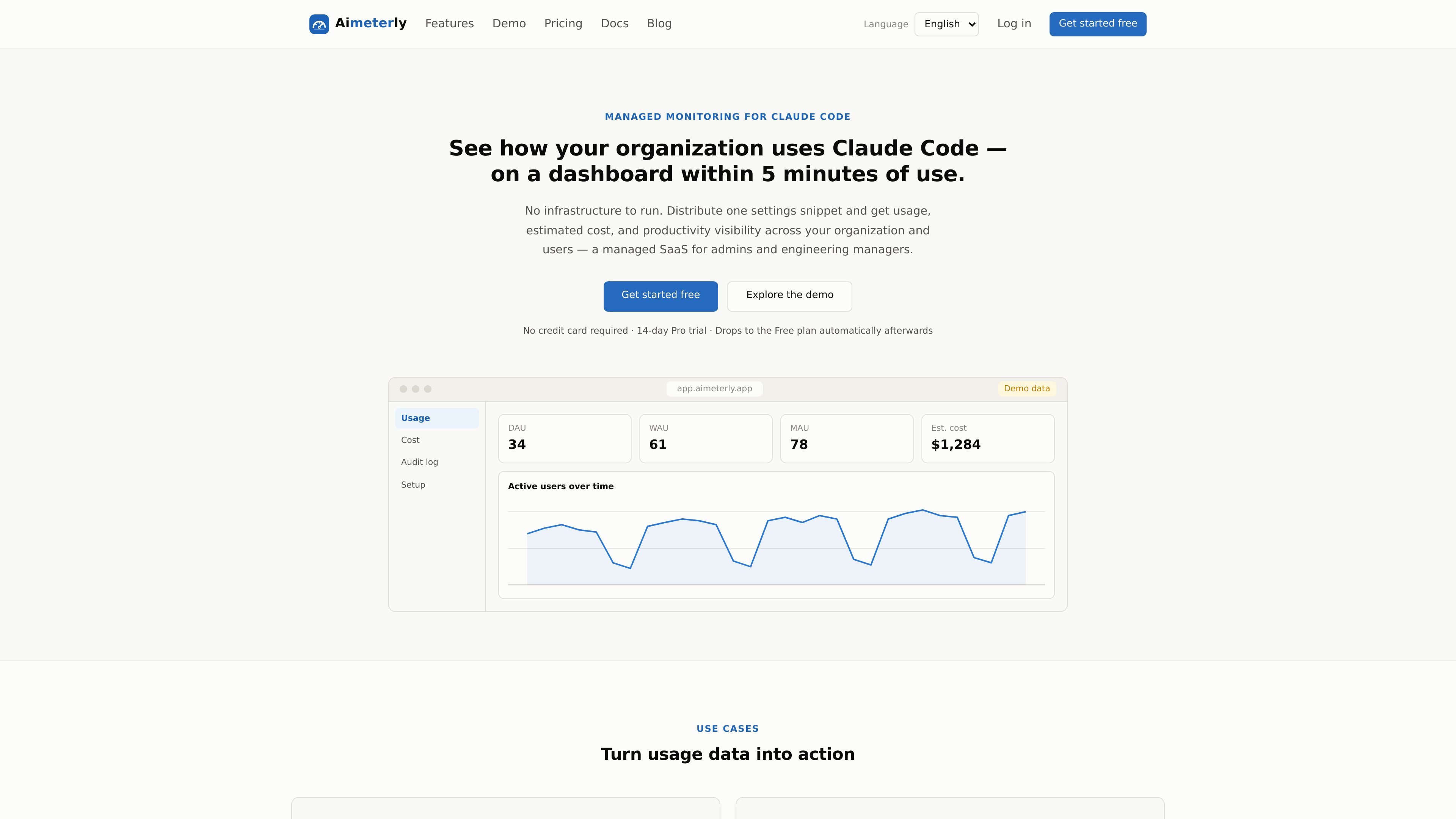
Aimeterly is a managed SaaS for tracking Claude Code usage, estimated cost, productivity, and audit data across an organization. It is designed for admins and engineering managers who want a shared dashboard instead of piecing together telemetry from separate tools.
The product works by having an organization administrator distribute one configuration snippet to Claude Code. Aimeterly then receives telemetry at a dedicated endpoint and shows usage data, cost estimates, productivity signals, and, when enabled, content-capture audit logs within a few minutes.
Track DAU, WAU, MAU, sessions, and tokens by model at the organization and user level so you can see adoption depth instead of only aggregate totals.
View estimated cost by user and model using API-equivalent pricing, with period-over-period comparison to identify heavy users and changing spend patterns.
Follow lines of code, commits, pull requests, and suggestion acceptance rate over time to connect Claude Code use with engineering output signals.
Capture prompts, responses, and tool input/output only when your organization opts in, with keyword, user, and capture-type search across the retained data.
Start from a single configuration snippet that can be delivered through the Claude Team / Enterprise admin console or as managed-settings.json, with no extra development required.
See new telemetry appear on the dashboard within minutes after the settings are distributed and Claude Code is used.
Use DAU, WAU, MAU, sessions, and token usage to see whether Claude Code is being adopted across teams or concentrated in a few users.
Rank users by estimated cost and compare models to identify heavy spenders before budgets or usage patterns drift too far.
Review lines of code, commits, pull requests, and acceptance rate alongside usage to discuss whether Claude Code is contributing to engineering output.
When content capture is enabled, search prompts and file edits by keyword, user, or capture type to review records that match an internal rule or question.
Roll out Claude Code telemetry with a single settings snippet through the admin console or managed-settings.json, then check the dashboard after members start using the tool.
It appears to work in two supported distribution paths: an organization administrator can paste the settings snippet into the Claude Team / Enterprise admin console, or deploy a managed-settings.json file on each machine. In both cases, Claude Code then sends telemetry to Aimeterly's dedicated endpoint and the dashboard updates within a few minutes, usually within about five minutes.
By default, Aimeterly receives usage metadata such as user identifiers, team attributes, model names, token counts, and estimated cost. Prompt, response, and tool input/output content are not sent unless your organization explicitly enables the corresponding capture type.
The setup guide says the service works where you can distribute settings through the Claude Team / Enterprise admin console or via managed-settings.json. It also notes that server-managed settings are not delivered when using third-party providers such as Amazon Bedrock, Google Cloud, or Microsoft Foundry.
Yes. The setup guide says content capture is optional and off by default, and that enabling it requires the Pro plan or above, including the trial period. The pricing page also lists content capture on Pro and Enterprise, while Free includes usage and cost dashboards and an audit log without content capture.
No. The site says the costs shown in Aimeterly are estimates derived from telemetry at API-equivalent pricing and may differ from billing by Anthropic or cloud providers. They are intended for comparison and trend analysis rather than exact invoice matching.

PromptScout tracks how ChatGPT, Gemini, Google AI Overviews, and Perplexity mention your brand or competitors, with source analysis and website audits.

Sleek Analytics is a privacy-friendly web analytics tool with real-time visitor tracking, Core Web Vitals, and revenue attribution.

ByteAsk is a terminal-first AI coding agent for C and C++ that edits repos and verifies changes with compilers, debuggers, sanitizers, and tests.

SaveMRR is a Stripe retention tool for SaaS teams to scan churn and MRR leaks, then automate recovery with dunning, cancel-save offers, win-back emails, and onboarding nudges.

CreateOS Sandbox is an isolated compute environment for running code and agent workloads in Firecracker micro-VMs with private networking and SDK, CLI, or MCP control.

Hype is a web tool for finding trending YouTube topics by category, time range, and scoring mode. Spot emerging ideas and review source videos.