

Delos
Delos is an AI-native workspace bringing email triage, meeting summaries, document analysis, sourced research, translation, scheduling & slides—sovereign hosting.
What is Delos?
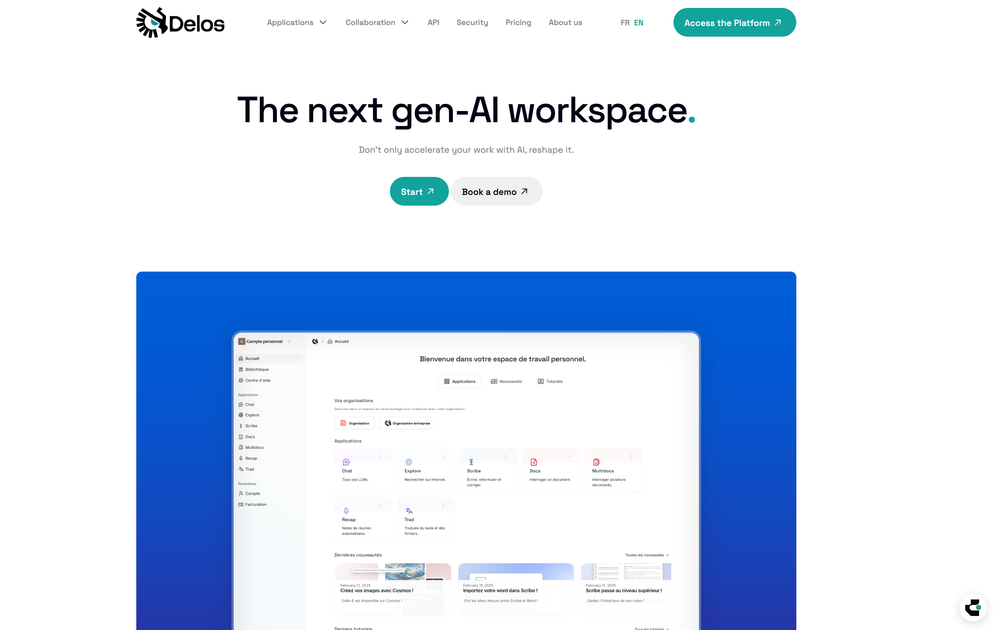
Delos is an AI-native workspace that centralizes multiple applications for everyday work—writing, email handling, meeting summaries, document analysis, research, translation, scheduling, and slide creation. The core purpose is to help individuals and teams execute common knowledge-work tasks using AI outputs built around templates and sourced results.
The platform emphasizes where data is processed and how it’s handled: it provides “souverain hosting,” uses servers in France (via Scaleway), deploys LLMs in France, and states that no training on users’ data occurs. It also includes encryption in transit and at rest and segmentation of data by person and company.
Key Features
- AI assistant access to multiple model outputs: Generate content such as text, code, images, and spreadsheets from the workspace.
- AssistantMail for email triage and drafts: Sort messages by priority and draft replies in an appropriate tone per recipient.
- Recap for automated meeting summaries: Create summaries from Teams, Google Meet, recordings, or in-person meetings using templates and send them to participants.
- Docs/Document drive for analysis and querying: Organize and manage files in a dedicated drive with categorization, multiple versions, and sourced analyses supported by visualizations.
- Explore for in-depth, sourced research reports: Produce detailed reports on topics with explicit sourcing.
- Trad for document translation with formatting preservation: Translate documents while retaining formatting (including titles, colors, tables, and text boxes) with customizable tone and glossary.
- Calendar for scheduling optimization: Find suitable time slots for individuals, colleagues, or teams.
- Actu for automated personalized briefings: Discover relevant updates from sources and deliver clean briefings based on a topic description.
- Slides for slide deck generation: Generate complete presentations from a prompt, using reference files and an image bank to build templates.
- Scribe and Scribe-like writing support: Improve text from draft to polished output with prompt control and requested tone adjustments.
How to Use Delos
- Start with the application you need (for example, Mail for email drafts, Recap for meeting summaries, Docs for file analysis, or Actu for briefings).
- Provide inputs and context such as a message, meeting materials, documents, a topic description, or a draft text.
- Use templates where available—especially for meeting summaries and briefing-style outputs—to keep results consistent.
- Review outputs and iterate (for example, adjust tone, glossary terms, or the structure of reports and slides) before sharing or sending.
Use Cases
- Email management with consistent tone: A professional can sort incoming email by priority and generate reply drafts tailored to each recipient’s context.
- Meeting documentation for teams: A team can generate templated summaries from Teams/Google Meet meetings and distribute the recap to all participants.
- Working with complex documents: An analyst can categorize files, track multiple versions, and run sourced analyses with visualizations inside the document drive.
- Research and reporting with sourcing: A user can request a fully sourced report on a topic and receive an in-depth write-up that points back to sources.
- Cross-language document workflows: A user can translate documents while preserving formatting and controlling translation tone and glossary terms.
- Planning time across a group: A manager can quickly identify common available time slots for an individual, colleague, or entire team.
FAQ
-
Where are Delos’ data and models handled? Delos states it uses “souverain hosting” with data stored on sovereign servers (Scaleway) and LLM deployment in France.
-
Does Delos train its AI models on my data? The site states that none of your data is used to train its AI models.
-
Is data protected in transit and at rest? Delos states it uses encryption in transit and at rest (TLS and AES-256) and segments data by person and by company.
-
Can Delos generate meeting summaries for different meeting types? The page indicates summaries can be generated from Teams, Google Meet, recordings, or in-person meetings.
-
Does translation preserve document formatting? Delos states that translation preserves formatting such as titles, colors, tables, and text boxes, with customizable tone and glossary controls.
Alternatives
- General-purpose AI chat tools with file/document features: Useful for drafting and Q&A, but they may not provide the same end-to-end workspace for email triage, templated meeting recaps, scheduling, and sourced research across multiple applications.
- Enterprise document management + separate AI add-ons: Strong for organizing and versioning documents, while AI functions (summaries, research, translation) would typically come from separate tools rather than an integrated workspace.
- Productivity suites with built-in meeting notes and scheduling: Helpful for calendar and meeting workflows, though they may not offer the same breadth of AI tasks (e.g., sourced research reporting and formatting-preserving translation) in one place.
- Workflow tools focused on research/report generation: Can generate reports and summaries, but may not cover the combined set of email, file drive analysis, translation, and slide deck creation described for Delos.
Alternatives

LIAM
LIAM is an AI copilot that drafts email replies, organizes your inbox with auto-labels and prioritization, and schedules meetings from your calendar.

Gemma AI
Gemma AI is a smart application that calls you directly with personalized, intelligent voice reminders to ensure you never miss important tasks, appointments, or deadlines.

Tactiq
Tactiq is an AI meeting assistant that provides live transcription, AI summaries, action items, and custom AI prompts for Google Meet, Zoom, and Teams.

garden-md
Turn meeting transcripts into a structured, linked company wiki with local markdown and an HTML browser view. Sync from supported sources.

Planndu: Daily Task Planner
Planndu is an intuitive productivity application designed to help users organize tasks, manage projects, build routines, and enhance focus using tools like AI generation and a built-in Pomodoro timer.

Nolain OCR
Nolain OCR is an advanced Optical Character Recognition solution designed to accurately extract text and data from various document formats, streamlining document processing workflows.