

EchoFlow
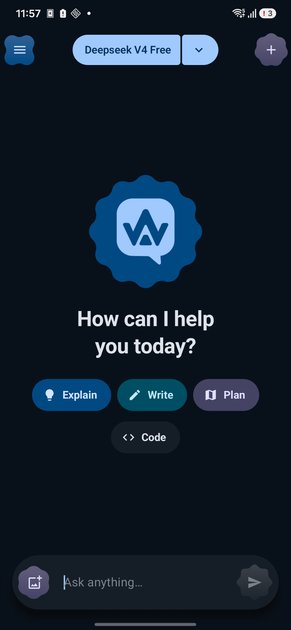
EchoFlow is an Android chat app for OpenRouter with your own API key, model switching, and local chat history on your phone.
What is EchoFlow?
EchoFlow is an Android chat app for OpenRouter. It lets you use your own OpenRouter API key, choose from available models by ID, and keep conversations stored locally on your device rather than on a server.
The app is designed for people who want a mobile chat experience with model switching, streaming responses, and on-device history. It also supports custom model entries, image attachments for vision-capable models, and a range of themes built around Android's Material 3 Expressive style.
Key Features
- Bring your own OpenRouter key: EchoFlow is set up around a user-provided OpenRouter API key, so chat access is tied to the user's own account and usage.
- Model selection by ID: users can add custom models by ID and display name, then switch between them from a bottom sheet or mid-conversation.
- Local chat storage: conversations are saved on the device, which keeps chat history available offline and avoids server-side storage.
- Real-time response streaming: replies appear word by word with a live caret instead of waiting for a full response to finish.
- Reasoning traces panel: when available, the app can show model reasoning in a collapsible panel alongside the answer stream.
- Rich message support: markdown rendering, code blocks, tables, lists, and emphasis are displayed cleanly in chat bubbles.
- Image attachments: the composer can send photos and screenshots to vision-capable models.
- Theme customization: the app includes multiple palettes, light and dark appearance options, and Android 12+ wallpaper-based color extraction.
How to Use EchoFlow
Start by installing the Android app, then add your OpenRouter API key in the app. After that, choose a model by its ID or add a custom model entry with a display name.
Once a model is selected, you can begin chatting, attach images when needed, and switch models from the conversation without losing the thread. Chats are saved locally on the device and can be reopened later, even without internet access.
Use Cases
- Testing multiple models on mobile: users who want to compare different OpenRouter models can switch between them in the same app without setting up separate clients.
- Private personal chat history: people who prefer their conversations to stay on their phone can use EchoFlow instead of a service that stores chats on a remote server.
- Offline access to past conversations: because chats are stored locally, users can review prior threads when they do not have an internet connection.
- Prompting with screenshots or photos: users can attach an image to ask a vision-capable model to interpret a screenshot, document, or photo.
- Reading structured model output: people working with code snippets, tables, or markdown-heavy answers can use the app's rendering to keep responses readable on mobile.
FAQ
Does EchoFlow require an account? No account is mentioned. The app is described as using your own OpenRouter key, with no account required for the app itself.
Where are chats stored? Chats are stored locally on your device and are not kept on a server, according to the source content.
Can I use the app without internet? Past conversations can be opened offline because they are stored on the device. Live chatting still depends on connecting to OpenRouter.
Can I use models that are not listed by default? Yes. The app supports adding custom models by ID and display name.
Does EchoFlow support images? Yes. The composer can send photos and screenshots to vision-capable models.
Alternatives
- Other OpenRouter clients: similar mobile or desktop clients may also let you use your own OpenRouter key, but they may differ in design, theme customization, and local history handling.
- General AI chat apps: products built around a single provider or built-in account system may offer a simpler setup, but they usually do not provide the same OpenRouter model selection workflow.
- Web-based chat interfaces: browser apps can be easier to access across devices, but they typically rely on server-side storage and do not emphasize on-device chat history.
- Native Android notes or assistant apps with AI features: these may integrate chat into a broader workflow, while EchoFlow is centered specifically on model switching, local storage, and OpenRouter usage.
Alternatives

BookAI.chat
BookAI allows you to chat with your books using AI by simply providing the title and author.

Biji
Biji is a versatile platform designed to enhance productivity through innovative tools and features.

Ably Chat
Ably Chat is a chat API and SDKs for building custom realtime chat apps, with reactions, presence, and message edit/delete.

Grok AI Assistant
Grok is a free AI assistant developed by xAI, engineered to prioritize truth and objectivity while offering advanced capabilities like real-time information access and image generation.

Decision Jar
Create virtual jars of options with Decision Jar—shake your phone to pick instantly, use AI suggestions, and view decision logs over time.

AakarDev AI
AakarDev AI is a powerful platform that simplifies the development of AI applications with seamless vector database integration, enabling rapid deployment and scalability.