

ReactVision Studio
ReactVision Studio is a browser-based AR and VR editor for building scenes visually and shipping natively to iOS, Android, and Meta Quest via React Native and ViroReact.
What is ReactVision Studio?
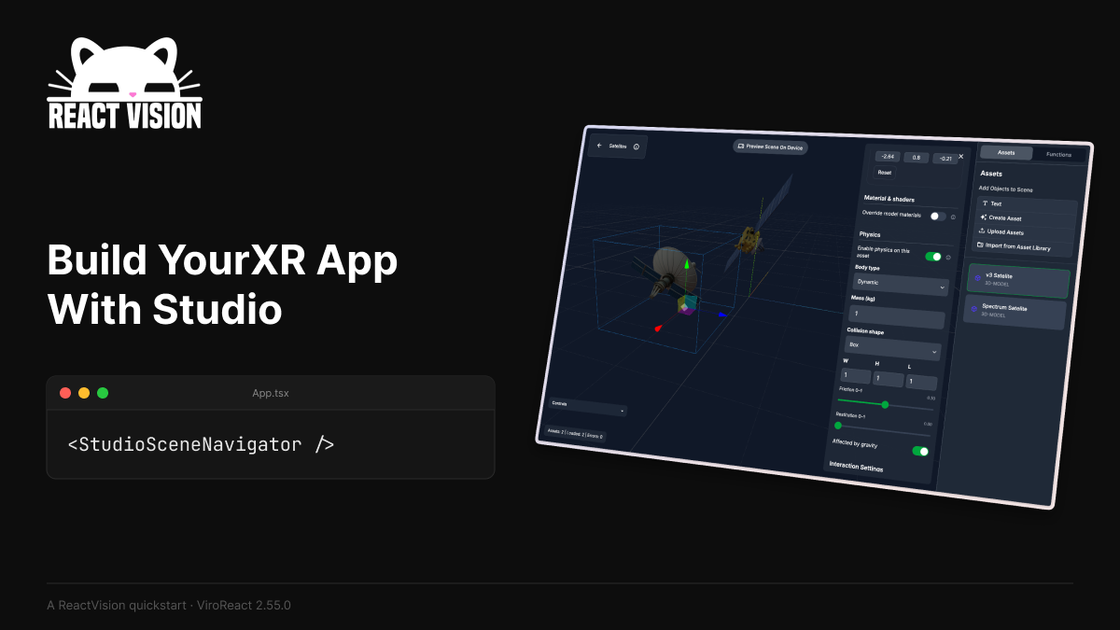
ReactVision Studio is a browser-based visual editor for building augmented reality and virtual reality scenes as part of the ReactVision stack. It lets users assemble scenes by dragging components onto a canvas, preview changes on a phone or headset with StudioGo, and ship the same scene inside a React Native app through ViroReact.
The product is designed to keep the authoring workflow in the browser while preserving native rendering on iOS, Android, and Meta Quest. According to the page, Studio writes the scene graph for you, supports cloud and geospatial anchors, and can generate AI-based 3D assets that are added to the project library.
Key Features
- Browser-based scene editor for AR and VR: scenes are built visually in the browser rather than in a desktop engine.
- React Native delivery through ViroReact: a single scene format can be loaded into an app with one component, which keeps the runtime inside a React Native codebase.
- Native platform rendering: the stack renders through ARKit on iOS, ARCore on Android, and HorizonOS on Meta Quest.
- Live device preview with StudioGo: users can see edits appear on a connected physical device over the local network while they work.
- Asset and scene management tools: the editor includes a component inspector, an asset library for models, textures, and audio, and multi-scene projects with anchor-driven navigation.
- AI-assisted 3D asset generation: users can describe an asset in text, generate a 3D model, and place it directly into the project library.
- Expo compatibility: the page says Studio can drop into an Expo project with a development build.
How to Use ReactVision Studio
A typical workflow starts in the browser, where a developer or XR creator opens Studio and builds a scene by placing components on the canvas. They can inspect each node, add assets, configure animations or anchors, and preview the scene on a phone or headset using StudioGo.
When the scene is ready, they add the StudioSceneNavigator component to a React Native app. ViroReact loads the scene at runtime, allowing the team to keep iterating on the visual scene without rebuilding the app for each change.
Use Cases
- Building an AR product demo that needs real device preview during layout and positioning.
- Creating a VR or mixed reality experience for Meta Quest without starting a separate headset-specific project.
- Shipping a React Native app that includes spatial scenes and can be maintained by a mobile team already familiar with JSX.
- Prototyping geospatial or anchor-based experiences where scene placement and navigation need to be adjusted frequently.
- Generating placeholder or starting-point 3D assets from text prompts and dropping them into a scene library for faster assembly.
FAQ
Does ReactVision Studio run in the browser? Yes. The editor is browser-based, while the rendered experiences ship natively through React Native and ViroReact.
Which platforms are supported for runtime output? The page lists iOS, Android, and Meta Quest, with native rendering via ARKit, ARCore, and HorizonOS.
Do I need to rebuild the app every time I change a scene? The page says StudioSceneNavigator loads the scene at runtime from Studio, which is intended to let teams iterate on the scene without rebuilding the app.
Can I use Expo? Yes, the page says Studio is Expo compatible and can drop into an Expo project with a development build.
Are simulators supported for AR preview? No. The page says AR preview requires a physical device, and simulators and emulators are not supported for that workflow.
Alternatives
- Unity-based XR development: a common alternative for AR and VR projects, typically involving a full engine workflow rather than a browser editor and React Native scene runtime.
- Unreal-based XR development: another engine-centered option that is generally used when teams want a broader game engine workflow instead of JSX-driven React Native integration.
- WebXR applications: browser-delivered XR experiences that avoid native app deployment, but the page positions ReactVision as a native-first option rather than a browser-only one.
- Manual React Native + platform SDK integration: teams can build directly with native ARKit, ARCore, or Quest tooling, but that usually requires more platform-specific implementation than Studio’s visual authoring flow.
Alternatives

FigPrompt
FigPrompt is an AI Figma plugin builder that generates production-ready plugin logic from your description—no code, in seconds.

MakerLoft
MakerLoft is an AI app builder for non-developers that connects to your GitHub repo to generate working apps with auth, payments, files, jobs.

Rork
Rork creates complete, production-ready mobile apps from your description with AI and Expo (React Native)—from idea to working app fast.

Ably Chat
Ably Chat is a chat API and SDKs for building custom realtime chat apps, with reactions, presence, and message edit/delete.

Make Real
Draw a UI and make it real using the tldraw SDK.

AakarDev AI
AakarDev AI is a powerful platform that simplifies the development of AI applications with seamless vector database integration, enabling rapid deployment and scalability.