
Free-form file arrangement
Place files where you want inside a folder instead of relying only on a standard list or grid view.

Deskboard is a folder-based workspace organizer that lets you arrange files freely, add widgets, annotate, and keep everything synced with your files.
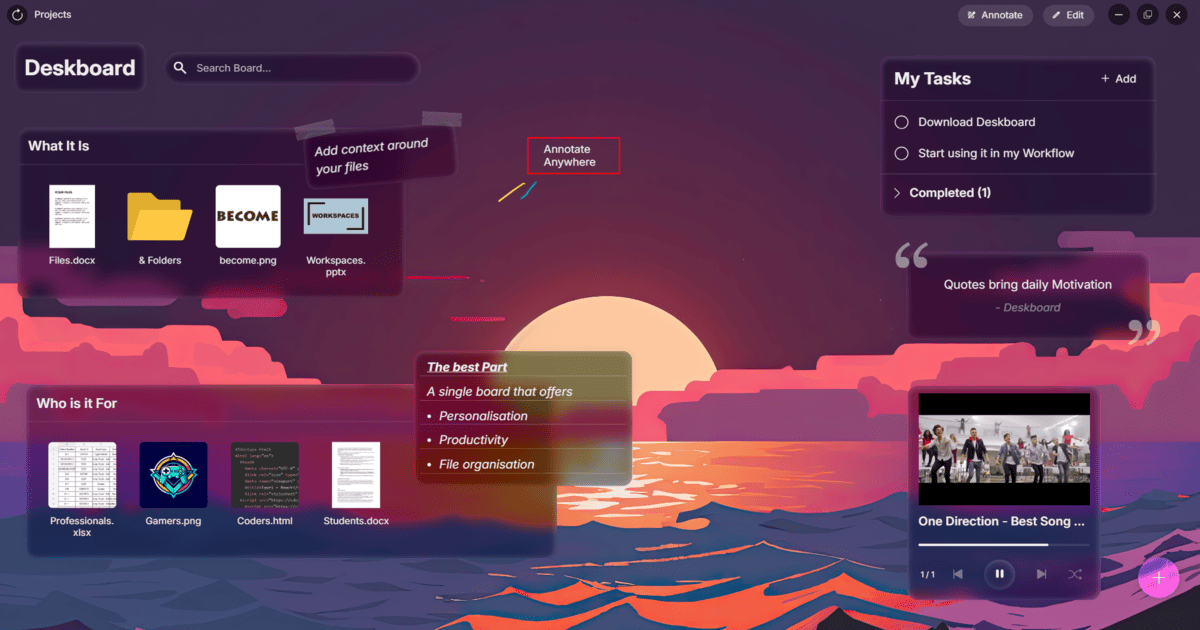
Deskboard is a file-organization workspace that turns ordinary folders into visual workspaces. According to the product copy, it lets you arrange files freely, add widgets, annotate content, and keep everything synced with your actual files.
The product’s core purpose is to make folder-based work feel more spatial and contextual. Instead of treating folders as a simple list of files, Deskboard presents them as editable workspaces where files and supporting information can live together.
Place files where you want inside a folder instead of relying only on a standard list or grid view.
Add widgets to a workspace to surface information alongside the files you are organizing.
Write notes and annotations directly in the workspace to add context to files and folders.
Keep workspace changes aligned with the actual files stored in the folder.
Use folders as visual workspaces rather than static containers for documents.
Create a more visual home for project files when a standard folder view is too flat for the amount of context you need to track.
Keep notes, labels, and supporting widgets near the files they relate to so context stays in one place.
Organize a folder around a specific task or effort and update the workspace as the work changes.
Use the synced workspace to manage files while preserving the underlying folder structure on disk.
Deskboard is a workspace layer for folders. It lets you arrange files freely, add widgets, annotate, and keep those changes synced with your actual files.
The source describes Deskboard as turning folders into beautiful workspaces, so it is aimed at people who want a more visual way to organize files inside folders.
The available source does not list platform support, so compatibility should be confirmed on the product site before use.
The pricing page is available, but the collected source text does not include plan names, prices, or limits.

Goldfish is an AI memory app for macOS that helps you reply, write, summarize, and continue with context already on your Mac. It stores memory locally and writes in your tone.

Dcyde is a shared decision log for product teams to capture what was decided, why, and the source, with searchable records from Slack, Figma, or Dcyde.

Lasso is an ecommerce product data platform for enriching catalog records, processing supplier files, generating product content, and tracking competitors. It includes a web app, REST API, SDK, and MCP server.

Biji is a versatile platform designed to enhance productivity through innovative tools and features.

Codex Plugins bundle reusable skills, app integrations, and MCP servers into workflows you can install in the Codex app or use from Codex CLI.

Struere turns spreadsheet data into structured operational software with dashboards, alerts, and automations for teams replacing manual spreadsheet workflows.