
Tool result trimming
Filters boilerplate framing, pagination markers, ANSI escape sequences, repeated headers, and verbose wrappers from CLI, search, file, API, and other tool results before they reach the model.
Edgee Token Compression V2 cuts redundant context and model output for coding agents with tool-result trimming, task-aware tools, and brevity controls.
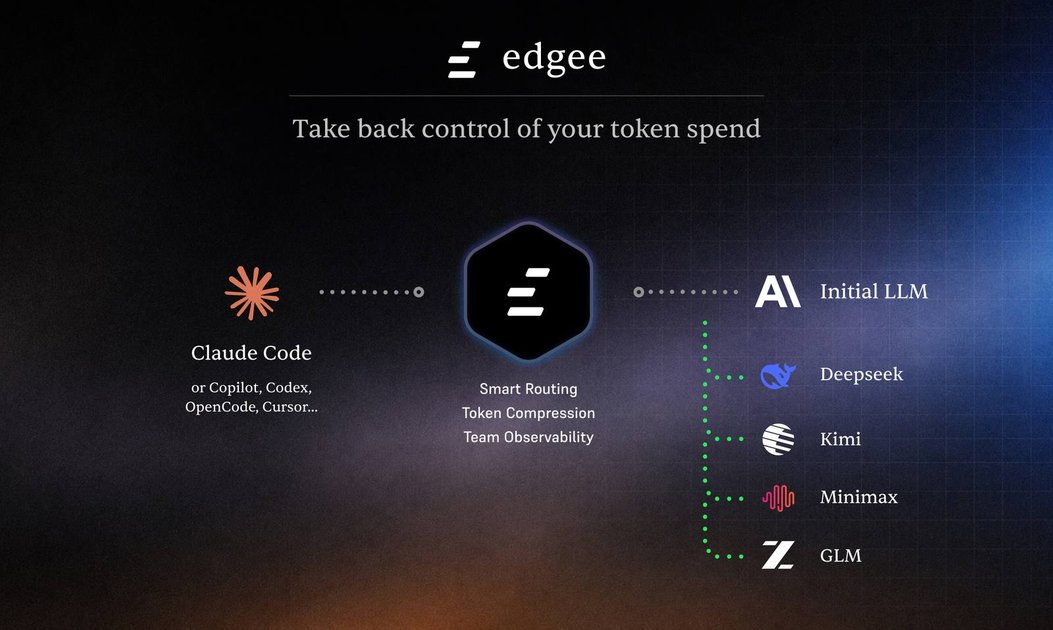
Edgee Token Compression V2 is a token-control feature in Edgee's agent gateway for coding agents. It reduces redundant content sent to and received from language models, rather than summarizing or removing technical information needed for code tasks. The system works across two layers: input compression for context entering the model and output compression for the model's response.
V2 combines improved tool result trimming with two additions: task-aware tool surface reduction and output brevity. It is presented as a drop-in CLI integration for existing coding-agent workflows, including Claude Code, Codex, OpenCode, and Cursor, with no code changes. Edgee reports a 15–20% production token-bill reduction from compression alone across a rolling 30-day customer aggregate; its separate SWE-bench Lite benchmark measured a 50% reduction with all three techniques enabled.
Filters boilerplate framing, pagination markers, ANSI escape sequences, repeated headers, and verbose wrappers from CLI, search, file, API, and other tool results before they reach the model.
Scores the task against available MCP tools and presents the model with a curated, task-relevant subset instead of the full tool surface on every request. The IDE can still expose all configured tools.
Reduces filler, repetitive scaffolding, over-explanation, and markdown overhead in model responses. Users can select light, medium, or hard levels to control aggressiveness.
Separates compression into input and output layers. Input processing targets tool results, tool definitions, codebase context, and related context; output processing targets the model's generated response.
Provides the three techniques as independently toggleable configuration flags, allowing teams to enable a subset rather than applying every strategy to every API key.
Apply tool result trimming to shell output, search results, directory listings, file operations, and API responses so long coding sessions carry less redundant context between steps.
Use task-aware tool surface reduction when projects expose multiple MCP servers or large tool catalogs. The model receives a smaller, task-relevant tool set without requiring the IDE to disable tools manually.
Choose a light, medium, or hard output-brevity level when agent responses contain excessive explanation or formatting and the team wants to reduce output tokens while retaining technical content.
Put existing coding-agent subscriptions or API-key workflows behind the Edgee gateway as a drop-in layer, reducing token usage without rewriting the application or agent integration.
Edgee describes Compression V2 as a drop-in CLI wrapper that works with existing API keys and plans, with no code changes. The source does not provide full installation or authentication steps, so setup details should be confirmed in the product documentation.
The three techniques are independently toggleable configuration flags: tool result trimming, tool surface reduction, and output brevity. Output brevity supports light, medium, and hard levels.
Tool result trimming removes redundant framing from tool results while preserving technical content. Tool surface reduction curates the tool definitions shown to the model based on the task, while the IDE can continue exposing the full tool set. Output brevity reduces verbosity in model responses.
The production figure is a rolling 30-day aggregate across active Edgee customers and reports a 15–20% reduction in token bills from compression alone. The published SWE-bench Lite result is a separate controlled benchmark in which all three techniques reduced one session from 18,420 to 9,210 tokens, or 50%; it is not a forecast for every fleet.
Compression is intended for code-oriented tasks and is described as semantically lossless from the model's perspective. The documentation says extremely short prompts compress less, tool-use schemas are passed through untouched, and Edgee may skip compression when in doubt.

ByteAsk is a terminal-first AI coding agent for C and C++ that edits repos and verifies changes with compilers, debuggers, sanitizers, and tests.

CreateOS Sandbox is an isolated compute environment for running code and agent workloads in Firecracker micro-VMs with private networking and SDK, CLI, or MCP control.

GitBot is a local browser workspace for reusable coding bots powered by Claude Code, Codex, or OpenCode, with persistent threads and configurable permissions.

hob is an independent workspace for coding agents, with local control over sessions, terminals, history, routing, and follow-up work.

Manta AI is an autonomous web app testing tool that maps app behavior, catches regressions, and generates tests from a URL, no scripts or selectors needed.

SonOf connects to your repo and PM tool, audits your codebase, and turns approved work into shipped tickets with senior engineering review.