
Capture text from any screen region
Press ⌘⇧2 or a custom shortcut, select a region with the crosshair, and receive the recognized text in the clipboard without managing a separate OCR window.

Letra is a macOS Sonoma 14+ menu bar OCR tool that copies text from screens, videos, PDFs, images and screen shares, with on-device OCR and QR decoding.
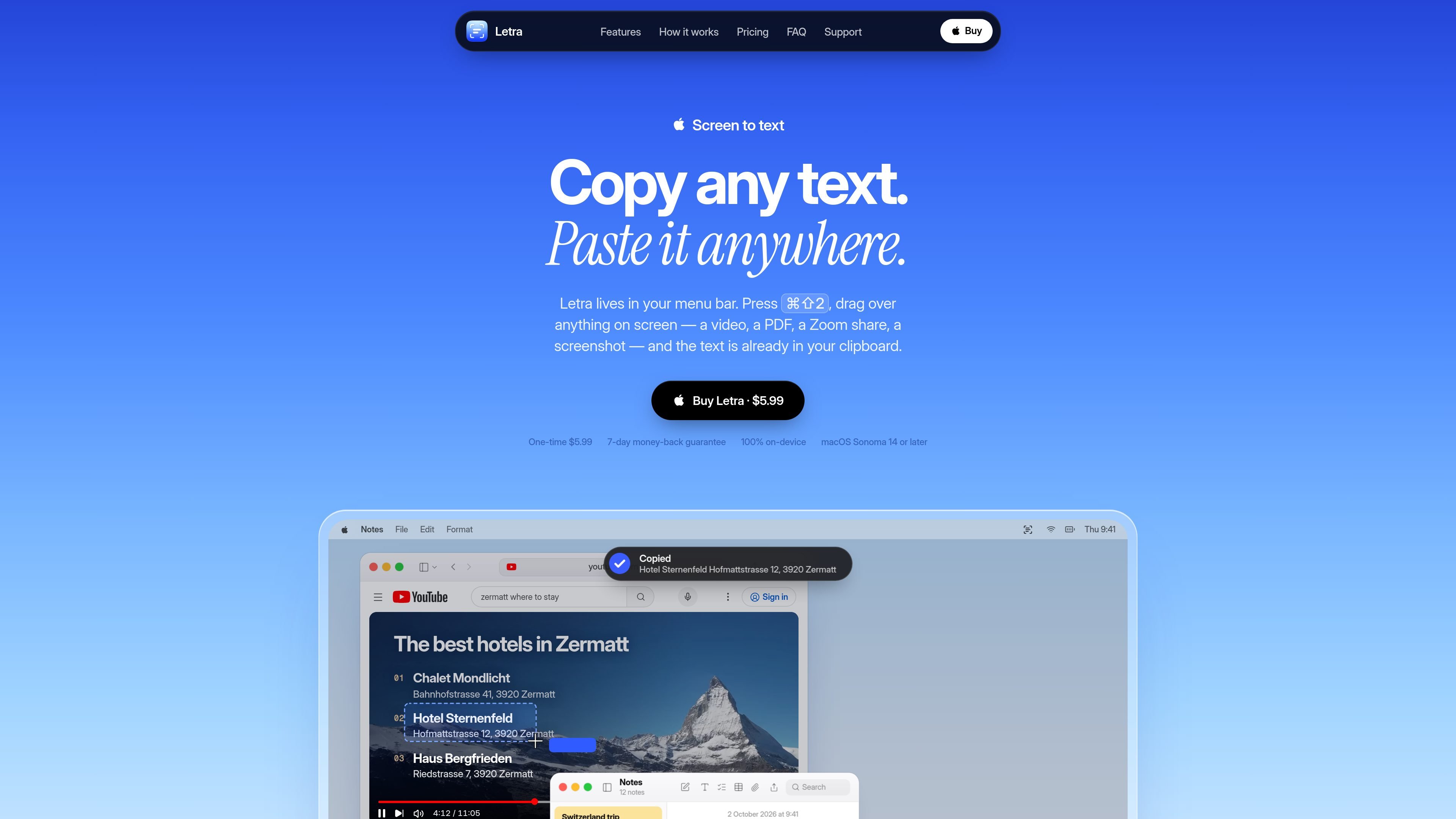
Letra is a menu bar screen-OCR utility for Macs running macOS Sonoma 14 or later. It turns text that cannot be selected normally—such as text in a paused video, PDF, screenshot, video call, or screen share—into clipboard text. The basic workflow is a shortcut, a screen-region selection, and paste.
Recognition runs on the Mac using on-device OCR. Alongside screen capture, Letra can read copied images and PNG, JPEG, or PDF files, decode QR codes and barcodes, and retain captures in a searchable history. It is intended for short, immediate extraction tasks rather than large-scale document OCR or batch processing.
Press ⌘⇧2 or a custom shortcut, select a region with the crosshair, and receive the recognized text in the clipboard without managing a separate OCR window.
Recognition runs locally on the Mac, so selected screen content does not need to be uploaded to a server and can work with Wi-Fi switched off.
Read text from screenshots, paused videos, screen shares, PDFs, copied images, and PNG or JPEG files. Language detection is automatic, with support for around 20 languages stated on the product page.
Decode QR codes and barcodes from screen content or images. QR links can open automatically when enabled, and detected URLs are grouped in history.
Keep captures in a searchable menu bar history with filters for Text, Links, and QR Codes, then click an item to copy it again.
Choose accurate or fast recognition, control line-break handling, launch Letra at login, and trigger captures through its URL scheme for Raycast, Alfred, or Shortcuts workflows.
Select text from a paused tutorial, online course, or demonstration when the video player does not expose selectable text, then paste code or notes into an editor.
Capture clauses, headings, or values from scanned pages and PDFs that do not allow normal text selection, while keeping the extracted passage in notes.
Read a URL, error message, or configuration value shown during a Zoom, Meet, or Teams screen share without asking the presenter to send it separately.
Decode a QR code from a slide, poster, or photo and open its payload on the Mac; this is useful when the phone or camera is not immediately available.
Collect text from screenshots, copied images, whiteboards, recipe cards, or handwriting and return to earlier captures through the searchable history.
Letra runs as a macOS menu bar app. Press ⌘⇧2, or a shortcut you set, drag over the text on screen, and paste the resulting text from your clipboard.
The selected screen region is processed with on-device OCR, and the recognized text is placed on the clipboard. A small toast displays a preview after capture.
Yes. Letra can decode QR codes and barcodes, and QR links can be opened automatically when that option is enabled. URLs detected in captures can also be found in searchable history under Links.
Letra supports macOS Sonoma 14 or later. It is designed for screen OCR rather than large document-processing jobs such as batch-converting a 200-page scan into a searchable PDF.
Letra costs $5.99 as a one-time purchase and includes a 7-day money-back guarantee. The source describes it as having no free trial.

KlutterAI is an AI expense tracker for iOS and Android to capture receipts, organize spending, track budgets, surface recurring charges, and export reports.

SlimSnap is a Mac app that turns screenshots into JSON for CLI coding agents like Claude Code, Aider, and Codex CLI. Free, local, no registration.

Munch is a social app for food and recipes to discover, share, and organize recipes in one place, with AI formatting and ingredient scanning.

UglyPDF is an AI PDF creator that turns prompts or files into editable documents for resumes, invoices, reports, and more.
LabelLens scans packaged food labels from a photo or upload and gives a nutrition score with a plain-English breakdown of ingredients, additives, and key values.
Capecho is a Mac app for capturing unfamiliar words in context and reviewing them with spaced repetition. Save vocabulary from articles, PDFs, subtitles, and images without hand-made flashcards.