

GoEnhance AI
GoEnhance AI is an all-in-one AI platform to create videos and images from text, images or clips, with video-to-anime, face swap & lip-sync.
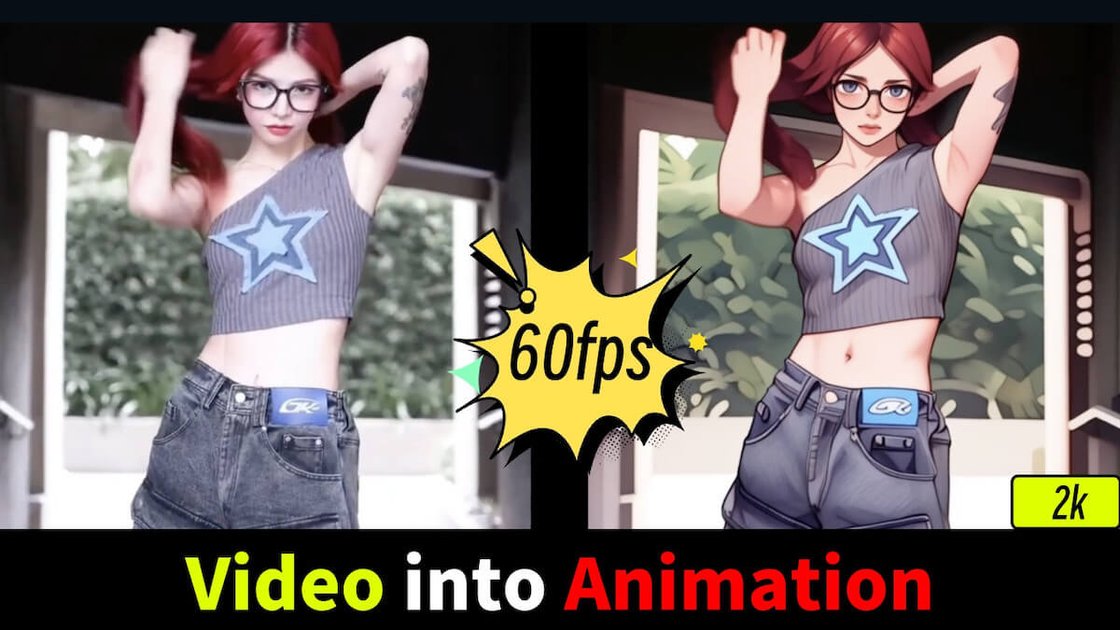
What is GoEnhance AI?
GoEnhance AI is an all-in-one AI video platform for creating videos and images from text, images, or existing clips. It provides tools for text-to-video and image-to-video generation, plus video editing and face/character-related effects intended to help users produce short-form content.
The platform also includes an AI image generator and several image editing tools (such as enhancement, editing, and face swapping), along with AI avatar, lip-sync, and video face swap features described on the site.
Key Features
- Text-to-video and image-to-video generation: Create AI videos from text prompts or from provided images.
- AI video effects library (100+ effects): Apply preset photo/video effects to transform clips or snapshots into formats intended for social short-form content.
- HD & 4K video output: The site states outputs support 4K and 60fps for its video-to-anime conversion feature.
- AI avatar and character tools: Includes AI avatar creation from a single photo and consistent character video generation.
- Video face swap and related tools: Offers video face swap, plus face swap capabilities for photos via an image tool.
- AI video lip-sync: Adds lip-sync by automatically syncing lips from video to audio (as described on the page).
- AI image generator and image tools: Generates high-resolution images from text and includes image enhancer, image edit, and text-to-image.
- Access to multiple generative models in one place: The site mentions using leading AI engines (including Runway, Kling, and Veo 3, and references “Sora”).
How to Use GoEnhance AI
- Create an account (the site points users to actions like “Try For Free” and describes an in-app web app at app.goenhance.ai).
- Choose a workflow: text-to-video, image-to-video, video effects, video tools (e.g., avatar, lip-sync, face swap), text-to-image, or image tools (e.g., enhance/edit).
- Provide inputs: for generation tools, enter text prompts or upload images/clips; for effects/tools, select the source media and the effect/tool configuration.
- Start processing and review the output (the site also describes generation modes and token behavior, covered below).
Use Cases
- Turn a text prompt into a short-form video: Use the text-to-video generator to produce video content without manual video production skills.
- Convert a video into an anime-style look with character consistency: Apply the platform’s video-to-anime conversion and leverage the site’s emphasis on high resolution and consistency for characters.
- Replace a person’s face in an existing video: Use the video face swap tool to change faces in video clips (with the related photo face swap tool available for images).
- Create an AI avatar from a single photo: Generate a lifelike avatar video starting from one image, then use the result for content creation.
- Enhance and upscale images for better visual quality: Use the image enhancer to upscale and enhance photos to “extreme detail,” plus use image edit tools when needed.
- Sync speech audio to a video clip: Use the lip-sync tool to align mouth movement with audio from video to audio inputs.
FAQ
What is GoEnhance AI?
GoEnhance AI is an all-in-one AI video platform that supports creating videos from text, images, or existing clips and includes video tools (such as video-to-anime conversion, avatar creation, lip-sync, and face swap) along with AI image generation and image editing tools.
Is GoEnhance AI suitable for beginners?
The site says it is designed to be user-friendly for creators of all skill levels and is available on both PC and mobile devices.
Can I use GoEnhance AI for free?
Yes. The platform offers a free tier that includes some tokens usable for features across the platform.
What’s the difference between Fast Mode and Relax Mode?
- Fast Mode: Attempts to provide instant GPU access but costs tokens.
- Relax Mode: Doesn’t cost tokens; it allows unlimited images and videos each month for features that support it, but may be slower due to queuing based on system usage.
How do I cancel my subscription?
The site directs users to https://app.goenhance.ai/billing-setting and to click Manage Subscription, which opens Stripe’s billing portal for managing, switching plans, or canceling.
Alternatives
- Other text-to-video and image-to-video AI tools: These focus primarily on generating video from prompts and typically differ in supported effects, model options, and workflow depth for face/character tools.
- Video editing suites with AI effects: These tools may prioritize editing timelines and effects after generation, while GoEnhance AI emphasizes AI generation plus dedicated video/photo effect and swap tools.
- AI image generators with editing add-ons: If your primary need is text-to-image and upscaling, an image-first platform may simplify workflows compared with GoEnhance AI’s combined video-and-image toolset.
- Social-focused short-form content editors: These specialize in templates and export formats for reels/shorts workflows; GoEnhance AI differs by centering AI generation and video-to-video transformations.
Alternatives

HeyGen
HeyGen Developers offers an API platform to generate, translate, and lipsync avatar videos with TTS models—built for scalable production workflows.

Plask
Plask is an AI motion capture and 3D animation tool that turns uploaded video into character motion, with video renders or 3D asset export.

VIDEOAI.ME
VIDEOAI.ME is an AI video generator to create studio-quality, publish-ready videos with realistic AI actors and voiceovers from text or a selfie.

DeepMotion
DeepMotion is an AI motion capture and body-tracking platform to generate 3D animations from video (and text) in your web browser, via Animate 3D API.

艺映AI
艺映AI is a free AI video generation platform focused on transforming text and images into high-quality dynamic videos.

Captions.ai
Captions.ai is an online video editor and app with AI-powered editing, automatic captions, music, and AI avatars for faster video creation.