

Harbor
Harbor is a CLI and companion app for launching a pre-wired local LLM stack with chat, search, voice, image, and coding tools.
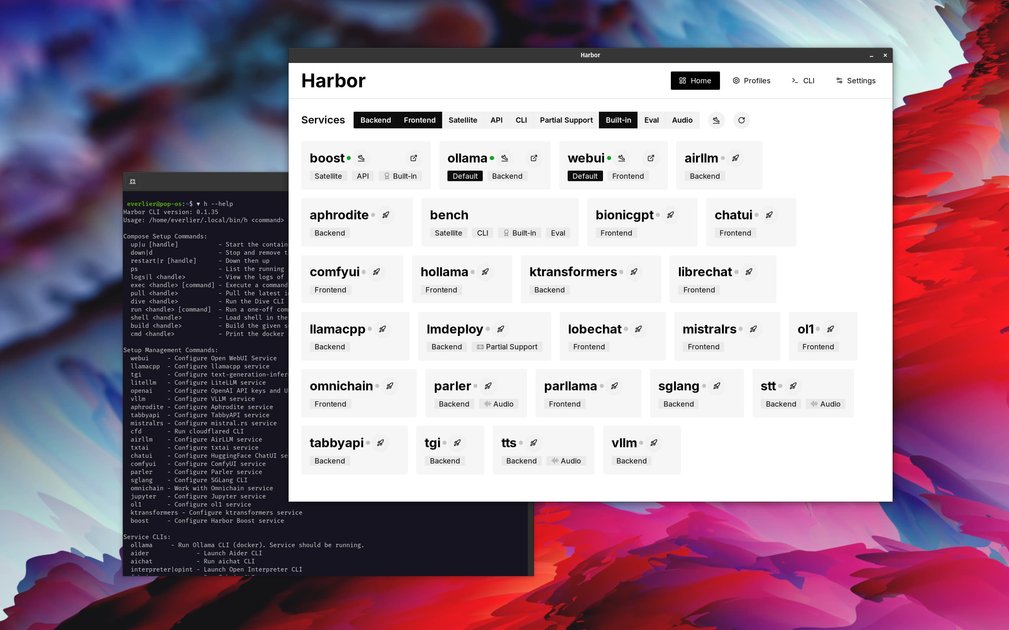
What is Harbor?
Harbor is a CLI and companion app for setting up and running a local LLM stack with pre-wired services. It is designed to reduce the manual work of configuring model backends, frontends, and supporting tools so users can start with a working stack through a single harbor up command.
The project supports local model backends such as Ollama, llama.cpp, and vLLM, and can bring up related services like Open WebUI, SearXNG for web search, Speaches for voice chat, and ComfyUI for image generation. Harbor also includes tooling for coding and agent workflows, where harbor launch can connect host tools to a Harbor-managed backend and model without hand-editing provider settings.
Key Features
- One-command stack startup:
harbor upstarts selected services with Docker Compose orchestration and cross-service wiring already configured. - Support for multiple model backends: Harbor can work with backends including Ollama, llama.cpp, vLLM, and other supported inference engines mentioned in the project materials.
- Pre-connected companion services: Frontends and utilities such as Open WebUI, SearXNG, Speaches, and ComfyUI are set up to work together instead of being configured separately.
- Coding agent integration:
harbor launchcan start or detect an OpenAI-compatible backend, connect a model to a host CLI or editor, and keep the tool running in the current project directory. - Config and argument handling: Harbor can remember or write configuration for services and host tools, including backend-specific arguments such as llama.cpp settings.
- Companion app and documentation: The repository includes an app, CLI reference material, install guides, service catalog documentation, and guides for local workflows.
How to Use Harbor
A typical setup starts by installing Harbor using the project’s install guides, then running harbor up with the services you want. From there, you can open the connected interfaces such as Open WebUI or add extra services like web search or voice chat as needed.
For coding workflows, you would use harbor launch to select a backend and model, then start a supported host tool such as a CLI agent or editor with Harbor handling the connection details. The documentation also covers service selection, configuration, and supported host tools.
Use Cases
- Local LLM experimentation: Start a backend and chat interface together so you can test models locally without manually assembling each component.
- Web-enabled RAG workflows: Add SearXNG and Open WebUI so a local assistant can search the web and use retrieved sources in the same environment.
- Voice-based local interaction: Bring up Speaches with the rest of the stack when you want speech-to-text or text-to-speech in a local AI setup.
- Image generation workflows: Include ComfyUI alongside model backends when you need a local stack that covers both text and image generation services.
- Coding agent setup: Connect a supported coding CLI or editor to a Harbor-managed backend so the tool can use an AI model without separate per-tool configuration.
FAQ
Does Harbor require manual configuration for every service? No. The project description emphasizes pre-wired services and a single-command setup for bringing the stack online.
Can Harbor be used with coding tools and agents?
Yes. The materials describe harbor launch as a way to connect supported host tools to a Harbor backend and model.
Which backends are mentioned? The source explicitly mentions Ollama, llama.cpp, vLLM, Docker Model Runner, and MLX/OMLX in the context of supported inference engines and macOS options.
Does Harbor only provide chat interfaces? No. It also references supporting services for web search, voice chat, image generation, and tooling for coding workflows.
Alternatives
- Manual Docker Compose setup: Similar in output, but requires you to assemble and wire the services yourself instead of using Harbor’s preconfigured commands.
- Single-service local model runners: Tools focused only on one backend such as a model server can be simpler if you do not need a full stack with frontends and adjunct services.
- Dedicated chat frontends: Applications centered on a web UI for model interaction can be a fit when you already have backend infrastructure in place.
- General self-hosted AI stack templates: Other stack templates or starter kits may cover parts of the workflow, but Harbor emphasizes CLI-driven orchestration and cross-service connectivity for local AI use.
Alternatives

Ably Chat
Ably Chat is a chat API and SDKs for building custom realtime chat apps, with reactions, presence, and message edit/delete.

AakarDev AI
AakarDev AI is a powerful platform that simplifies the development of AI applications with seamless vector database integration, enabling rapid deployment and scalability.

BookAI.chat
BookAI allows you to chat with your books using AI by simply providing the title and author.

Grok AI Assistant
Grok is a free AI assistant developed by xAI, engineered to prioritize truth and objectivity while offering advanced capabilities like real-time information access and image generation.

DeepMotion
DeepMotion is an AI motion capture and body-tracking platform to generate 3D animations from video (and text) in your web browser, via Animate 3D API.

skills-janitor
Audit, track usage, and compare your Claude Code skills with skills-janitor—nine focused slash commands and zero dependencies.