

IconsRoom
Search 250,000+ free SVG icons on IconsRoom, customize colors, and download as SVG, PNG, or WebP. React & Vue exports available.
What is IconsRoom?
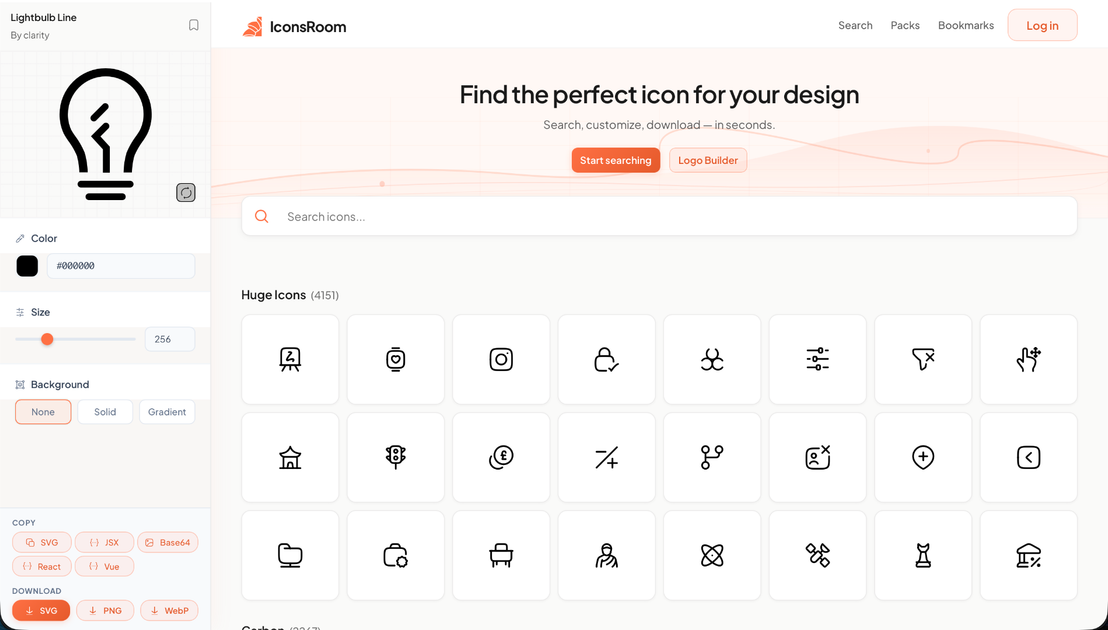
IconsRoom is a free SVG icon library and search tool for finding and customizing icons for design and development workflows. It lets you search across a large collection of icon packs, then customize and download assets in commonly used formats.
The site is oriented around quick icon discovery—browse by specific icon collections and explore a large catalog of icons—so you can move from selection to download without setting up an account.
Key Features
- Search and browse an icon catalog: Quickly find icons across a large library and explore multiple curated icon sets.
- Icon customization: Adjust icon properties (notably color) before downloading so assets match your design.
- Fast download options: Download icons in multiple formats, including SVG, PNG, and WebP.
- Icon pack selection: Start from named collections (for example, popular icon sets listed on the site) rather than searching from scratch every time.
- Framework-friendly exports: Offers React & Vue exports for incorporating icons into component-based projects.
- No signup mentioned: The page indicates you can start designing without creating an account.
How to Use IconsRoom
- Use the site search to find an icon or select an icon collection shown on the homepage.
- Customize the icon—such as changing color—to match the needs of your design.
- Download the asset in the format you need (SVG, PNG, or WebP).
- If you’re building with React or Vue, use the provided export option to bring the icon into your project.
Use Cases
- Web UI design: Designers searching for specific symbols can customize color and download the appropriate format for mockups or prototypes.
- Front-end development: Developers can integrate icons into React or Vue component code using the site’s export support.
- Brand-aligned assets: Teams can match icon coloring to product branding by adjusting icon color before download.
- Responsive marketing pages: Reusing the same icon set across layouts becomes easier when icons are available in both SVG (scalable) and raster formats like PNG/WebP.
- Rapid iteration: Building variants for different screens or campaigns can be done by quickly searching within large icon collections and downloading revised assets.
FAQ
Do I need an account to use IconsRoom? The page states “No signup,” indicating you can start searching and designing without creating an account.
Which file formats can I download? IconsRoom supports downloading icons as SVG, PNG, and WebP.
Does IconsRoom support code exports for front-end frameworks? The page indicates React & Vue exports, which can help you use icons in component-based workflows.
Can I customize icons before downloading? Yes. The page mentions customizing icons (including color) before downloading.
How many icons are available? The site highlights 250,000+ icons available to explore.
Alternatives
- Other free SVG icon libraries (by category/collection): Similar tools focused on downloadable SVGs, often with search and per-icon previews. They may differ in format options (e.g., PNG/WebP) and export targets.
- Icon pack marketplaces: Paid or subscription-based packs that typically provide stricter licensing and consistent design systems; workflow may be less “search-first” if you browse pack collections instead.
- Design tool icon plugins/assets: Tools embedded in design environments can streamline importing icons into UI mockups, but may not offer the same standalone download/export options.
- Developer-focused icon kits: Framework-oriented icon providers can make code integration easier, but may require downloading in code-first forms rather than offering broad format downloads like SVG/PNG/WebP.
Alternatives

Napkin AI
Napkin AI transforms your text into insightful visuals, making communication more effective and engaging.

Refero
Refero: UI/UX design inspiration & references for web/iOS. Find tens of thousands of screenshots with advanced search for designers.

Frames
Frames helps you create launch posters and social media marketing graphics fast with premium device frames and templates for Instagram, Twitter, and Product Hunt. Free to start.

GPTIMG2 AI
GPTIMG2 AI is an image-first AI generator for product shots, posters, and marketing visuals—refine with prompts to preserve subject, layout, and readable text.

TapNow
TapNow is an AI-native visual creation engine for businesses and creators—generate professional-grade visuals for e-commerce ads to cinematic art.

Outsource Rizz
Outsource Rizz pairs senior design and engineering to ship startup products, websites, and brand work faster—fast design + dev together.