

Nano Banana 2
Nano Banana 2 (Gemini 3.1 Flash Image) is Google DeepMind’s image generation model—fast editing across Gemini, Search, and Ads.
What is Nano Banana 2?
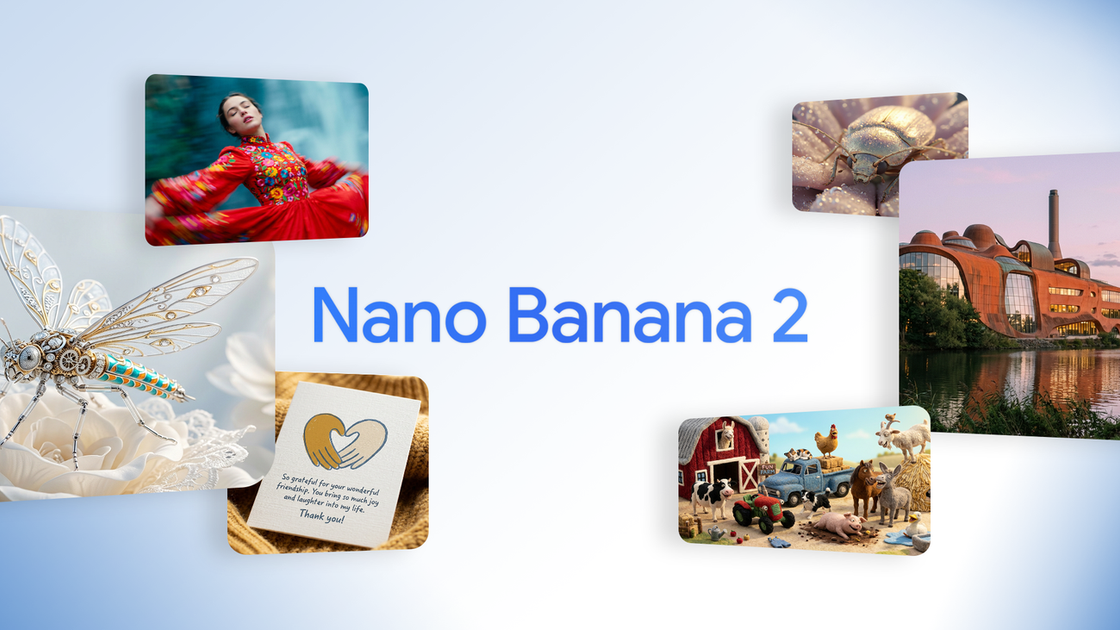
Nano Banana 2 is Google DeepMind’s latest image generation model, released as “Gemini 3.1 Flash Image.” It’s designed to combine advanced capabilities associated with Nano Banana Pro with the speed of Gemini Flash for quicker image generation and faster editing and iteration.
According to Google, Nano Banana 2 is rolling out across Google products such as the Gemini app, Google Search, and Ads. The model is positioned to support higher-quality outputs plus features aimed at maintaining subject fidelity and following complex instructions more closely.
Key Features
- Advanced world knowledge powered by Gemini real-world knowledge: The model uses Gemini’s knowledge base and is powered by real-time information and images from web search to render specific subjects more accurately.
- Enhanced creative control for subject consistency: The model supports character resemblance of up to five characters and fidelity of up to 14 objects within a single workflow, helping maintain appearance across edits when building sequences or narratives.
- Precision text rendering and translation inside images: Nano Banana 2 can generate accurate, legible text for assets like marketing mockups or greeting cards, and can also localize/translate text within an image.
- Improved instruction following: Google reports that the model adheres more strictly to complex requests, including nuanced details of an idea, to better match what the user asked for.
- Production-ready image specifications across multiple sizes: Users can control aspect ratios and resolutions from 512px to 4K, supporting outputs for formats such as vertical social posts and wide-screen backdrops.
- Visual fidelity improvements at Flash speed: Google describes richer textures, sharper details, and vibrant lighting while maintaining the expected speed associated with Flash.
How to Use Nano Banana 2
To start, access Nano Banana 2 through Google products where it’s available (Google notes rollout across Gemini, Search, and Ads). Enter prompts describing the subject, style, and desired changes. When you need consistent characters or objects across a sequence, include those elements in the prompt and specify how the scene should evolve.
For marketing or communication assets, use prompts that require readable text or localized/translated text, and request specific aspect ratios or resolutions (where available) to match your intended placement.
Use Cases
- Create infographics and diagrams from notes: Use prompts to turn topics into structured visuals (for example, generating an infographic such as a water cycle), leveraging the model’s described world knowledge to render specific subjects.
- Generate marketing mockups with legible on-image text: Request accurate text for materials like signage or promotional graphics, then generate versions in different aspect ratios for different placements.
- Localize image content for global audiences: Ask the model to translate and localize text within an image so the visual can be reused across languages.
- Storyboard-like workflows with consistent characters: For narratives involving multiple frames, specify up to five character resemblances and up to 14 objects to keep characters and key items looking consistent across edits.
- Ad or campaign assets with controlled format specs: Produce visuals sized for common creative needs by selecting aspect ratios and resolutions from 512px to 4K and iterating quickly based on prompt refinements.
FAQ
-
Where can I access Nano Banana 2? Google states it is rolling out across Google products including the Gemini app, Google Search, and Ads.
-
What does “Flash speed” mean in this context? The page describes Nano Banana 2 as combining Nano Banana Pro capabilities with the speed of Gemini Flash, enabling faster image generation and quicker edits and iteration.
-
Can it keep characters or objects consistent across edits? Yes. Google reports support for maintaining character resemblance up to five characters and fidelity of up to 14 objects within a single workflow.
-
Can it generate readable text in the image and translate it? Google says it can produce precise text rendering for marketing mockups or greeting cards and can translate/localize text within an image.
-
What output sizes does it support? The model is described as supporting various aspect ratios and resolutions from 512px to 4K.
Alternatives
- Other AI image generation models: Many tools in the AI image generation category can produce images from prompts, but may differ in how consistently they follow instructions, maintain subject fidelity, or render text.
- Image editing workflows using generation + inpainting/outpainting: For users focused on iterative refinement, an editing-first approach (generate, then selectively revise parts) can be an alternative, though it may require more manual steps to preserve character/object consistency.
- Template-based design tools with human-editable text: If readable text and localization are the primary requirements, template-based workflows can reduce reliance on model text rendering by keeping typography editable—at the cost of less seamless visual integration.
- General-purpose creative suites: For production pipelines that prioritize layout, typography, and asset management, creative suites can complement AI generation by handling final design and formatting once imagery is generated.
Alternatives

PXZ AI
An All-In-One AI Platform that combines tools for image, video, voice, writing, and chat to enhance creativity and collaboration.

Pic Copilot
Transform your eCommerce store with AI Fashion Models, AI Product Images, and UGC videos—all in one tool. No studio or design skills needed.
exactly.ai
exactly.ai is an AI image generator and creative studio for teams to replicate brand visuals with signature images—on-brand variations, private style.

GPTIMG2 AI
GPTIMG2 AI is an image-first AI generator for product shots, posters, and marketing visuals—refine with prompts to preserve subject, layout, and readable text.

TapNow
TapNow is an AI-native visual creation engine for businesses and creators—generate professional-grade visuals for e-commerce ads to cinematic art.

Hotpot.ai
Hotpot.ai is an AI platform for generating images and AI headshots, editing photos with upscaling and background removal, plus AI writing templates.