

Phasr
Phasr is an open-source desktop workspace for running terminal-based AI coding agents in parallel with Git worktree isolation and human review.
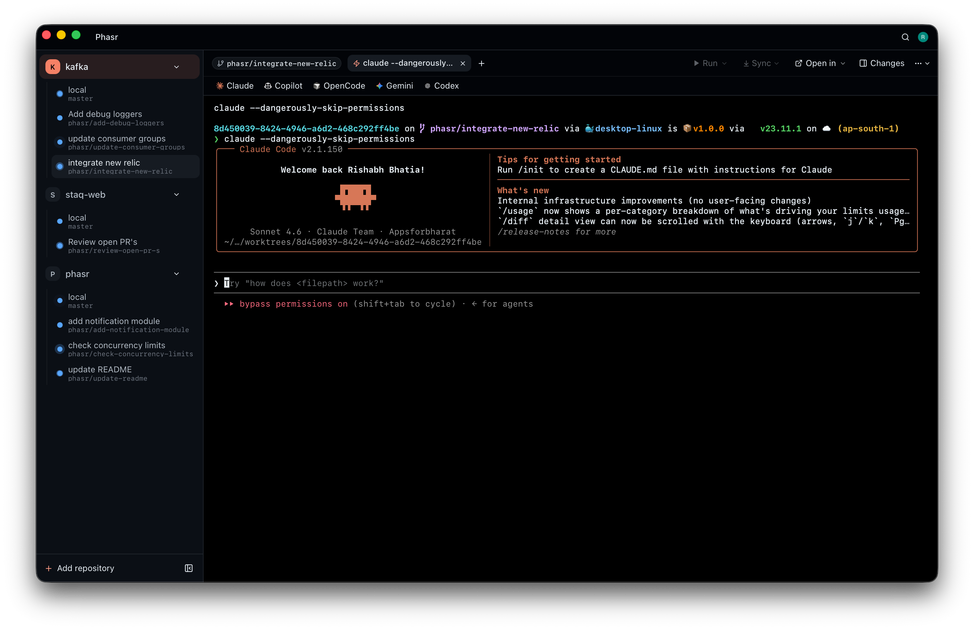
What is Phasr?
Phasr is an open-source desktop workspace for running AI coding agents in parallel. It is designed for developers who want to coordinate multiple terminal-based coding agents, keep each task isolated, and review changes before they are merged into a main branch.
The product centers on Git worktree isolation, live task visibility, and human review. It supports a review-first workflow for teams that want to compare diffs, approve or reject changes, and work with agent output in their preferred editor or IDE.
Key Features
- Parallel agent execution: Start multiple AI coding agents at the same time, each on its own task, so work can proceed concurrently rather than in sequence.
- Git worktree isolation: Each agent runs in a separate Git worktree, which keeps changes isolated and avoids collisions in a shared working directory.
- Real-time task tracking: Monitor agent status, progress, and queued or completed tasks from the workspace while work is running.
- Agent-agnostic terminal support: Phasr is built to work with CLI agents that run in a terminal, including tools such as Claude Code, Codex CLI, Gemini CLI, Cursor Agent, and Aider.
- Review and merge controls: Inspect file-level diffs, change summaries, and line counts, then approve, reject, or request modifications before merging.
- Editor handoff: Open agent-generated work in external editors such as VS Code, Cursor, JetBrains, Zed, or other native development environments.
How to Use Phasr
Start by downloading the macOS app or viewing the project on GitHub. Then create or connect a repository, launch one or more coding agents against separate tasks, and let Phasr manage the isolated worktrees for each agent.
As changes are produced, review the diffs in the workspace, open the code in your preferred editor if needed, and approve only the work that is ready to merge back into the main branch.
Use Cases
- Implementing multiple repo changes at once: Assign separate tasks such as authentication middleware, rate limiting, and webhook retries to different agents so they can run concurrently.
- Reviewing agent output before merge: Use the diff and approval workflow to validate generated code before it reaches the main branch.
- Working with terminal-based AI tools: Orchestrate CLI coding agents without being locked into a single provider or proprietary protocol.
- Keeping changes isolated in a shared codebase: Give each agent its own worktree to reduce file conflicts and simplify parallel development.
- Editing generated code in a preferred IDE: Open agent-created changes in VS Code, Cursor, JetBrains, Zed, or another editor for deeper manual review.
FAQ
Is Phasr open source? Yes. The page describes Phasr as open source and notes that it is available under the MIT license.
What platforms does it support? The source page says Phasr is available for macOS. No other desktop platforms are mentioned.
Does Phasr work with only one AI model or provider? No. The product is described as agent-agnostic and compatible with terminal-based tools such as Claude Code, Codex CLI, Gemini CLI, Cursor Agent, and Aider.
Can I review changes before they are merged? Yes. The workspace includes file diffs, change summaries, and approval actions such as reject or approve and merge.
Does Phasr replace your editor? Not necessarily. The page emphasizes one-click handoff into external editors, so it appears designed to work alongside native development tools rather than replace them.
Alternatives
- Single-agent coding assistants: Tools that focus on one agent or one chat-driven coding flow at a time. These are simpler, but they do not emphasize parallel task orchestration or worktree isolation.
- IDE-native AI coding features: Editor-integrated assistants such as those built into code editors or IDEs. These are convenient for in-editor help, but they may not provide the same multi-agent workspace or review workflow.
- Other terminal-based agent runners: CLI orchestration tools that execute agents from the terminal. These may offer similar agent execution, but not always the same review-first merge process or built-in worktree management.
- General Git workflow tooling: Branch and merge tools that help manage code changes. These support collaboration, but they are not specifically designed to coordinate multiple AI coding agents in parallel.
Alternatives

Devin
Devin is an AI coding agent that helps software teams complete code migrations and large refactoring by running subtasks in parallel.

imgcook
imgcook is an intelligent tool that converts design mockups into high-quality, production-ready code with a single click.

Pi Coding Agent
Pi Coding Agent is a terminal-based coding agent for developers who want coding help from the command line. Find docs, GitHub, and Discord for setup, feedback, and discussion.

Biji
Biji is a versatile platform designed to enhance productivity through innovative tools and features.

Ably Chat
Ably Chat is a chat API and SDKs for building custom realtime chat apps, with reactions, presence, and message edit/delete.

AakarDev AI
AakarDev AI is a powerful platform that simplifies the development of AI applications with seamless vector database integration, enabling rapid deployment and scalability.