

Pinly
Pinly reminder app: drop map pins for arrive/leave alerts or set timed reminders with repeat and weekday options—organized with tags and on-device location triggers.
What is Pinly?
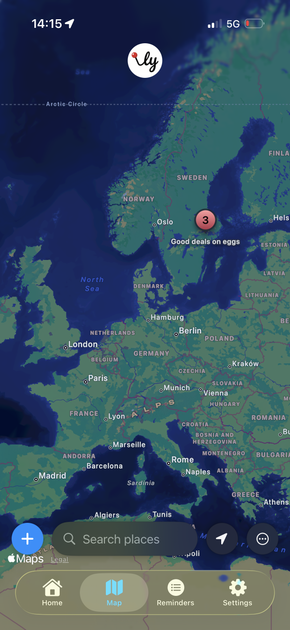
Pinly is a reminder app that combines time-based reminders with location-based alerts. You create reminders by dropping a pin on a map (for “arrive” and “leave” triggers) or by setting a specific date and time (with options for repeating and weekday exclusions).
The app also helps you stay organized by tagging pins and filtering what you see, and it can silence notifications during planned downtime. Pinly is designed to run location geofencing triggers using location data processed strictly on-device.
Key Features
- Location Alerts with pins: Drop a pin anywhere and get notified when you arrive at or leave that specific area.
- Timed Reminders: Choose a date and time, then repeat daily or exclude specific weekdays.
- Smart Organization via tags: Tag pins (for example, “Groceries” or “Work”) and filter to focus on what matters.
- Quiet Hours (Pro): Silence notifications during set downtime such as evenings or nights.
- Simple Notes: Add lightweight, non-timed reminders for quick checklists.
- Data control options: Use automatic local saving, iCloud backup/restore support, and JSON export (Pro).
How to Use Pinly
Start by creating a reminder in the view that matches your intent:
- For location-based reminders, drop a pin on the map at the relevant place and select whether you want an alert when you arrive or when you leave.
- For time-based reminders, set the desired date and time, then choose whether it should repeat daily or exclude specific weekdays.
- Add tags to organize reminders so you can filter later by category.
If you want notifications to pause during evenings or nights, enable Quiet Hours (Pro). For quick checklists that don’t need a time or location trigger, add Simple Notes.
Use Cases
- Commute or arrival reminders: Set a location alert for when you arrive home to remember tasks like picking up groceries.
- Work-related triggers: Drop a pin for your office and get notified when you arrive, so you can remember to start tasks or bring items.
- Recurring personal schedule: Create timed reminders for routines that happen daily, while excluding particular weekdays (such as skipping weekends).
- Focused planning with categories: Tag multiple location pins (e.g., “Groceries,” “Work,” “Errands”) and filter the list so only one category is visible.
- Quiet-time notifications: Enable Quiet Hours (Pro) to avoid notification interruptions during evenings or nights.
FAQ
Does Pinly track my location?
No. Pinly processes location data strictly on-device for geofencing triggers, and it states that it does not see your data.
Can I back up my reminders?
Yes. Pinly supports iCloud backup/restore. It also offers local JSON export as a Pro feature.
Is Pinly free?
Pinly is free to use. The site indicates optional Pro features (such as Quiet Hours and custom geofence radius) support development.
What kinds of reminders can I create?
You can create location alerts based on arriving/leaving a pinned area, timed reminders for specific dates and times (with repeating or weekday exclusions), and simple non-timed notes for quick checklists.
What does “Quiet Hours” do?
Quiet Hours (Pro) silences notifications during downtime, such as evenings or nights.
Alternatives
- Calendar apps with location and recurring events: Useful if your reminders are mostly time/calendar-based, with location only where your calendar supports it. Compared with Pinly, the workflow is centered on events rather than pin-based geofences.
- Task and checklist apps: Best when you primarily need non-timed checklists. Compared with Pinly, location-arrival/leave triggers would typically not be the core feature.
- Other geofencing reminder tools (mobile/location automation apps): These focus on location triggers for notifications. Compared with Pinly, they may require a more automation-oriented setup rather than the specific combination of tags, timed reminders, and notes described here.
- iOS/Android reminder solutions using geofencing: If you want to stay within your device’s native reminder system, these can provide similar arrival/leave notifications depending on platform capabilities, with less emphasis on the tag/filter workflow and JSON export mentioned for Pinly.
Alternatives

Planndu: Daily Task Planner
Planndu is an intuitive productivity application designed to help users organize tasks, manage projects, build routines, and enhance focus using tools like AI generation and a built-in Pomodoro timer.

Biji
Biji is a versatile platform designed to enhance productivity through innovative tools and features.

LIAM
LIAM is an AI copilot that drafts email replies, organizes your inbox with auto-labels and prioritization, and schedules meetings from your calendar.

Gemma AI
Gemma AI is a smart application that calls you directly with personalized, intelligent voice reminders to ensure you never miss important tasks, appointments, or deadlines.

ClawTick
ClawTick is a CLI-first AI agent automation platform for scheduling webhook tasks on cron with monitoring, alerts, retries, and execution logs.

Decision Jar
Create virtual jars of options with Decision Jar—shake your phone to pick instantly, use AI suggestions, and view decision logs over time.