
Hardware capture management
Connect Rokoko hardware such as the Smartsuit Pro II, Smartgloves II, Face Capture, and Coil Pro to view diagnostics and receive firmware updates in Studio.

Rokoko motion capture software and hardware ecosystem for body, finger, and face animation. Rokoko Studio cleans, retargets, streams, and exports mocap to 3D tools.
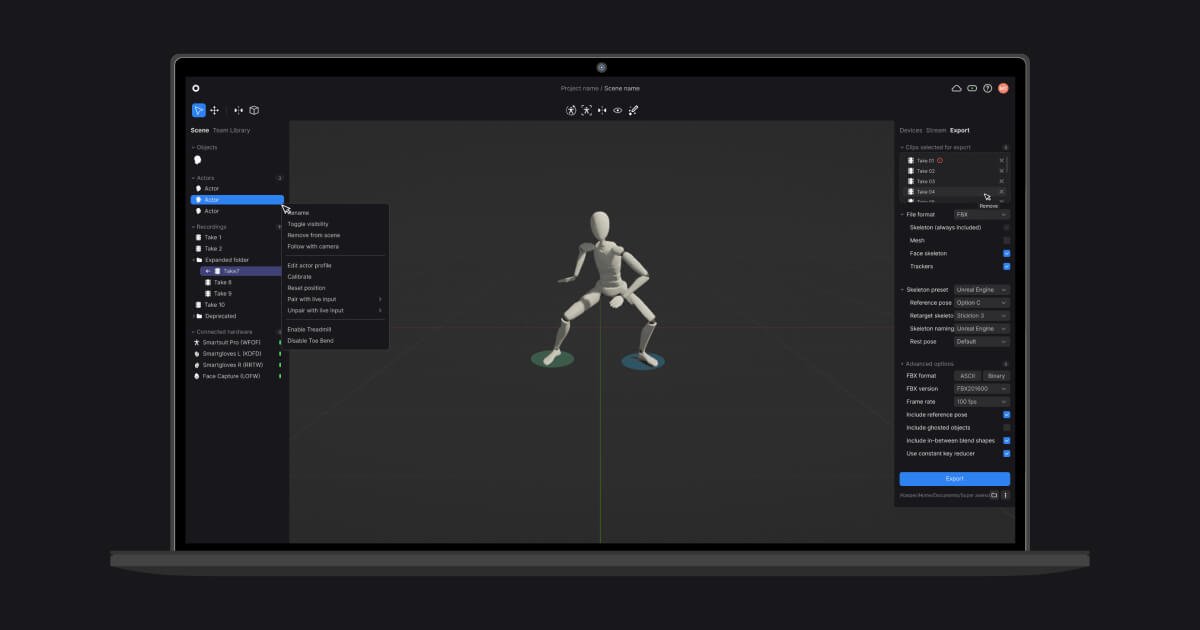
Rokoko Studio is the software hub in Rokoko’s motion capture ecosystem. It receives data from Rokoko body, finger, and face capture tools, then visualizes, cleans up, records, and exports the motion for use in 3D animation pipelines.
The product is aimed at creators who need mocap for character animation, live streaming, or transfer into other software. The site also positions Rokoko tools for robotics and research workflows, including high-fidelity hand and body tracking for teleoperation and AI training data.
Connect Rokoko hardware such as the Smartsuit Pro II, Smartgloves II, Face Capture, and Coil Pro to view diagnostics and receive firmware updates in Studio.
Record unlimited mocap takes, keep them organized in folders, and work from the recorded data later instead of only live sessions.
Use real-time visualization to review motion capture with low latency, which helps with immediate feedback during performance capture.
Apply filters and editing tools such as root locking, foot locking, elevation tracking, knee pop smoothing, pose correction, retargeting, and custom character import.
Stream mocap data live to supported 3D tools including Unreal Engine, Unity, Blender, Maya, Cinema 4D, Houdini, MotionBuilder, and iClone.
Export finished animation to FBX, BVH, or CSV, with skeleton presets and mesh export options for downstream production workflows.
Capture full-body motion with the Smartsuit Pro II, finger tracking with Smartgloves, and face capture in the same workflow for character performances.
Stream live mocap data into tools such as Unreal Engine, Unity, Blender, Maya, Cinema 4D, Houdini, MotionBuilder, or iClone for animation work in a separate 3D pipeline.
Clean up recorded takes with filters like foot locking, root locking, and elevation tracking before exporting to FBX, BVH, or CSV.
Use the robotics-oriented workflow for high-fidelity hand and body tracking in teleoperation, dexterous manipulation, and AI training data collection.
No. The source says Rokoko Studio is the software layer that receives raw data from the Smartsuit Pro, Smartgloves, and Rokoko Face Capture, processes it with real-time algorithms and filters, and can then stream the result to other 3D tools.
The source says Rokoko Studio is designed to run on laptops, and that most modern computers are sufficient. The site points to recommended specs for more detail.
Rokoko Studio supports export to formats including FBX, BVH, and CSV, with skeleton and mesh options. The site also mentions export overrides and skeleton presets such as Human IK and Mixamo.
The pricing page shows a Starter free tier, paid Starter, Basic, Plus, and Pro plans, plus an Enterprise option with custom pricing and contact sales flow. Annual and monthly billing are both shown.
Yes. The site says Rokoko Studio can stream in real time to tools including Unreal Engine, Unity, Blender, Maya, Cinema 4D, Houdini, MotionBuilder, and iClone through native integrations.

MacSpoof is a macOS MAC address changer that lets you change or randomize your Wi‑Fi MAC to reconnect and limit device logging on public Wi‑Fi.

NomNak is a free iPhone app for discovering restaurants through friends’ recommendations, with saved spots, a food passport and city search.
TyeGit is a native Git client built with Rust and Tauri for fast, precise control over staging, commits, branches, and remotes on Windows, macOS, and Linux.

Loomal adds paywalls to APIs, MCP tools or hosted files, letting AI agents pay per request in USDC on Base with direct settlement.

idmly converts self-contained HTML designs into editable Adobe InDesign (.idml) files for browser-made or AI-generated layouts.

Hacker-News is a native macOS Hacker News client built with SwiftUI. Install from DMG via GitHub Releases or build from source in Xcode 26+.