

SemanticGuard
SemanticGuard is an AI gateway with a self-validating cache for OpenAI, Anthropic, and Google LLM APIs. Measure savings, cache similar responses, keep requests flowing.
What is SemanticGuard?
SemanticGuard is an AI gateway and self-validating cache for LLM APIs. It sits in the request path for providers such as OpenAI, Anthropic, and Google, caching responses while using multi-layer verification to check whether a cached answer is still correct.
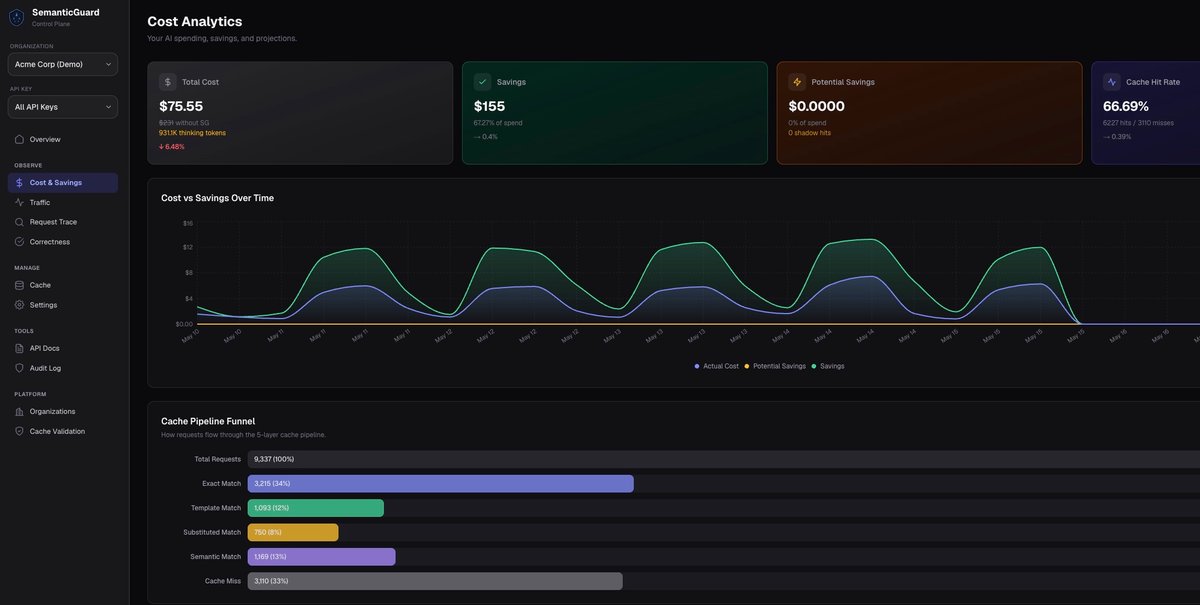
The product is designed to reduce LLM API spend without forcing users to change prompts or manage cache objects manually. It also includes a Shadow Mode that measures potential savings before caching is enabled, and it supports a fail-open design so requests continue to the upstream provider if the cache is unavailable.
Key Features
- One-line SDK integration via
fetch: withSemanticGuard()in the AI SDK, which lets teams add caching without rewriting application logic. - Shadow Mode measurement that shows per-request cost, projected savings, hit types, and where traffic would be cached before serving any cached responses.
- Self-validating cache hits using multi-layer verification, with sampled hits also judged by AI for correctness and failures flagged.
- Cross-provider support across OpenAI, Anthropic, Google, and other listed providers such as Azure, Bedrock, and Mistral.
- Cache behavior tuned for semantic matches, so requests with different names, dates, or IDs can still hit when the answer is effectively the same.
- Fail-open request handling, which sends traffic straight to the provider if the cache is down.
- Security controls noted on the site, including encryption in transit and at rest, optional prompt storage, and upstream API keys passed at request time rather than stored.
How to Use SemanticGuard
Developers add SemanticGuard to their AI SDK configuration by wrapping the fetch layer with withSemanticGuard() and then sending requests as usual. The workflow shown on the site starts with Shadow Mode to measure savings and observe how traffic would be classified.
When the team is comfortable with the results, caching can be enabled. At that point, cache hits are returned automatically, and the dashboard can be used to review savings, hit rate, and validation results.
Use Cases
- Reducing spend on high-volume LLM applications where many users ask overlapping questions and repeated answers can be reused.
- Measuring the economics of caching before rollout, especially for teams that want to quantify savings without serving cached output immediately.
- Serving semantically similar requests that differ in surface details such as names, dates, or IDs, where byte-identical provider caching would miss.
- Supporting multi-provider AI stacks that need a single caching layer across different model vendors.
- Maintaining availability for production apps that need a fallback path if the caching layer is unavailable.
FAQ
Does SemanticGuard require prompt changes?
No. The site describes a one-line SDK integration and says there is no need for prompt changes.
Can I test savings before enabling cache hits?
Yes. SemanticGuard includes Shadow Mode, which measures what you would save before cached responses are served.
Does it work with more than one model provider?
Yes. The page lists OpenAI, Anthropic, Google, and also mentions compatibility across other providers such as Azure, Bedrock, and Mistral.
What happens if the cache is unavailable?
The product is described as fail-open, meaning requests go directly to the provider.
Is the product only for exact-match caching?
No. The page positions SemanticGuard as semantic caching, aimed at requests that mean the same thing even when details like names, dates, or IDs change.
Alternatives
- Provider-native prompt caching, such as built-in caching from OpenAI or similar vendors. This is typically limited to exact or near-exact prefix reuse within a provider’s own system and is better suited to static prompt segments.
- Manual cache layers built into an application or proxy. These can be customized, but they usually require more engineering work to define cache keys, manage invalidation, and verify correctness.
- General AI gateways without semantic validation. These may handle routing, observability, or policy enforcement, but they do not necessarily focus on caching with correctness checks.
- Direct provider usage without a caching layer. This is the simplest setup, but it does not add reuse across similar requests or a pre-launch savings measurement workflow.
Alternatives

AakarDev AI
AakarDev AI is a powerful platform that simplifies the development of AI applications with seamless vector database integration, enabling rapid deployment and scalability.

Ably Chat
Ably Chat is a chat API and SDKs for building custom realtime chat apps, with reactions, presence, and message edit/delete.

BookAI.chat
BookAI allows you to chat with your books using AI by simply providing the title and author.

DeepMotion
DeepMotion is an AI motion capture and body-tracking platform to generate 3D animations from video (and text) in your web browser, via Animate 3D API.

skills-janitor
Audit, track usage, and compare your Claude Code skills with skills-janitor—nine focused slash commands and zero dependencies.

Arduino VENTUNO Q
Arduino VENTUNO Q is an edge AI computer for robotics, combining AI inference hardware and a microcontroller for deterministic control. Arduino App Lab-ready.