

Stripe Projects
Stripe Projects is a CLI workflow to provision and manage services, generate and sync credentials, and handle usage and billing in one place.
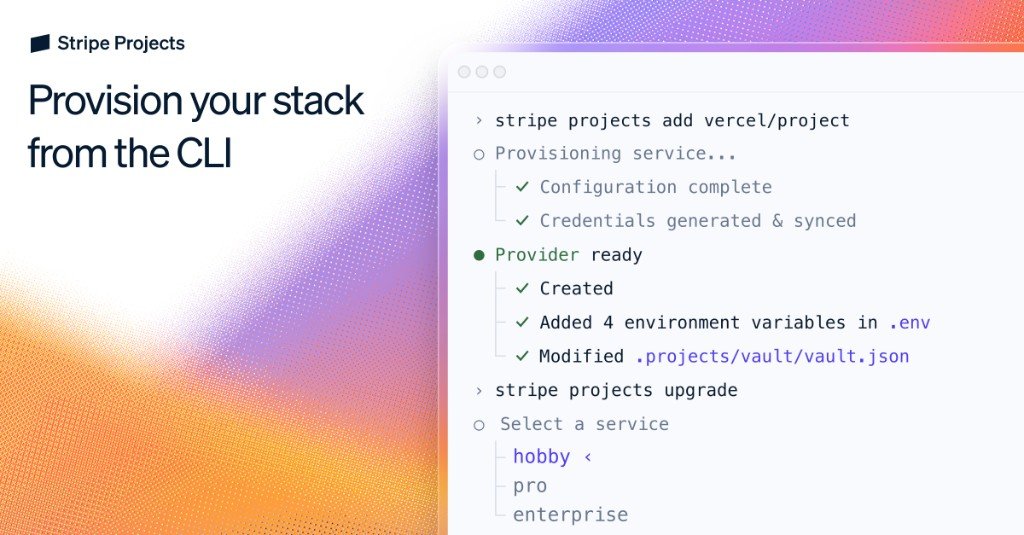
What is Stripe Projects?
Stripe Projects is a CLI workflow to provision and manage services, generate and sync credentials, and handle usage and billing in one place.
The core purpose is to reduce the manual steps involved in setting up services across different dashboards—such as signing up for multiple providers, configuring API keys, and repeating setup—by making provisioning auditable, repeatable, and portable via environment variables.
Key Features
- Provision services from the CLI: Add the providers/services your app needs using commands like
stripe projects initandstripe projects add <provider>/<service>, so setup can be done outside of web dashboards. - Credential generation and syncing: Generate credentials during provisioning and sync them back to your local environment (example shown includes environment variables placed into a
.envfile). - Project configuration and portability: Keep environment variables portable across local setups, machines, teammates, and agents.
- Billing and usage management from the CLI: Set billing details once, then upgrade/downgrade tiers, monitor usage, and manage subscriptions from the command line.
- Programmatic upgrades: Upgrade a provider’s setup using a CLI command such as
stripe projects upgrade <provider>to keep plans aligned with your needs.
How to Use Stripe Projects
- Request early access and/or view docs: Stripe Projects is described as being available via early access.
- Initialize a project: Run
stripe projects init <app-name>(example:stripe projects init helloworld-app) to create a Stripe Projects project. - Browse available providers: Use
stripe projects catalogto view supported providers. - Add services: Install the services your app needs with
stripe projects add <provider>/<service>. - Upgrade or change plans when needed: Use
stripe projects upgrade <provider>to adjust a provider configuration.
During provisioning, the workflow shown includes a completed configuration step, credentials being generated and synced, and environment variables being added to .env (with an example also indicating changes to /.projects/vault/vault.json).
Use Cases
- Provisioning an app stack for a new project: Create a new project with
stripe projects init, then add hosting, database, and auth services required by your application. - Using an agent to set up dependencies: Have an agent prompt the CLI to add services your application needs, with resources provisioned in accounts you own and credentials synced back to your environment.
- Managing API keys and credentials across environments: Keep environment variables portable so the same configuration can be used across teammates, machines, or agent environments.
- Coordinating billing changes for multiple services: Use CLI workflows to upgrade or downgrade tiers and monitor usage, without leaving the command line.
- Iterating on provider plans: When requirements change, upgrade a specific provider’s configuration using the upgrade command rather than repeating manual steps across dashboards.
FAQ
-
Is Stripe Projects a CLI tool or a dashboard? Stripe Projects is described as enabling provisioning and management from the command line.
-
What kinds of services can I provision? The page mentions hosting, databases, auth, AI, analytics, and more.
-
How are credentials handled after provisioning? The workflow generates credentials and syncs them back to your environment, with an example showing environment variables added to a
.envfile. -
Can billing and usage be managed from the CLI? Yes. The page states that billing details can be set up once and shared with the SaaS stack, and that you can upgrade/downgrade tiers, monitor usage, and manage subscriptions from the CLI.
-
Is Stripe Projects limited to provisioning only, or does it manage updates too? It includes provider upgrades via a CLI command (
stripe projects upgrade <provider>), supporting changes after initial setup.
Alternatives
- Manual provider setup across dashboards: Provisioning services by signing up and configuring each provider’s settings separately. Compared to Stripe Projects, this is more fragmented and typically requires managing credentials and configuration in multiple places.
- Generic infrastructure-as-code tools: Use infrastructure automation tooling to provision resources and manage configuration. This can automate provisioning, but the source emphasizes Stripe Projects’s single CLI workflow for credential syncing and CLI-driven billing/usage management.
- Provider-specific CLIs and SDK workflows: Use each provider’s own CLI or API to set up services and manage credentials. Stripe Projects differs by targeting a unified workflow across providers with portable environment variables.
- Agent-driven setup using custom scripts: Build your own scripts that call provider APIs, store credentials, and orchestrate billing. This can match Stripe Projects’s goals, but it requires implementing the orchestration and syncing workflow yourself.
Alternatives

GitBoard
GitBoard is a native macOS menu bar app for GitHub Projects to view your kanban board, filter by status, search issues, and create or assign.

OpenFlags
OpenFlags is an open source, self-hosted feature flag system with a control plane and typed SDKs for progressive delivery and safe rollouts.

Studio CLI
Control WordPress Studio features from the terminal with Studio CLI—manage local sites, create/update/delete WordPress.com preview sites, and authenticate.

Polsia
Polsia is an autonomous AI system that plans, codes, and markets your company on a daily cadence while you sleep.

Biji
Biji is a versatile platform designed to enhance productivity through innovative tools and features.

Codex Plugins
Use Codex Plugins to bundle skills, app integrations, and MCP servers into reusable workflows—extending Codex access to tools like Gmail, Drive, and Slack.