

TabAI
TabAI is an AI workspace that collects tasks from Gmail, Notion, Slack and more, organizes tabs, blocks distractions, and includes Pomodoro analytics.
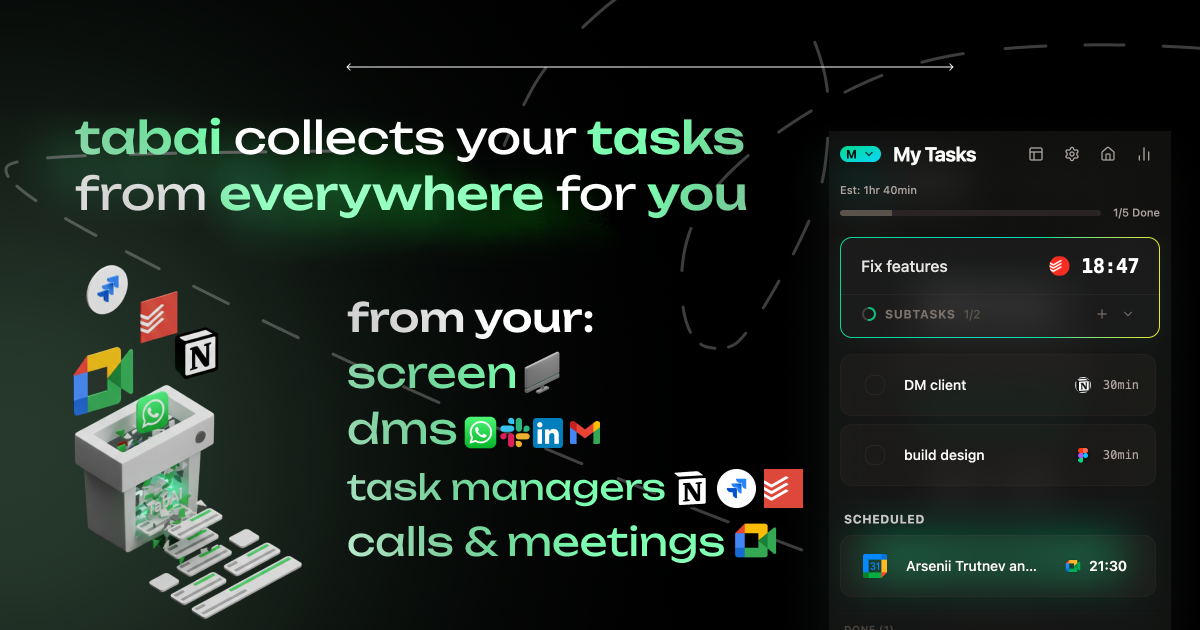
What is TabAI?
TabAI is an AI workspace delivered as a browser extension and desktop app entry point. It collects tasks from multiple tools, organizes your browser tabs, and helps you stay focused by blocking distractions based on your current task context.
Its core purpose is to reduce manual task gathering and tab clutter—so you can keep tasks and related work in one place and enter focused work sessions with fewer interruptions.
Key Features
- Automatic Task Collection: Pulls tasks from sources such as Gmail, Google Calendar, Notion, Linear, Todoist, TickTick, Slack, Telegram, WhatsApp, and “many more” into a single view so due work is tracked in one place.
- Context-Aware Blocking: Uses AI to detect what you’re working on and blocks distractions depending on your current task context.
- Automatic Tab Organization: Groups and organizes browser tabs by work context to keep the browser cleaner as projects change.
- Duplicate Tab Detection: Identifies duplicate tabs to reduce redundancy while you work.
- Turn Any Text Into a Task: Lets you select text on any webpage (e.g., emails or messages) to create a task instantly, with AI extracting the context.
- Focus Sessions & Pomodoro: Includes a built-in Pomodoro timer and performs automatic blocking during focus sessions, with customizable work sessions and smart break reminders.
- Analytics for Focus and Distractions: Tracks focus time, blocked distractions, and productivity patterns with unified analytics.
How to Use TabAI
- Install and open TabAI (via the Chrome Web Store extension, and/or access it from the “Save for Desktop” entry shown on the site).
- Connect or enable your existing work apps so TabAI can collect tasks from the tools you already use (e.g., Gmail, Google Calendar, Notion, Slack, Todoist).
- Use the task view to see what’s due and to drive context for blocking.
- Start a focus session using the built-in Pomodoro timer; TabAI will handle automatic blocking during the session.
- Use tab organization features while working (auto-grouping and duplicate detection) and create new tasks by selecting text on webpages.
Use Cases
- Centralize tasks from scattered tools: When your tasks live across email, calendar, and project trackers, TabAI consolidates them into one structured view and keeps you aware of what’s due.
- Stay focused during deep work: During Pomodoro-style focus sessions, TabAI blocks distractions based on your current task context to reduce interruptions.
- Manage browser tab overload: As you switch between projects, TabAI automatically groups tabs by work context and flags duplicates to keep your workspace navigable.
- Create tasks directly from messages: When you come across an actionable detail in an email or Slack message, select the relevant text and let TabAI generate a task with context extraction.
- Review productivity patterns: Use TabAI analytics to see how much time you spent in focus sessions and which distractions were blocked, then adjust how you plan work.
FAQ
-
Does TabAI integrate with my existing tools? The site lists integrations with Gmail, Google Calendar, Notion, Linear, Todoist, TickTick, Slack, Telegram, WhatsApp, and more.
-
How does TabAI decide what to block? It describes “AI understands what you're working on” and blocks distractions based on the current task context; it also mentions automatic distraction detection and learning your work patterns.
-
Can I create tasks without switching apps? Yes. TabAI allows selecting text anywhere on the web and creating tasks instantly with AI context extraction.
-
What focus features are included? TabAI includes a built-in Pomodoro timer, customizable work sessions, smart break reminders, and automatic blocking during focus sessions.
Alternatives
- General-purpose task managers (e.g., Todoist-style tools): Useful for capturing and tracking tasks, but they don’t specifically focus on browser tab organization and context-aware distraction blocking.
- Calendar + email-based workflow (e.g., Google Calendar + Gmail task workflows): Can track due dates and actionable items, but typically requires more manual organization and doesn’t provide automated tab grouping and in-session blocking.
- Focus and distraction blockers (category alternative): Tools that block websites during work can help with distractions, but they may not consolidate tasks from multiple apps into one structured view or provide AI-driven tab organization.
Alternatives

ClawTick
ClawTick is a CLI-first AI agent automation platform for scheduling webhook tasks on cron with monitoring, alerts, retries, and execution logs.

Planndu: Daily Task Planner
Planndu is an intuitive productivity application designed to help users organize tasks, manage projects, build routines, and enhance focus using tools like AI generation and a built-in Pomodoro timer.

PromptScout
PromptScout tracks how your brand is mentioned, which competitors are recommended, and what sources are cited in AI answers—plus website audits.

Biji
Biji is a versatile platform designed to enhance productivity through innovative tools and features.

LIAM
LIAM is an AI copilot that drafts email replies, organizes your inbox with auto-labels and prioritization, and schedules meetings from your calendar.

Sleek Analytics
Lightweight, privacy-friendly analytics with real-time visitor tracking—see where visitors come from, what they view, and how long they stay.