

Uncluttr
Uncluttr is an AI tab manager with a vertical sidebar to group and search tabs, then detach or auto-close to reduce browsing clutter.
What is Uncluttr?
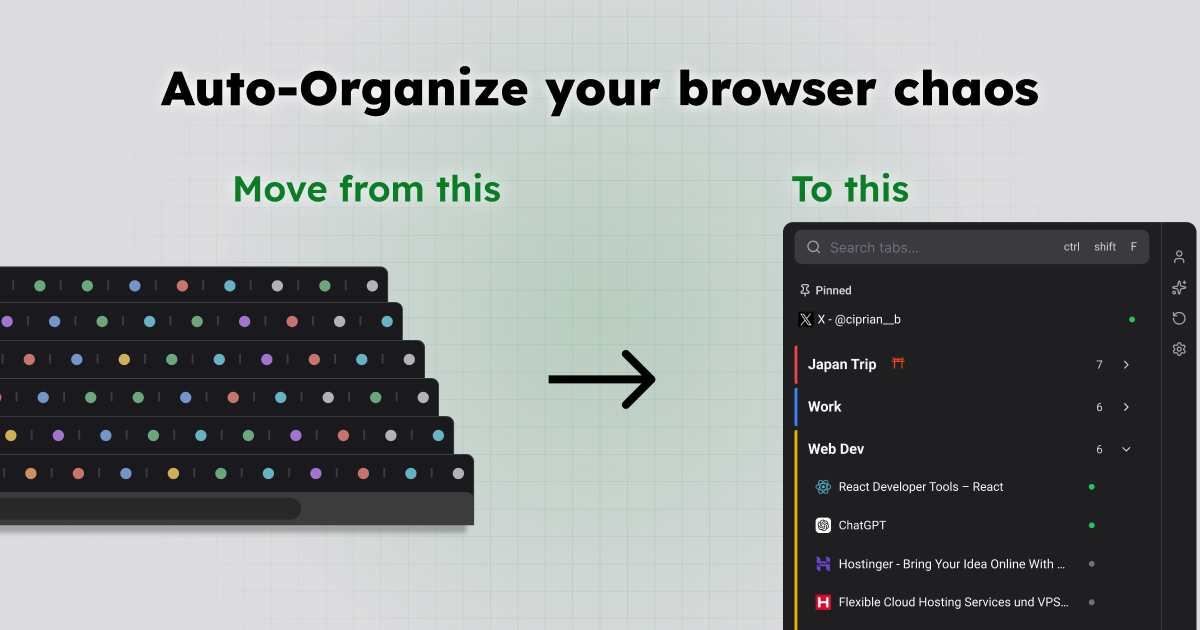
Uncluttr is an AI tab manager and sidebar that helps you organize browser tabs. It focuses on a sidebar-first workflow for grouping, searching, and managing open tabs so you can reduce “tab-hoarding” and regain attention.
The core purpose is to reorganize your tab workspace into a clearer structure, including features like automatic grouping, duplicate detection, and the ability to detach tabs while keeping them one click away.
Key Features
- Vertical sidebar tab manager: Presents tabs in a grouped, searchable sidebar designed to replace the clutter of a horizontal tab bar.
- AI automatic grouping: Uses automatic grouping to organize tabs into groups without manual rearranging.
- Search across tabs and groups: Lets you search through both individual tabs and grouped items from within the sidebar.
- Detach tabs with reduced memory impact: Detached tabs are described as using zero memory while remaining easily accessible.
- Tab cleanup helpers (auto-close, duplicate detection): Includes auto-close for unused tabs and duplicate detection to reduce redundancy.
- Smart grouping options: Offers limited smart grouping and auto-collapse groups for keeping the sidebar compact.
- Plan-based upgrade controls: The page describes a free tier (“Explorer”) and a paid tier (“Architect”) with additional capabilities like analytics/insights and rule-based grouping.
How to Use Uncluttr
- Install the free Chrome extension (“Add to Browser”).
- Open your browser and start adding or managing tabs using Uncluttr’s vertical sidebar.
- Use the sidebar to view grouped tabs, search for specific items, and keep frequently used tabs organized.
- If you need more control, upgrade in-app to unlock additional features described under the Architect plan (such as rule-based grouping and analytics/insights).
Use Cases
- Research workflows with many related tabs: As you gather sources, use automatic grouping and the sidebar to keep related reading items together and find them later via search.
- Developer project context switching: Keep tabs for tasks like GitHub issues, docs, and internal tools organized by group, so switching between workstreams is faster.
- “Junk drawer” cleanup: When tabs accumulate across windows (e.g., unreadable titles scattered across sessions), Uncluttr’s grouping and duplicate detection can help consolidate them into a calmer layout.
- Reading lists and scheduled review: Maintain a small, structured set of reading tabs using groups and (where available) auto-collapse to keep attention on what’s next.
- Minimizing resource use while browsing: Detach tabs you don’t need immediately to reduce active memory usage while keeping them one click away.
FAQ
-
Is Uncluttr free? Yes. The site states there is a Free plan (“Free to Use”) and describes an additional Architect plan for more features.
-
Will Uncluttr delete my tabs? The page mentions auto-close unused tabs, but it does not describe a general “delete” behavior. Auto-close appears to be a specific cleanup feature.
-
How does the AI tab grouping work? The site describes automatic grouping and limited smart grouping, but it does not provide the underlying method beyond that.
-
Does Uncluttr slow down the browser? The page specifically claims detached tabs use zero memory, but it does not provide broader performance benchmarks or measurement details.
-
Which browsers does Uncluttr support? The meta description says it is a Chrome extension and that it works with Edge, Brave, and all Chromium browsers.
Alternatives
- Built-in browser tab grouping: Uses the browser’s native grouping features to organize tabs, but may lack AI-driven organization and the sidebar-first workflow Uncluttr provides.
- General-purpose tab management extensions: Extensions focused on tab organization, search, and cleanup can address clutter, but may not include the same AI auto-grouping and detach behavior described here.
- Session and workspace managers: Tools that save/restore tab sessions can reduce reloading and switching costs, though they may not continuously reorganize tabs in a sidebar during everyday browsing.
- Vertical tab sidebar extensions: If your main pain point is horizontal tab sprawl, vertical-tab extensions can help layout, but may differ in whether they provide AI grouping and detaching.
Alternatives
MealTime
MealTime is your personal, offline-first recipe companion designed to help you save, organize, plan meals, and generate smart grocery lists, all while keeping your data private.

OrgaNice
OrgaNice is a smart tab manager that helps users save, organize, and quickly restore browser tabs using clean collections and workspaces, enhancing productivity and reducing tab chaos.

Lasso
Lasso is an AI-first PIM for ecommerce teams that enriches product attributes and descriptions, processes supplier data, and monitors competitors via app or API.

Biji
Biji is a versatile platform designed to enhance productivity through innovative tools and features.

Struere
Struere is an AI-native operational system that replaces spreadsheet workflows with structured software—dashboards, alerts, and automations.

Gemma AI
Gemma AI is a smart application that calls you directly with personalized, intelligent voice reminders to ensure you never miss important tasks, appointments, or deadlines.