
Configurable heartbeat
Set a heartbeat from 1 minute to 4 hours so Argus periodically reads its mission, evaluates child sessions, assigns more work when needed, and reports progress.

Argus is Scape’s session-backed AI orchestrator for coordinating multiple coding agents on recurring engineering work. It uses a Mission note, configurable heartbeat, isolated git worktrees, tables, and playbooks to assign and monitor tasks while supporting human triage.
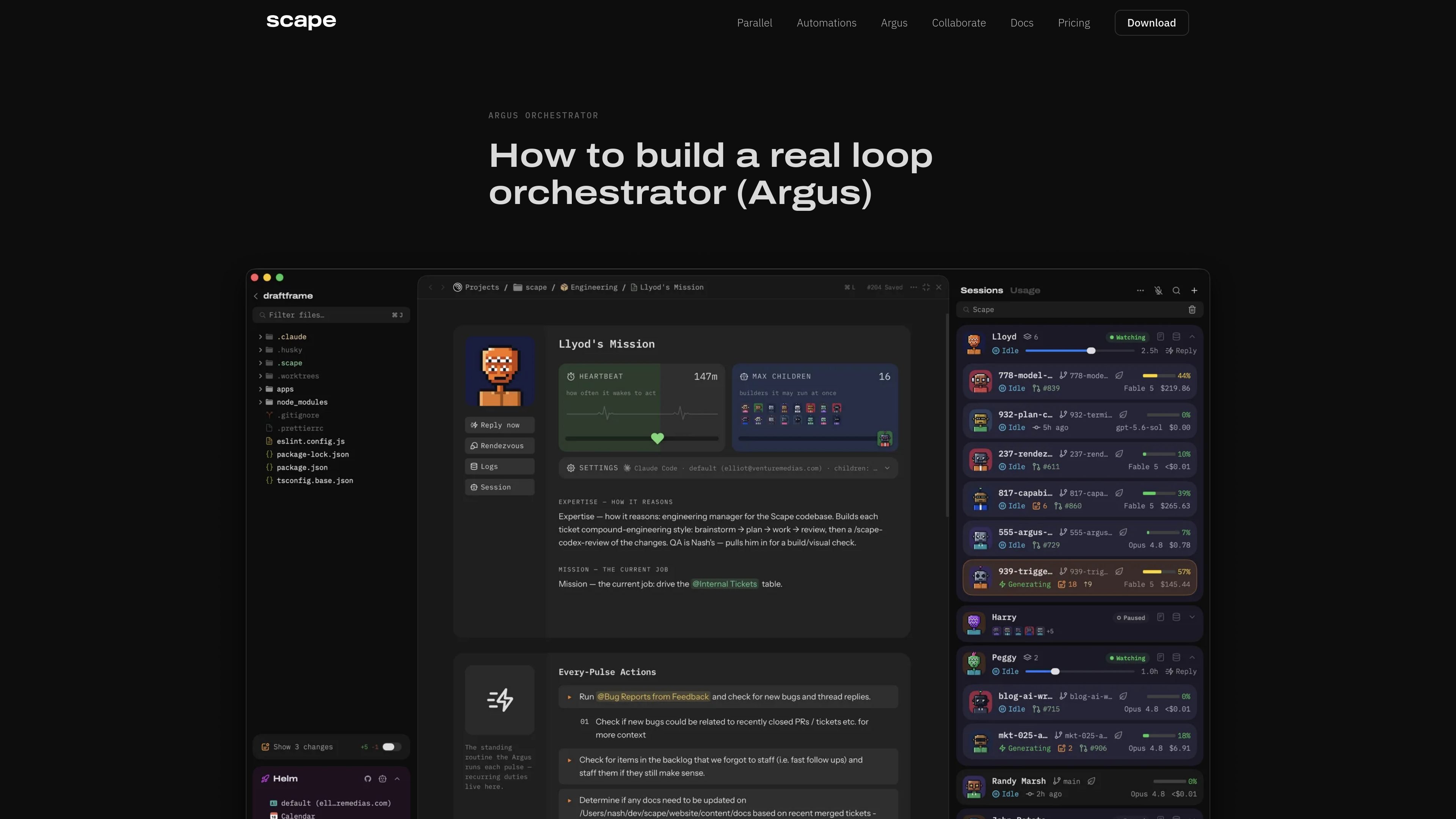
Argus is Scape’s session-backed AI orchestrator for managing multiple coding agents. You give it a Mission note describing repositories, tasks, constraints, and priorities; it reads that mission on each pulse, evaluates active child sessions, starts additional sessions when needed, and reports progress.
Each child is a real coding session running in its own git worktree, so parallel tasks remain isolated. Argus can also work with Scape tables and playbooks: tables provide structured project memory, while playbooks can automate recurring checks such as reviewing customer bug reports, application logs, or documentation. The result is a recurring engineering workflow that can continue while the user is away, with explicit controls for timing and delivery mode.
Set a heartbeat from 1 minute to 4 hours so Argus periodically reads its mission, evaluates child sessions, assigns more work when needed, and reports progress.
Write instructions in a Mission note covering repositories, tasks, constraints, and priorities. Notes can reference other Scape objects, including repos, tables, and playbooks.
Spawn multiple real coding sessions in parallel, with each child working in its own fresh git worktree to isolate changes.
Use Watching, Sleeping, or Disabled modes to control whether timed pulses and automated messages reach the manager. Sleeping can still respond to child reports, triggers, calendar events, and scheduled events.
Store structured project data in per-project SQLite tables that agents and playbooks can query and update. Tables support typed columns, natural keys, and Table, Kanban, Gantt, List, and Visual views.
Run playbooks as automation steps, such as checking customer email for bug reports, reviewing application logs, or checking whether website documentation needs updates.
Give Argus a repository-focused mission and let it break engineering work into parallel child sessions, with each session editing, testing, and potentially creating a pull request in its own worktree.
Run a recurring pulse that checks application logs and creates tickets for problems that may not generate an explicit error or customer report, giving a human a queue to triage.
Use a playbook to inspect customer email for new bug reports, query existing table records for related context, and staff follow-up work with that history available.
Maintain a project table for tickets, operational notes, or other structured records so agents can query prior work instead of relying only on the current session.
Put Argus to Sleep when work is waiting on an external event, then use scheduled events, child reports, triggers, or calendar events to wake it without a continuous heartbeat.
Argus is created in Scape by selecting Argus from the Creation Picker, naming it, and choosing or creating a Mission note. The Mission note contains the repositories, tasks, constraints, and priorities that guide the manager.
The heartbeat is configurable from 1 minute to 4 hours. Timed pulses occur while Argus is in Watching mode; Sleeping stops timed pulses but still allows incoming events to wake it, while Disabled stops automated delivery.
Each child session runs in a fresh git worktree. Child agents can edit files, run tests, create pull requests, and report progress to Argus.
Argus runs as a session-backed orchestrator using Claude Code, Codex, or OpenCode, whichever is configured as the default harness. The site also lists Scape support for Claude Code, Codex, Copilot, Cursor, and OpenCode.
Argus ships with Scape and can be downloaded for macOS without an account, credit card, or license key. The documentation states that Argus requires an active Scape subscription; the site offers a seven-day trial, while the pricing page provided is not available.

CreateOS Sandbox is an isolated compute environment for running code and agent workloads inside Firecracker micro-VMs. It is designed for workflows that need machine-level isolation, private networking between sandboxes, and programmatic control through SDK, CLI, or MCP.

GitBot is a local browser-based workspace for creating reusable coding bots powered by Claude Code, Codex, or OpenCode. It helps developers run those agents across repository folders with persistent threads and configurable permissions.

ByteAsk is a terminal-first AI coding agent for C and C++ that edits repositories and verifies changes with the real compiler, debugger, sanitizers, and tests before showing a diff. It offers a free tier plus paid plans, with editor connectors and zero-retention handling described in the source.

hob is an independent workspace for coding agents that keeps agent sessions, terminals, history, and follow-up work organized around the tools and providers you already use. It is aimed at developers who want local control over routing, history, and workspace structure rather than a bundled model stack.

Manta AI is an autonomous web app testing tool for teams that want to map application behavior, catch regressions, and generate tests without writing scripts or maintaining selectors. It works from a URL and supports plain-English test flows, run results with screenshots, and scheduled or deployment-triggered checks.

SonOf connects to your repo and PM tool, audits the codebase and surrounding product context, and turns approved work into shipped tickets with senior engineering review. It is aimed at founders and engineering leaders who need backlog help without hiring a full team immediately.