
Large, consistent icon catalog
The library contains 4,159 hand-crafted pixel art icons designed on a strict 24×24 grid, which keeps the visual style consistent across an interface.

Pixelarticons is a pixel art icon library with 4,159 icons on a 24×24 grid. It offers a free MIT-licensed starter set and one-time Pro licensing for the full catalog.
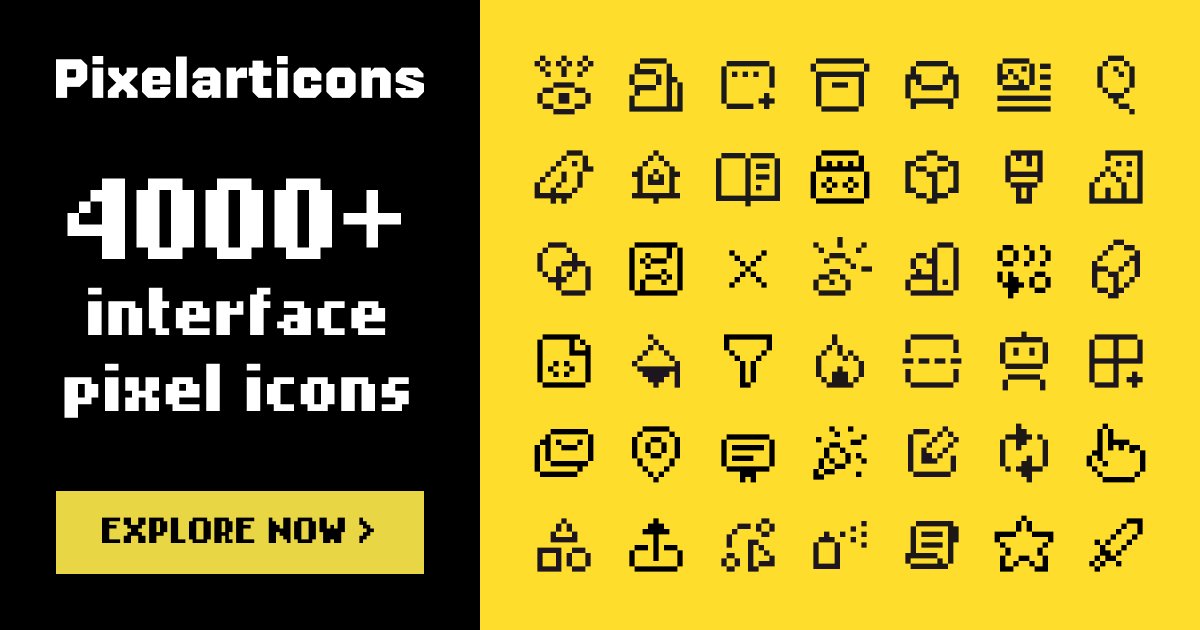
Pixelarticons is a library of hand-crafted pixel art icons built for modern interfaces. It centers on a 24×24 grid and offers four styles—Base, Sharp, Glyph, and Solid—so teams can keep a single pixel-art visual language across different UI needs.
The site says 4,159 icons are available in total, with 816 free icons offered forever under the MIT license and the rest available through a one-time Pro license. The pricing page also describes separate Base, Mini, and Prime sets, plus Solo and Team Unlimited licenses, which makes the product useful for individual developers as well as companies that need commercial rights and lifetime updates.
The library contains 4,159 hand-crafted pixel art icons designed on a strict 24×24 grid, which keeps the visual style consistent across an interface.
The set is available in four styles: Base, Sharp, Glyph, and Solid, giving teams multiple ways to match different interface densities and visual tones.
The site says 816 icons are free forever under the MIT license, while the full set is available through a one-time Pro license with lifetime updates.
Icons can be used through `npm install pixelarticons`, and the site notes support for React, Vue, Svelte, and plain HTML use cases.
The pricing page lists Figma, SVG, and IconJar among the available formats and workflows, and the icon pages show direct SVG and React usage examples.
Use the icon set for dashboards, apps, and websites that need a retro or pixel-art look without building every asset from scratch.
Choose the free MIT-licensed icons when you need a small starter set for a personal project, prototype, or internal tool.
Use the Pro license when you need the full catalog for a commercial product, client project, or a larger design system.
Pick different styles when nearby icons need a different level of outline, fill, or angular treatment while staying visually consistent.
Use the icon pages' SVG and React examples as a guide for adding icons directly into web interfaces and component-based front ends.
Yes. The site says 816 of the 4159 icons are free forever under the MIT license and can be installed with `npm install pixelarticons`. The full set is available through a one-time Pro license.
The icons are built on a 24×24 grid and the site says they render crisply at sizes that are multiples of 24, such as 24, 48, 72, and 96 pixels.
The pricing page says the set works with Figma, SVG, and IconJar, and the home page says the icons work with React, Vue, Svelte, or plain HTML.
Yes. The pricing page states that the Solo and Team Unlimited licenses both include unlimited commercial use and lifetime updates; the difference is the number of people covered.
The pricing page says a Team Unlimited license covers an entire company with unlimited users, while a Solo license covers one person.

PixelForge turns a single photo into a game-ready 2D character sprite pack, including a 4×4 sheet, transparent frames, direction strips, and looping walk GIFs. It is designed for engine-ready use in Godot, Unity, Phaser, GameMaker, and web games.

Mixels.ai is a browser-based AI pixel art generator for creating 8-bit characters, sprites, avatars, and photo-to-pixel conversions. It is designed for users who want grid-aligned retro artwork without installing software.

PixDone is a web-based task manager with pixel-art completion effects, a Pomodoro timer, and recurring tasks for personal planning. It offers a free tier plus PixDone+ for unlimited lists, more themes, and stronger effects.

Smallbits is a set of 290+ pixelated icons on an 8×8 grid, free for personal and commercial use. The license allows client work, end products, and customization while restricting resale and repackaging as a competing icon set.
Mac Pet is a macOS menu bar and notch companion app with a built-in Pomodoro timer, pet animations, and activity streak tracking. It is aimed at Mac users who want a visible focus timer without relying on a browser tab.

ColorCraft is a batch sprite recoloring and palette tool for pixel artists and game developers. It supports palette import, dithering, masking, and Aseprite-oriented workflows on Windows, macOS, and Linux.