
Worker availability portal
Workers submit availability through a dedicated portal, giving the scheduling engine the input it needs before generating the roster.

Daywatch is an AI shift-scheduling platform that builds rosters from worker availability, labor rules, preferences, and role coverage requirements. It helps managers in security, healthcare, manufacturing, retail, and other multi-role operations automate scheduling and review coverage issues before publishing.
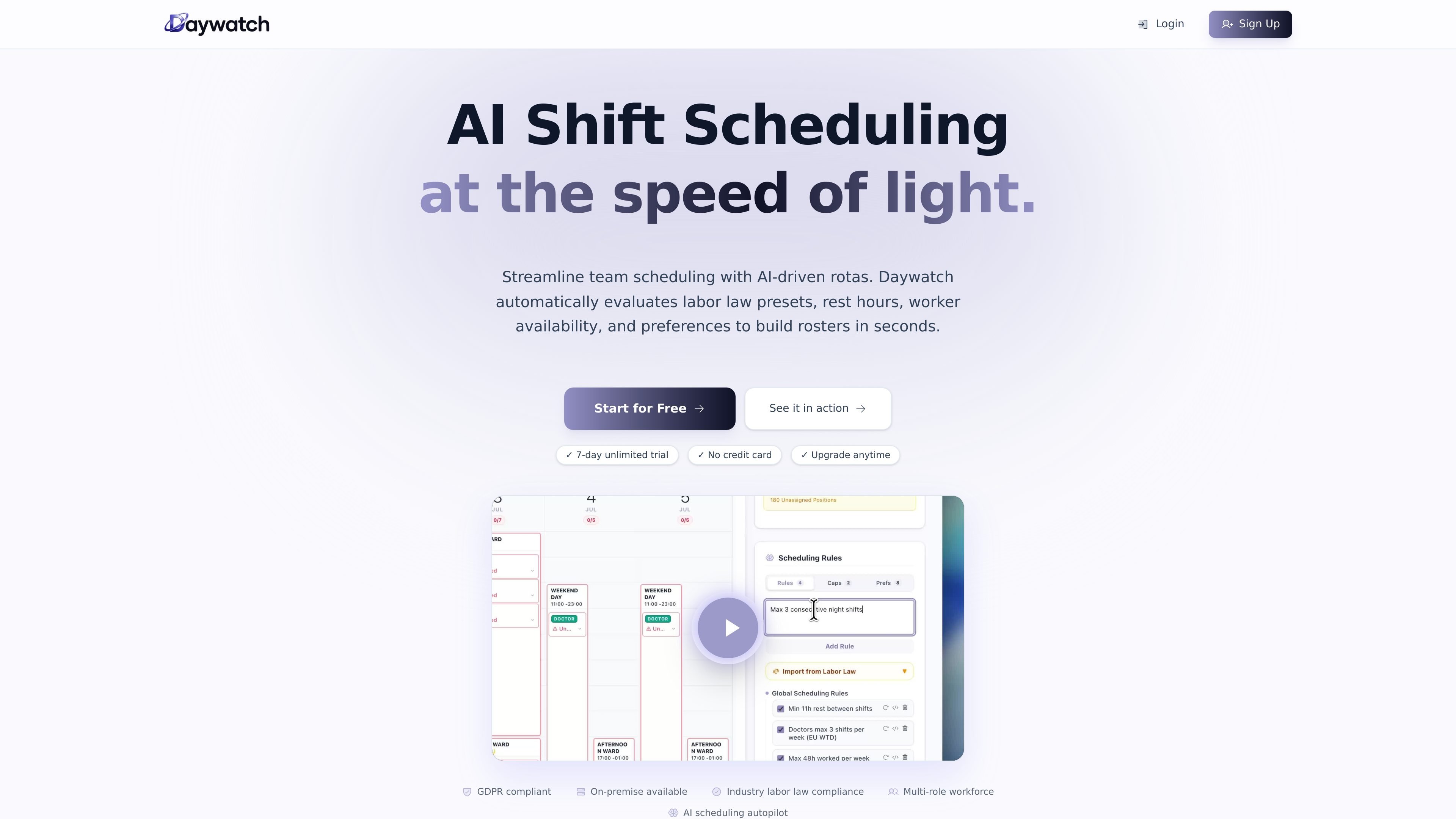
Daywatch is an AI shift-scheduling platform for teams that need to build recurring rosters around worker availability, labor rules, staffing coverage, and role requirements. It replaces manual schedule construction with an automated workflow: workers submit availability, managers define rules and coverage needs, and the AI generates a roster for review and publication.
The platform is positioned for regulated and multi-role workforces, including security, healthcare, manufacturing, and retail. Its industry workflows describe checks for rest periods, hour limits, overtime, fatigue, certifications, site coverage, and role pairing. Daywatch is available as a hosted service, with an on-premise option for organizations that need workforce data to remain within their own network.
Workers submit availability through a dedicated portal, giving the scheduling engine the input it needs before generating the roster.
The AI evaluates availability, labor law presets, rest hours, preferences, manager-defined rules, and role coverage to produce a complete schedule.
Built-in presets and configurable rules can enforce limits such as rest gaps, weekly hours, overtime caps, fatigue controls, certifications, and shift-type restrictions.
Required roles, certifications, and site assignments can be used to match eligible workers to particular shift slots and locations.
The Insights dashboard identifies coverage gaps and workers who have not responded, helping managers resolve exceptions before publishing.
Email and WhatsApp notifications communicate schedule updates, including backup-worker promotions described in the security and healthcare workflows.
Build 28-day site rotations for guards while checking post coverage, rest hours, weekly limits, overtime caps, shift streaks, role tags, and site assignments. Backup guards can be promoted when a cancellation occurs.
Create clinical rosters across wards, campuses, and sub-teams while accounting for duty-length limits, mandatory rest, certifications, supervision pairings, and consultant or specialist coverage.
Schedule day, afternoon, and night production shifts by matching workers to required certifications and applying shift, rest, and coverage rules across the operation.
Generate weekly retail rosters from worker availability and check applicable labor rules before the rota goes live, reducing the need for manual planning each week.
Coordinate larger organizations with multiple teams, regions, or departments using shared visibility and hierarchical team structures; the site describes support for organizations with more than 400 employees.
Daywatch builds schedules from worker availability, manager-defined rules, labor law presets, role coverage requirements, and preferences. The completed schedule is generated automatically and managers are notified when it is ready; an Insights dashboard can surface coverage gaps and unresponsive workers.
Yes. The site describes built-in labor law presets for security, healthcare, manufacturing, and other industries. Depending on the workflow, rules can cover rest periods, weekly hours, overtime, fatigue, certifications, role coverage, and shift caps before a roster is published.
Workers submit their availability through the availability portal. Daywatch then uses that information alongside scheduling rules and preferences to create the roster, with email and WhatsApp notifications available for schedule communication.
The service offers a seven-day free trial with unlimited workers and no credit card required. After the trial, monthly or annual plans are available, with listed plans covering teams from up to 10 through up to 500 workers; organizations with more than 500 workers are directed to enterprise sales.

Liam is an AI copilot for managing inboxes, writing replies, prioritizing email, and scheduling meetings. It is offered free for individuals, with custom pricing for teams and enterprise.

Gemma AI is a phone call reminder app that calls you with scheduled reminders instead of push notifications. It helps people who want a more direct way to stay on schedule, with Google Calendar sync and conversational call interactions.

ClawTick is an AI agent automation platform for scheduling jobs from the CLI, dashboard, or REST API. It is aimed at developers and teams running LangChain, CrewAI, webhook, or custom agent workflows that need monitoring, alerts, and logs.

ClawEase is an AI business operator that captures requests across calls, email, SMS, WhatsApp, LINE, and web forms, then completes booking and service workflows in existing web systems. It is aimed at appointment-based businesses that need intake, follow-up, and execution without API changes.
Foley is a voice-first task management app that turns spoken or typed instructions into organized tasks with dates, projects, and other details. It helps individuals and collaborators capture work quickly, plan their day, and access the same list across desktop, web, mobile, and supported watches.

SelectPrism is an agentic AI hiring platform for high-volume recruiting teams. It automates screening, scheduling, first-round interviews, and structured evaluation to help teams move candidates through hiring with less manual coordination.