

AccountyCat
AccountyCat is a macOS focus app that checks screen context and nudges you back when you drift off task, without hard-blocking work sites or apps.
What is AccountyCat?
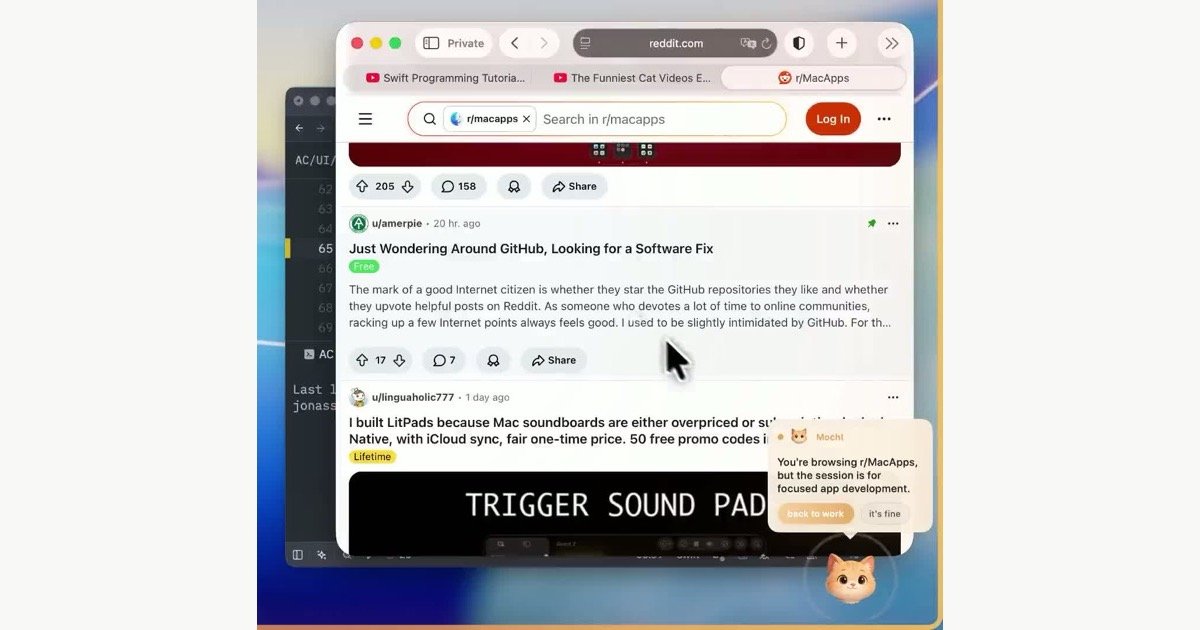
AccountyCat is a macOS menu bar focus app that monitors screen context and compares it with the task you said you were working on. Its purpose is to catch distraction early and prompt you back toward the intended task without hard-blocking access to sites or apps.
The product is designed for work sessions where some off-task content may still be useful in moderation, such as tutorials, documentation, or issue threads. It can run fully on-device or connect to OpenRouter for model-based context checks, and it is positioned as private by default with open source code and local inspection logs.
Key Features
- Screen-context awareness: AccountyCat checks what is on your screen and uses that context to decide whether you are still aligned with the task you set.
- Gentle nudges instead of hard blocks: When it detects drift, it prompts you back rather than blocking access outright, which is useful when a site or app may be part of legitimate work.
- Task profiles and companions: You can tell the app what you are working on and choose or build a companion persona, such as the default Mochi cat or a neutral mode.
- Two execution modes: It supports a fully local mode using llama.cpp and the Qwen multimodal family, or a private cloud mode through OpenRouter.
- Privacy-focused design: Screenshots are analyzed for context and then discarded; the app states that it does not store them permanently, send them where you did not configure, or collect telemetry.
- macOS permission-based workflow: It uses Screen Recording for periodic screenshots and Accessibility to read the active app name, both documented as part of the nudge decision.
How to Use AccountyCat
Install the macOS app, grant the requested Screen Recording and Accessibility permissions, and choose whether you want to run it locally or connect OpenRouter. Then define what you are working on so the app can compare your screen activity against your stated task.
From there, AccountyCat watches for drift during a focus session and nudges you when it thinks you have wandered into something unrelated. You can also pick a companion persona, switch to a neutral mode, or follow the setup flow for the launch code if you want to try private cloud mode.
Use Cases
- Writing sessions: Keep a writing block on track when you need access to research tabs, docs, or reference threads but do not want to fall into unrelated scrolling.
- Programming and debugging: Stay oriented while jumping between code, docs, and search results, especially when the app title or content indicates that your current browsing is still work-related.
- Research-heavy work: Use it when the job involves many short detours into articles, forum posts, or knowledge bases and a strict blocker would be too disruptive.
- Deep work with flexible tools: Run it during a timed focus block when you want accountability without fully locking yourself out of the internet or specific applications.
- Privacy-sensitive personal use: Choose the local or private-cloud path if you want a focus tool that does not rely on a traditional SaaS telemetry model.
FAQ
Does AccountyCat block websites or apps? No. The product is described as a nudge-based focus companion rather than a blunt blocker, so it tries to keep you honest without preventing access to legitimate work resources.
Does it store screenshots or send data to its own servers? According to the site, screenshots are analyzed and then discarded, and there is no permanent storage or upload bucket. It also states that it does not route inference through its own servers.
Can it run without an internet connection? Yes. The local mode is described as fully on-device with no account, no API key, and no internet required.
What permissions does it need on macOS? It asks for Screen Recording to capture periodic screenshots for context and Accessibility to read the active app name for the nudge decision.
Can I customize the companion persona? Yes. The site says you can use the default Mochi cat, switch to a neutral orb, or build your own accountability partner.
Alternatives
- Traditional website blockers: These tools enforce access limits by domain or app, which is simpler but cannot distinguish between work-related and distracting use on the same site.
- Pomodoro timers and focus timers: These help structure work into sessions and breaks, but they do not inspect screen context or react to what you are actually doing.
- Task-tracking or self-accountability apps: These can help define intent and review progress, but they usually rely on manual check-ins rather than automated context detection.
- macOS automation and scripting setups: Users can build custom reminders or app-switching workflows, but those typically require more setup and do not provide the same context-aware prompting out of the box.
Alternatives

Biji
Biji is a versatile platform designed to enhance productivity through innovative tools and features.

Decision Jar
Create virtual jars of options with Decision Jar—shake your phone to pick instantly, use AI suggestions, and view decision logs over time.

Planndu: Daily Task Planner
Planndu is an intuitive productivity application designed to help users organize tasks, manage projects, build routines, and enhance focus using tools like AI generation and a built-in Pomodoro timer.

Carbon Voice
Carbon Voice is an asynchronous voice messaging app for teams with people and AI agents, plus transcribed updates, voice or text replies, and desktop, mobile, watch, and widget access.
MealTime
MealTime is your personal, offline-first recipe companion designed to help you save, organize, plan meals, and generate smart grocery lists, all while keeping your data private.

Clawcard
Clawcard: AI agents get a real inbox, phone number & virtual credit card for OpenClaw. Secure, autonomous agent operations.