

blokdots
blokdots is a desktop app for building interactive hardware prototypes without code. Connect components, define logic, and export or run prototypes.
What is blokdots?
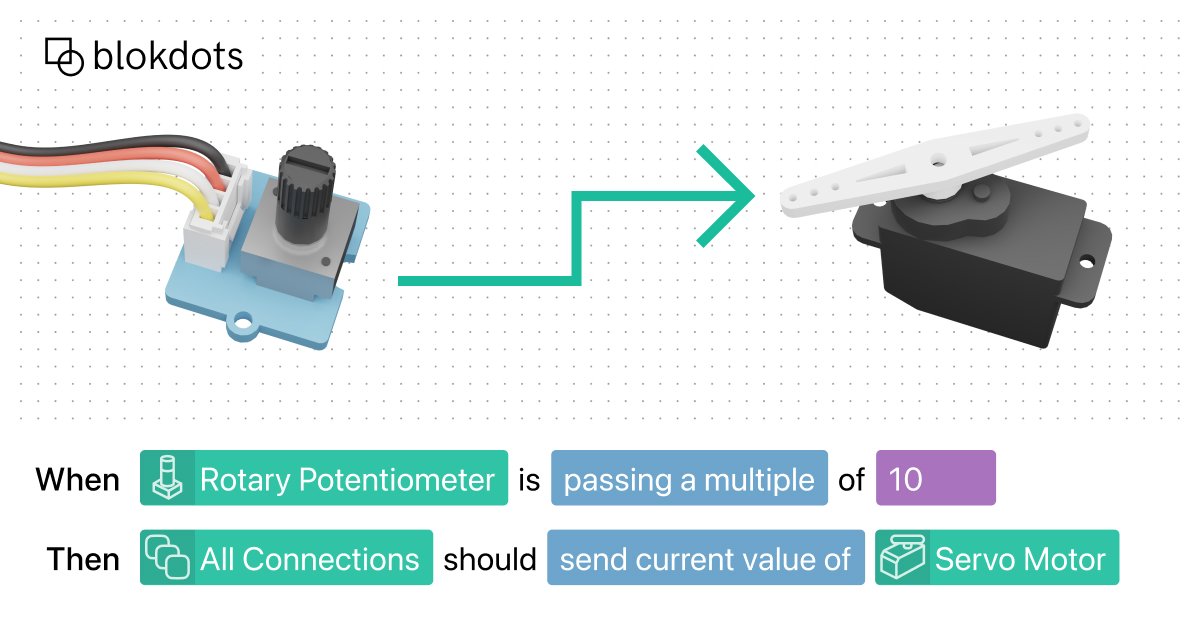
blokdots is a desktop app for building interactive hardware prototypes without writing code. It lets users connect physical components, view values in real time, define interaction logic, and export or run the prototype on a board.
The product is designed to move a hardware idea from exploration to a working prototype in one workflow. It supports live component monitoring, guided connection setup, simple rule-based logic, and, in Pro plans, export to JavaScript or Arduino C++ for further development.
Key Features
- Live control for hardware values: Shows component values in real time before the prototype is fully built, which helps users inspect behavior while iterating.
- Plug-and-play hardware connection: Connects hardware without manual debugging or configuration, reducing setup work when wiring components.
- Connection guidance: Provides step-by-step guidance on where to plug in a component, which is useful for users who are less familiar with hardware wiring.
- No-code interaction logic: Supports trigger-based rules such as if-this-then-that logic and mapping inputs to outputs with value control.
- Standalone board upload: Pro users can upload the prototype to a board and run it without keeping a computer connected.
- Code export: Pro users can export logic as JavaScript or Arduino C++ to continue development outside the app.
- Design tool connections: Includes connections for Figma, ProtoPie, ProtoPie Connect, Socket.IO, P5, websites, and Lovable, allowing physical components to be linked to digital prototypes.
How to Use blokdots
A typical workflow starts by opening the app and connecting physical components. Users can follow the built-in connection guide if they are unsure where each part should go, then monitor values live while testing the setup.
After the hardware is connected, users define interaction logic with trigger rules or mapped inputs and outputs. From there, they can test the prototype in the app, connect it to a design tool or digital app if needed, and, on Pro plans, upload the logic to a board or export code for further development.
Use Cases
- Early hardware concept testing: Designers and makers can check whether a physical interaction behaves as expected before committing to a final build.
- Interactive design prototypes: Teams can connect physical components to Figma or ProtoPie prototypes to make a digital design respond to hardware input.
- Educational hardware projects: Students can learn hardware interaction and prototype logic without starting with code, then move to code export when ready.
- Standalone interactive installations: Pro users can prepare a prototype to run directly on a board without a computer attached.
- Bridging design and code workflows: Users can start with no-code rules in blokdots and export to JavaScript or Arduino C++ when they need a more custom implementation.
FAQ
Does blokdots require coding to build a prototype?
No. The core workflow is no-code and uses simple trigger connections or input-output mapping.
Can blokdots run a prototype without a computer?
Yes, the Pro plan includes uploading the prototype to a board so it can run standalone.
Does blokdots export code?
Yes, Pro plans include export to JavaScript and Arduino C++.
Which design tools can it connect to?
The page mentions Figma, ProtoPie, ProtoPie Connect, Socket.IO, P5, websites, and Lovable.
Is blokdots free?
The site lists a free Basic plan for exploring the basics of hardware interaction, plus paid Education, Pro, and Studio plans.
Alternatives
- Manual Arduino development: A code-first approach for building hardware interactions directly in Arduino, with more flexibility but more setup and programming work.
- General no-code automation tools: Tools that link events and actions without hardware focus; these can handle logic but are not built around physical components.
- Prototyping tools with hardware integrations: Products such as ProtoPie are aimed at interactive design prototyping and may be a better fit when the main workflow stays inside a design prototype rather than a hardware-first app.
- Custom web or Socket.IO-based builds: For teams comfortable with development, a custom app can connect hardware to web experiences, but it requires more implementation effort than blokdots.
Alternatives
FigPrompt
FigPrompt is an AI Figma plugin builder that generates production-ready plugin logic from your description—no code, in seconds.

MakerLoft
MakerLoft is an AI app builder for non-developers that connects to your GitHub repo to generate working apps with auth, payments, files, jobs.

Rork
Rork creates complete, production-ready mobile apps from your description with AI and Expo (React Native)—from idea to working app fast.

Ably Chat
Ably Chat is a chat API and SDKs for building custom realtime chat apps, with reactions, presence, and message edit/delete.

Make Real
Draw a UI and make it real using the tldraw SDK.

AakarDev AI
AakarDev AI is a powerful platform that simplifies the development of AI applications with seamless vector database integration, enabling rapid deployment and scalability.