

BOSS.Tech
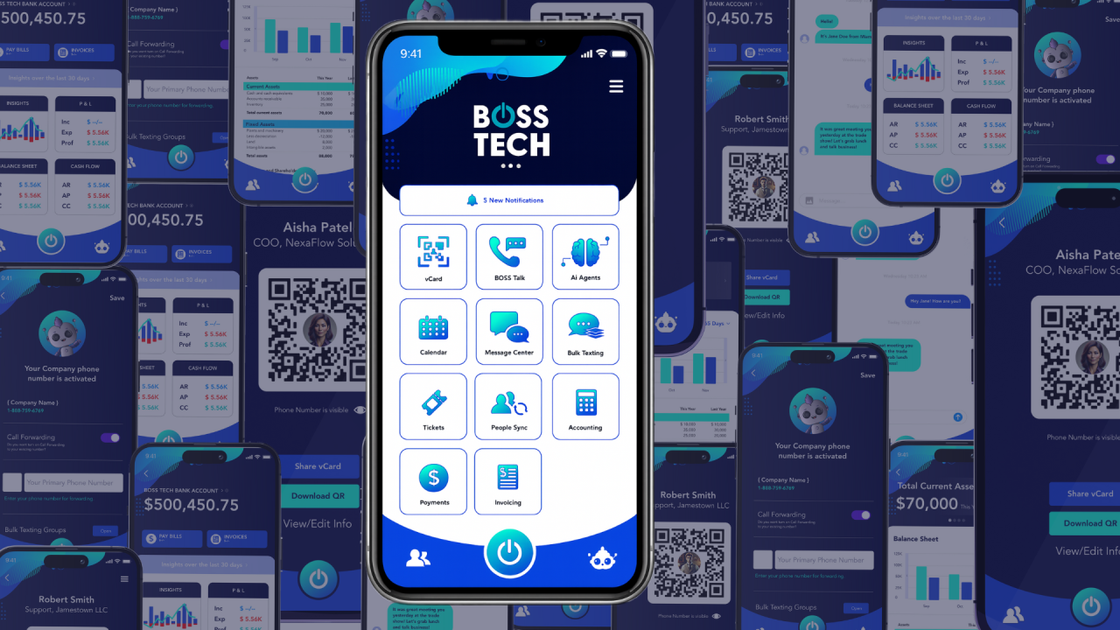
BOSS.Tech is a Business SuperApp that syncs calls, messages, invoices, contacts, events, and finance in one platform with an AI assistant.
What is BOSS.Tech?
BOSS.Tech is a “Business SuperApp” that consolidates multiple business tools into one connected platform. The site describes the app as a unified hub for day-to-day operations such as calls, messages, invoices, contacts, events, and finance.
Its core purpose is to reduce tab- and app-switching by syncing business data and workflows through a Tools Integrator, then presenting it in a single feed for managing messages, payments, and tasks.
Key Features
- Unified business hub for communications and work tracking: Brings calls, DMs, email, and text into one “unified hub,” alongside other business items like invoices, contacts, and events.
- Synced “BOSS Card” digital business cards: Digital business cards are presented as organized and synced, with sharing readiness powered by BOSS.Tech.
- Calendar synchronization across accounts: Adds multiple calendar accounts, syncs them, and provides a single schedule view.
- Invoicing and finance tracking in one place: Includes workflows for sending invoices and tracking cash flow, described as keeping “money moves” in a simple, synced location.
- Ticketing hub for requests and tasks: Centralizes requests and tasks in a ticketing workflow to address “calendar chaos,” “inbox chaos,” and other fragmented operations.
- AI assistant (BOSS Bot) for business insights: An AI business sidekick that answers questions across areas like finances, meetings, and messages, with the site stating it keeps data private.
- People Sync for client/contact unification: An AI-driven integrator syncs individuals from multiple apps into cohesive client profiles.
- Developer Portal for building “MiniApps” and integrator tools: Lets developers create MiniApps, integrate tools into the SuperApp, customize branding/colors, and launch AI agents without writing code (as described on the site).
How to Use BOSS.Tech
- Get access and review the app experience: Start by subscribing for updates or joining the waitlist, then use the on-site materials (videos/tutorials) to see available capabilities.
- Connect your existing tools: Use BOSS.Tech’s Tools Integrator approach to connect tools for areas the product lists—accounting, scheduling, marketing, messages, and invoicing.
- Sync data into a single workspace: Sync your calendars, communications, contacts/people profiles, and finance/invoicing items so they appear within the SuperApp’s unified feed.
- Set up operational workflows: Use the ticketing hub to organize requests and tasks, and rely on the unified messaging area to reduce inbox fragmentation.
- Use BOSS Bot for questions and summaries: Ask BOSS Bot about finance, meetings, or messages; if your goal is custom functionality, explore building MiniApps via the Developer Portal.
Use Cases
- Small business owner managing client communications and invoices: Use the unified messaging hub to handle DMs, email, and text in one place, while tracking invoices and finance actions without switching between separate tools.
- Team coordinating meetings and schedules: Add multiple calendar accounts and view a combined schedule; use the synced calendar view to reduce conflicts caused by managing separate calendars.
- Operations workflow for request tracking: Route incoming requests and tasks through the ticketing hub so work is organized consistently in one operational queue.
- Marketing or sales outreach with digital contacts: Share information via the digital BOSS Card and keep contact data organized through People Sync across connected tools.
- Developer or integrator extending the platform: Create a MiniApp from the Developer Portal, integrate an additional tool into the SuperApp, customize branding, or launch AI agents using the portal workflow described on the site.
FAQ
-
What does BOSS.Tech “connect” between? The site states BOSS.Tech connects business tools you already use—such as accounting, scheduling, marketing, messages, and invoicing—by syncing data and workflows into a single platform.
-
Does BOSS.Tech unify multiple calendars? Yes. The product page describes adding every calendar account, syncing instantly, and viewing all schedules in one place.
-
What is BOSS Bot? BOSS Bot is described as an AI business sidekick that answers questions related to finances, meetings, and messages, while the site says it keeps your data private.
-
What is People Sync? People Sync is described as an AI-driven syncing capability that synchronizes individuals from multiple apps into cohesive client profiles.
-
Can developers build custom MiniApps? The site says the BOSS.Tech Developer Portal helps create MiniApps, integrate tools into the SuperApp, customize branding, and launch AI agents without writing code.
Alternatives
- CRM systems with communications inboxes: Tools like CRM platforms often centralize contacts and interactions, but may not provide the same “SuperApp” consolidation across scheduling, invoicing/finance, and other operational hubs in one app.
- Unified collaboration platforms (chat + calendar + tasks): Messaging suites that combine chat, calendars, and task management can reduce tab switching, but the product page emphasizes BOSS.Tech’s specific focus on invoices/finance, ticketing, and People Sync.
- Accounting/invoicing platforms with basic contact management: Invoicing-first systems can cover billing and cash-flow tracking, but they typically require separate tools for messaging and ticketing workflows.
- Integration platforms / automation tools (workflow sync): Automation and integration tools can sync data across apps, but they usually don’t provide a single user-facing hub that combines communications, invoices, ticketing, and AI assistance as described for BOSS.Tech.
Alternatives

Biji
Biji is a versatile platform designed to enhance productivity through innovative tools and features.

LIAM
LIAM is an AI copilot that drafts email replies, organizes your inbox with auto-labels and prioritization, and schedules meetings from your calendar.

Tactiq
Tactiq is an AI meeting assistant that provides live transcription, AI summaries, action items, and custom AI prompts for Google Meet, Zoom, and Teams.

garden-md
Turn meeting transcripts into a structured, linked company wiki with local markdown and an HTML browser view. Sync from supported sources.

Podium
Podium is an AI-powered lead generation and management platform designed to help businesses convert more leads and increase revenue.

Decision Jar
Create virtual jars of options with Decision Jar—shake your phone to pick instantly, use AI suggestions, and view decision logs over time.