
AI-generated dashboards and reports
Upload data and let Bricks generate dashboards and reports with charts, tables, and written insights in seconds.

Bricks is an AI data analyst that turns CSV, Excel, PDF, PNG, Google Sheets and database data into dashboards and reports.
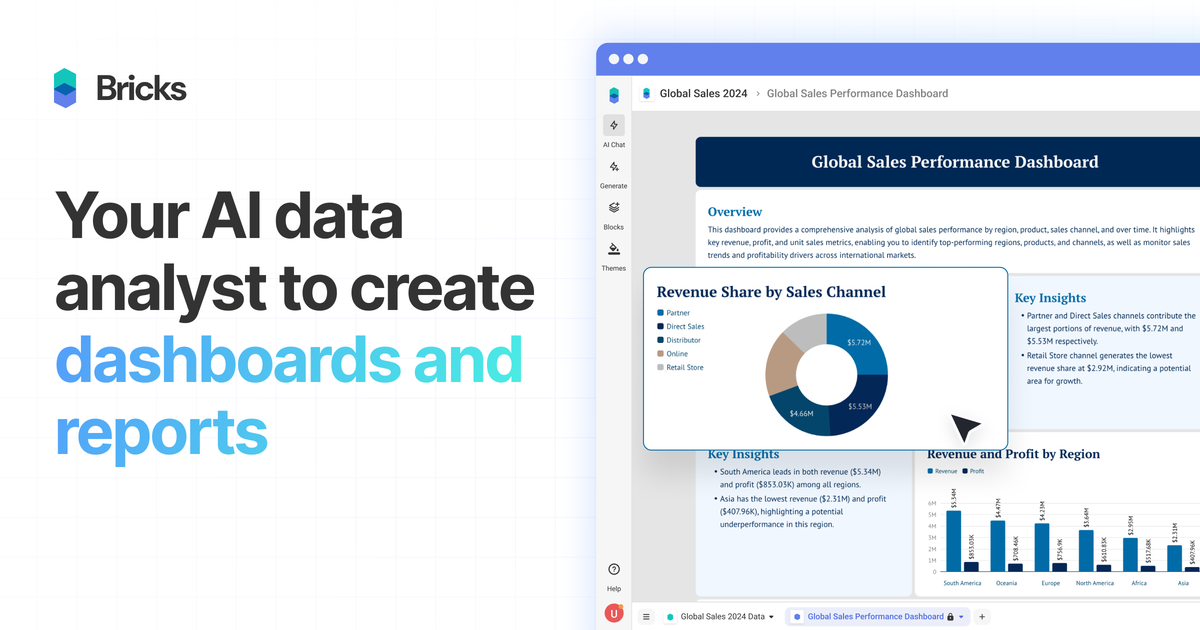
Bricks is an AI data analyst for turning spreadsheet-style files into dashboards and reports. The product is positioned for people who want polished visual reporting without building charts and layouts manually in Excel or learning a more complex BI tool.
It accepts common file formats such as CSV, XLSX, PDF, and PNG, and it can also bring data from Google Sheets or databases. After upload, Bricks generates dashboards with charts, tables, and insights, and then lets users refine the result with prompts or manual editing.
Upload data and let Bricks generate dashboards and reports with charts, tables, and written insights in seconds.
Edit chart types, analysis, and dashboard text with natural-language prompts, or adjust elements directly on the canvas.
Update source data and regenerate the dashboard while keeping the existing layout intact.
Click any data point to filter the rest of the dashboard and investigate patterns in context.
Save a dashboard layout as a template and reuse it with fresh data for repeated reporting cycles.
Apply polished visual themes to dashboards without starting from a design tool or manual styling system.
Turn monthly sales or operations exports into a dashboard that can be refreshed each reporting cycle instead of rebuilt from scratch.
Upload CRM, finance, or spreadsheet data and quickly produce a client-ready report with charts and narrative context.
Use click-to-filter interactions and editable charts to inspect trends, segments, and outliers across the whole dashboard.
Save a preferred layout as a template and apply it to new datasets for similar reporting tasks across teams or periods.
Share dashboards with teammates, assign access levels, and collaborate on reports without moving into a separate BI stack.
Bricks is an AI data analyst that creates dashboards and reports from uploaded CSV, Excel, PDF, and PNG files. It can generate charts, tables, insights, and polished layouts without requiring manual design work.
Yes. The pricing page says the Free plan includes 20 AI messages per month and supports teams of up to 3 people, while paid plans add more AI usage and larger team collaboration.
You can export dashboards or reports to PDF or PPTX, create a public share link, or present directly within Bricks.
Yes. Bricks supports team collaboration across its plans, with access levels that allow members to view, edit, and comment on dashboards depending on permissions.
Bricks is built for small to medium-sized datasets that people commonly work with in spreadsheets, CRM exports, sales reports, marketing analytics, financial data, survey results, and operational metrics. The source does not position it as a big-data or SQL-heavy BI platform.

PromptScout tracks how ChatGPT, Gemini, Google AI Overviews, and Perplexity mention your brand or competitors, with source analysis and website audits.

SaveMRR is a Stripe retention tool for SaaS teams to scan churn and MRR leaks, then automate recovery with dunning, cancel-save offers, win-back emails, and onboarding nudges.

Hype is a web tool for finding trending YouTube topics by category, time range, and scoring mode. Spot emerging ideas and review source videos.

Sleek Analytics is a privacy-friendly web analytics tool with real-time visitor tracking, Core Web Vitals, and revenue attribution.

Struere turns spreadsheet data into structured operational software with dashboards, alerts, and automations for teams replacing manual spreadsheet workflows.

ClayHog is an AI search visibility platform for tracking brand presence in ChatGPT, Gemini, Perplexity, Claude, and Google AI Overviews from one dashboard.