

Command in Sync
Command in Sync is a construction operations platform for commercial teams with field timecards, engineering calculators, financial dashboards, and AI daily logs.
What is Command in Sync?
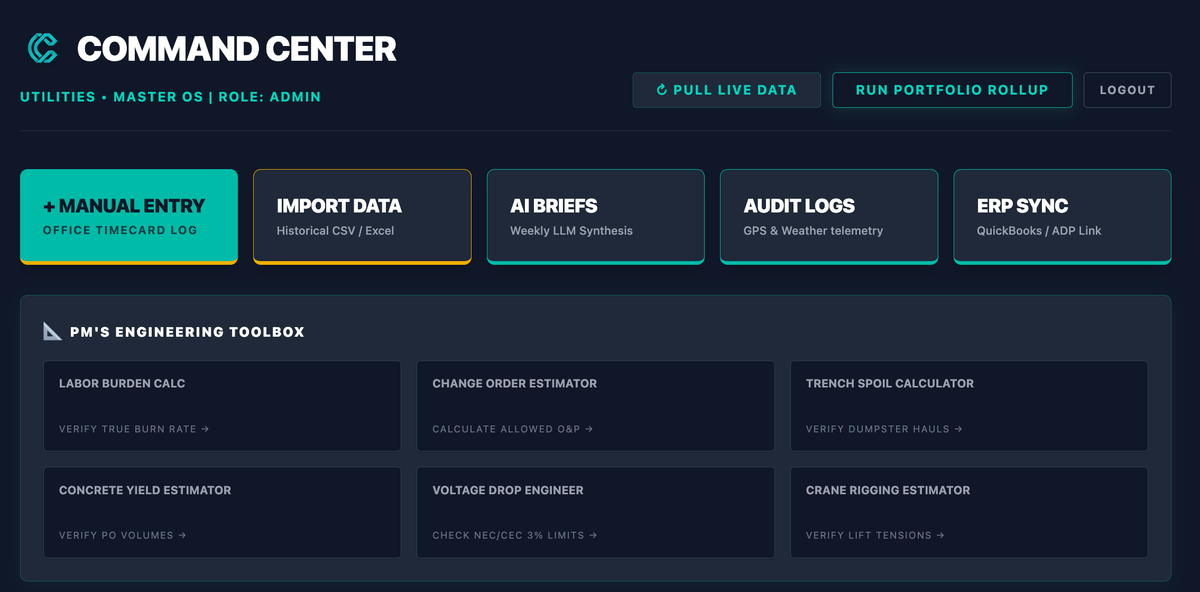
Command in Sync is a construction operations platform built around a dual-app workflow for commercial construction teams. It combines field-facing tools for foremen with executive-facing dashboards, so crews can record time and use engineering calculators while managers review financial data and AI-synthesized daily logs in one system.
The product is positioned as a replacement for scattered spreadsheets and office-centric legacy platforms. Its stated purpose is to unify field logs, calculations, and project oversight so commercial construction and engineering teams can keep operational data in sync across the jobsite and the office.
Key Features
- Dual-app ecosystem: Supports separate workflows for foremen and executives, allowing each group to use tools suited to its role.
- Lightweight mobile timecards: Gives field users a mobile way to record time without relying on office software.
- Engineering calculators: Includes calculators for complex civil and MEP engineering metrics, helping teams perform technical calculations in the same ecosystem as project records.
- Real-time financial dashboards: Provides executives with live visibility into financial information for project oversight.
- AI-synthesized daily logs: Automatically compiles daily log output from project activity, reducing manual log assembly.
- Local free use with cloud upgrade path: The product notes that core tools can be used free locally, with a 14-day trial that unlocks full cloud storage, AI synthesis, and five crew licenses.
How to Use Command in Sync
A typical setup starts by using the core tools locally and assigning the workflow to the field and executive roles that need them. Foremen can enter timecards and use the built-in calculators on mobile, while managers review dashboards and generated daily logs.
Teams that want cloud features can start the trial to access cloud storage, AI synthesis, and additional crew licenses. From there, the product is used as a shared operating layer for collecting field data, producing logs, and monitoring project status.
Use Cases
- Foreman time tracking: A foreman records crew hours from the field using mobile timecards instead of managing paper forms or separate spreadsheets.
- Engineering calculations on the job: A project or field engineer uses built-in calculators for civil or MEP metrics while working through technical tasks.
- Daily reporting for management: An executive or project manager reviews AI-synthesized daily logs to track site activity without assembling reports manually.
- Financial oversight across projects: Leadership uses the real-time dashboard to monitor project financial status and spot issues earlier.
- Team coordination between field and office: A construction company uses one system to keep time, logs, calculations, and executive reporting aligned across roles.
FAQ
Is Command in Sync only for office users? No. The product is described as a dual-app ecosystem, with tools for both foremen in the field and executives in the office.
What can be used without starting the cloud trial? The source says the core tools can be used free locally. It also says the 14-day trial unlocks full cloud storage, AI synthesis, and five crew licenses.
What kind of work is it designed for? It is aimed at commercial construction and engineering workflows, including field logs, timecards, financial dashboards, and civil or MEP engineering calculations.
Does the source mention integrations or supported platforms? No. The provided content does not specify integrations, operating systems, or device compatibility beyond a mobile workflow for field users.
Alternatives
- Spreadsheet-based construction tracking: Common for teams that want a flexible setup, but it usually requires manual reconciliation between timecards, logs, and financial reporting.
- General construction management software: Broader project platforms can cover scheduling and documentation, but they may not emphasize embedded engineering calculators or a split field/executive workflow.
- Field service or operations apps: These can support mobile data capture, but they are often aimed at general field operations rather than commercial construction-specific reporting and calculations.
- Separate point tools for logs, time, and dashboards: Some teams assemble a stack of individual tools for each task; Command in Sync is positioned as a single environment for combining those functions.
Alternatives

Struere
Struere is an AI-native operational system that replaces spreadsheet workflows with structured software—dashboards, alerts, and automations.

PromptScout
PromptScout tracks how your brand is mentioned, which competitors are recommended, and what sources are cited in AI answers—plus website audits.

SaveMRR
SaveMRR scans Stripe billing data to find SaaS MRR leaks and help recover failed payments, save cancellations, and win back churn—60-sec Free Revenue Scan.

Hype
Hype is a YouTube trend discovery tool that groups new videos by topic and surfaces what’s gaining momentum now.

Sleek Analytics
Lightweight, privacy-friendly analytics with real-time visitor tracking—see where visitors come from, what they view, and how long they stay.

Codex Plugins
Use Codex Plugins to bundle skills, app integrations, and MCP servers into reusable workflows—extending Codex access to tools like Gmail, Drive, and Slack.