
Doz
Doz: Medication Reminder is an iOS medication reminder app built from your real prescription—meal-based timing and critical alerts that can bypass Silent mode.
What is Doz: Medication Reminder?
Doz is a medication reminder app that helps you take doses on time using information from your actual prescription instructions, rather than generic alarm settings. It’s designed to mirror a treatment plan as prescribed, including how doses relate to meals.
The app aims to reduce missed doses by delivering reminders at the right moment (including “critical alerts” that bypass iOS silent settings), while also providing tracking and history so you can review what you took and when.
Key Features
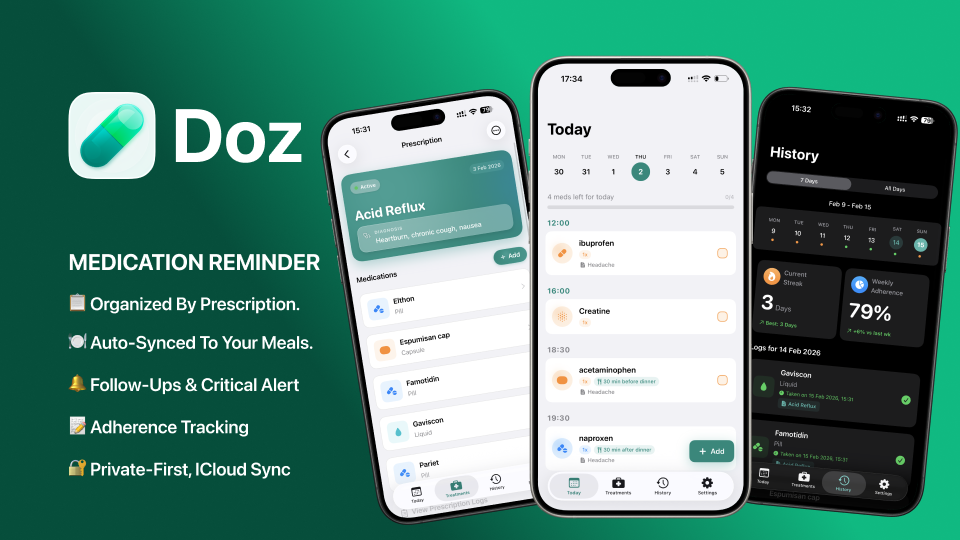
- Prescription-first setup: Enter your full prescription in one flow “exactly as written,” rather than creating multiple generic reminders.
- Condition-based grouping: Medication schedules are grouped by condition, not by medication name.
- Meal timing auto-sync: When you move dinner (or meal timing), the app adjusts associated dose timing accordingly.
- Smart alerts with follow-ups: Reminders appear only when needed, with smart follow-ups (“polite nudges”) if you haven’t taken the dose yet.
- Critical alerts that bypass Silent mode & Do Not Disturb: Certain reminder types are delivered even when silent settings are enabled.
- Context-aware scheduling and timezone travel: Scheduling is described as adapting to your routine and travel without resetting your schedule.
- Tracking and stats: Shows adherence rate per prescription, current streak, and a full intake history (every dose and status).
- Inventory tracking: Helps you track medication inventory to know when to refill.
- Private by default: No account is required; data sync is described as private iCloud sync, and reminders can fire offline.
- iOS experience and widgets: Includes Home and Lock Screen widgets to view the next dose without opening the app; supports light and dark mode.
How to Use Doz
- Download Doz from the App Store and open the app.
- Add your full prescription in the app using the prescription-first flow.
- Confirm dose timing instructions, including meal-related timing, then review the reminder schedule.
- Use the app’s widgets to see your next dose on your Home/Lock Screen.
- Follow reminders as they appear; Doz records dose status to build streaks, adherence, and intake history.
Use Cases
- Following a prescription with meal-dependent timing: If your dosing instructions are tied to dinner or other meals, you can adjust meal timing and have your dose timing move with it.
- Ensuring critical doses are not missed: When you need a reminder that should still alert you during Silent mode or Do Not Disturb, you can rely on “critical alerts” as described by the app.
- Adherence tracking between check-ins: Review adherence rate per prescription and daily streaks, along with a full intake history of every dose status.
- Managing refills before you run out: Use inventory tracking to see when it’s time to refill based on your medication usage.
- Maintaining your routine while traveling: Keep your schedule consistent when you travel, with the app described as adjusting across timezones.
FAQ
Do I need to create an account to use Doz?
No. The app is described as requiring no account and no sign-up (no email needed) to start tracking.
Does Doz work without an internet connection?
Yes. The app is described as working offline so reminders can fire regardless of internet availability.
Can reminders still alert me when my iPhone is in Silent mode?
Doz includes “critical alerts” that break through Silent mode and Do Not Disturb, while other reminders are described as smart alerts that appear only when needed.
How does Doz handle meal timing changes?
Doz is described as auto-syncing with meal timing. If you move dinner, dose timing associated with that meal moves too.
What information does Doz record about doses?
The app is described as maintaining a full intake history with every dose and its status, plus adherence and streak information per prescription.
Alternatives
- General alarm/clock apps with recurring schedules: These can remind you at fixed times but typically don’t connect reminders to your prescription instructions or meal-based timing.
- Medication management apps focused on checklists: Many apps track dose status and reminders, but Doz’s emphasis on prescription-first setup and meal-timing auto-sync differentiates the workflow.
- Health app reminders built into device ecosystems: Built-in reminders can notify you on schedule, but they may not provide the same prescription-first grouping, critical-alert behavior, and adherence/history views described for Doz.
- Offline-first habit tracking apps: These may help you build routines and track consistency, but they usually don’t mirror medication prescriptions or integrate dose alerts with iOS silent/Do Not Disturb behavior as specifically described by Doz.
Alternatives

LIAM
LIAM is an AI copilot that drafts email replies, organizes your inbox with auto-labels and prioritization, and schedules meetings from your calendar.
MIRA vision
MIRA vision is an AI medical diagnostics system using patented synthetic pathology analysis for precise, rapid results in clinical workflows.

Gemma AI
Gemma AI is a smart application that calls you directly with personalized, intelligent voice reminders to ensure you never miss important tasks, appointments, or deadlines.

ClawTick
ClawTick is a CLI-first AI agent automation platform for scheduling webhook tasks on cron with monitoring, alerts, retries, and execution logs.

Planndu: Daily Task Planner
Planndu is an intuitive productivity application designed to help users organize tasks, manage projects, build routines, and enhance focus using tools like AI generation and a built-in Pomodoro timer.

Oli: Pregnancy Safety Scanner
Oli: Pregnancy Safety Scanner helps check if foods, skincare, supplements, and more are safe in pregnancy with barcode/photo scanning and trimester ratings.