

GitBar
GitBar is a macOS menubar app that shows GitHub, GitLab, and Azure DevOps PRs and issues at a glance, with CI and PR status badges.
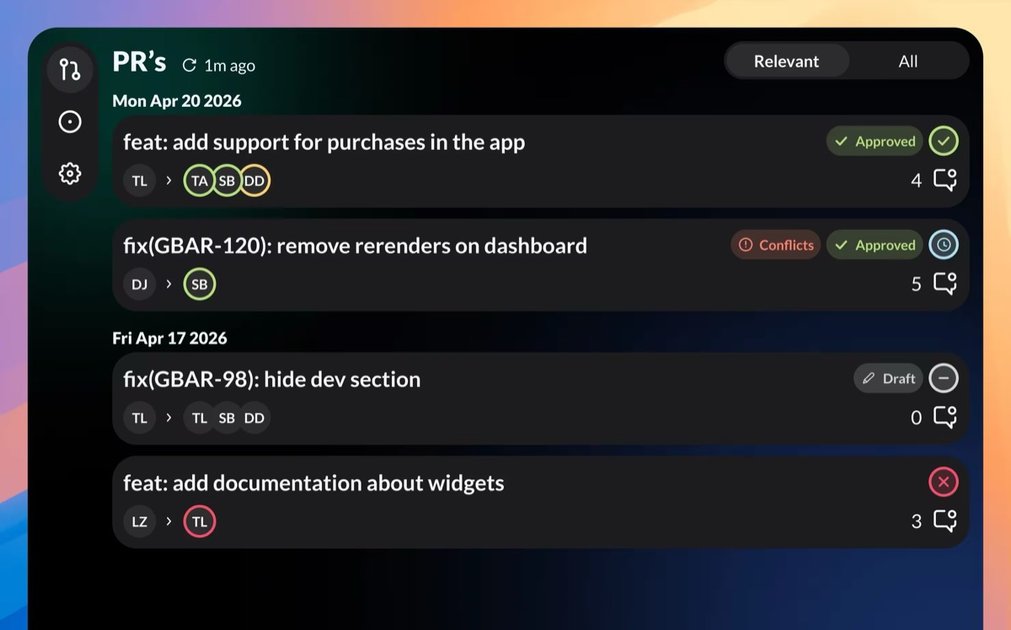
What is GitBar?
GitBar is a macOS menubar app that surfaces GitHub, GitLab, and Azure DevOps pull requests and issues in a compact, at-a-glance interface. It’s designed to help you monitor PR status, review needs, and issue activity without repeatedly switching back to your Git hosting site.
Instead of treating PRs as something you only check inside a web UI, GitBar brings key signals—such as approval/draft/conflict state and pipeline status—into the menubar experience. It also provides views for PRs you authored, PRs awaiting your review, and all PRs, plus an option to hide PRs you don’t want to see.
Key Features
- PR status badges (approved, draft, conflicted): Clear badge indicators show the current state of a pull request, reducing the need to click through just to confirm whether a PR is ready or has conflicts.
- CI status on cards: Each pull request card displays the pipeline status so you can tell at a glance whether the checks are complete and ready for review.
- Compact view layout: A compact mode is available to fit more pull request cards on screen when you’re tracking many items at once.
- Issues alongside pull requests: GitBar can show issues in addition to PRs, including issues you created and issues from repositories you work on.
- Multi-provider support with multiple accounts: The app works with GitHub, GitLab, and Azure DevOps, and lets you add multiple accounts across different providers.
- Tabs for PR workflow: Three tabs organize pull requests into Mine (authored by you), Review (waiting on you), and All.
- Filter and visibility controls: You can customize filters for Mine and Review in settings, and you can hide pull requests you don’t want to see (they remain available under All).
- Launch at login: You can configure GitBar to start automatically when you log in, keeping it available in your menubar.
- Notifications for new PRs and comments: Get notified when a new pull request is opened or when a comment lands on one you care about.
How to Use GitBar
Start by installing GitBar and adding your Git provider accounts (GitHub, GitLab, and/or Azure DevOps). After linking accounts, use the menubar interface to browse pull requests and issues organized across the Mine, Review, and All tabs.
From there, use the on-card indicators—such as PR status badges and CI/pipeline status—to triage what needs attention. If you prefer a denser overview, switch to the compact view, then use settings filters and the hide option to keep the lists focused on what you want to review.
Use Cases
- Review queue triage (PRs waiting on you): Open GitBar’s Review tab to see which pull requests are awaiting your input, with status badges and CI status displayed directly on the cards.
- Follow your own contributions (author view): Use Mine to monitor pull requests you authored, including whether they are still drafts or have moved to an approved/conflicted state.
- Check pipeline readiness without leaving your desktop: When you’re working across tasks, glance at the CI status shown on each PR card to determine which ones have completed checks and are worth reviewing next.
- Track issues along with PRs: When issue work matters in parallel with code review, use the issues view to monitor issues you created and those in repositories you work on.
- Manage multiple providers and accounts: For teams or projects spread across GitHub, GitLab, and Azure DevOps, add the relevant accounts and use the tabs and filters to keep your workflow consistent across sources.
FAQ
Does GitBar support more than one Git hosting service?
Yes. GitBar supports GitHub, GitLab, and Azure DevOps, and it allows you to add multiple accounts across these providers.
What does GitBar show for pull requests?
GitBar shows pull requests with PR status badges (approved, draft, conflicted) and includes CI/pipeline status on each PR card.
How are pull requests organized in the app?
GitBar provides three tabs: Mine (PRs you authored), Review (PRs waiting on you), and All.
Can I reduce the list to only the PRs I want to see?
Yes. You can hide unwanted pull requests so they stay out of Mine and Review while remaining available under All. You can also customize filters for Mine and Review in settings.
Does GitBar notify me about changes?
GitBar can send notifications when a new pull request is opened or when a comment is added to a pull request you care about.
Alternatives
- Native Git hosting web UI (GitHub/GitLab/Azure DevOps): Use the PR and issue pages in your browser; this differs by requiring you to switch contexts and click into each PR to view CI and status.
- Standalone code review/issue dashboard tools (browser-based or desktop): Alternatives in this category aggregate PRs and issue activity into a dashboard, but may vary in how they surface CI status and how tightly they integrate with your OS menubar workflow.
- Terminal-based PR/issue clients: Text-focused clients can be useful for command-driven workflows; compared to GitBar, they may not provide a macOS menubar visual overview with PR/CI badges.
- CI and notification systems (Slack/email integrations): Teams can rely on CI status and PR events routed through chat or email; these alternatives provide notifications but don’t replace an at-a-glance PR/issue list in the menubar.
Alternatives

Biji
Biji is a versatile platform designed to enhance productivity through innovative tools and features.

BotBoard
Manage AI agents like a team with a shared backlog, structured context, and human review workflow to assign, track, and approve outputs.

GitBoard
GitBoard is a native macOS menu bar app for GitHub Projects to view your kanban board, filter by status, search issues, and create or assign.

Polsia
Polsia is an autonomous AI system that plans, codes, and markets your company on a daily cadence while you sleep.

Falconer
Falconer is a self-updating knowledge platform for high-speed teams to write, share, and find reliable internal documentation and code context in one place.

OpenFlags
OpenFlags is an open source, self-hosted feature flag system with a control plane and typed SDKs for progressive delivery and safe rollouts.