

KreadoAI
KreadoAI is an AI video creation platform for text/image/slide-to-video, with digital avatars, AI voice generation, and multilingual video editing.
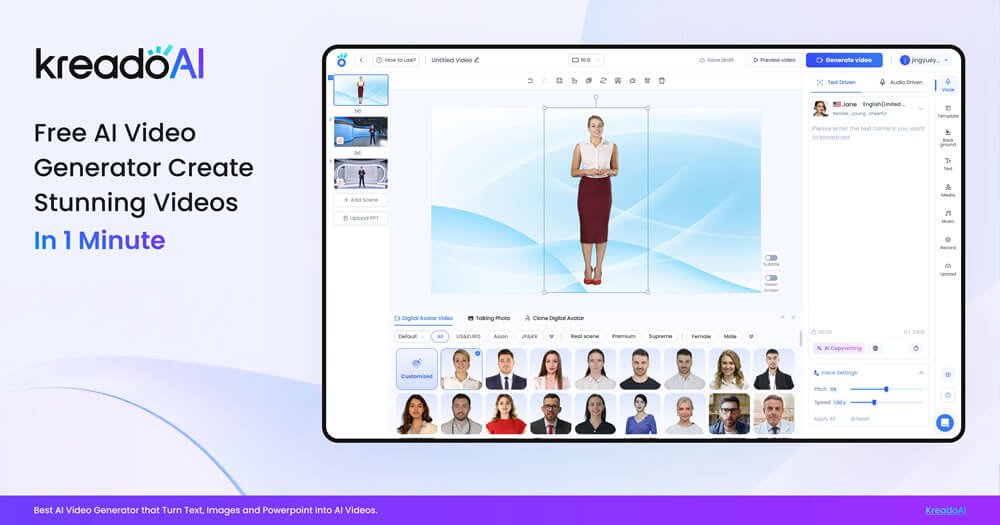
What is KreadoAI?
KreadoAI is an AI video generation and creation platform for "text/image/PowerPoint and more to video." It targets users needing to produce digital human videos, marketing short videos, and training/explainer videos, offering digital avatars and AI voice generation, with support for generating, editing, exporting, and sharing content.
The platform integrates multiple creation steps into one workflow, covering everything from material prep to final video output, including content-to-video generation, post-production editing, and export/sharing. Beyond traditional text and image-to-video, it also supports URL-to-video, background removal, script generation, and more, enabling users to complete "prep—generate—edit" in a single workflow.
For digital human content, KreadoAI provides customizable digital avatars (customizable/clonable) and AI voice generation. Users can dub around digital characters, generate videos, and then clip and enhance edit them to produce multilingual video content versions.
Key Features
- Text/image/slide-to-video generation: Supports converting scripts, images, slides, etc., into videos, aiming to lower the time barrier from copy to final production.
- Digital avatars and customizable avatars: Select from built-in AI avatars or upload image/video avatars to create digital characters; supports lip-sync and natural motion.
- Digital human avatar "cloning/reuse" (page wording): Allows reusing digital human avatars and heads during creation to reduce repeated production time.
- AI voice and multilingual support: Choose from 140+ languages and 40,000+ voices using Microsoft and ElevenLabs TTS models; also supports custom voice cloning.
- Voice cloning and multilingual dubbing: Clone "your own AI avatar and voice" for dubbing/narration; page notes over 99% cloning accuracy, preserving voice style, accent, and nuances.
- Post-generation video editing and enhancement: Supports clipping, background removal, transitions and stickers, music addition, and "face swap" edits; can also generate scripts.
- Image-to-video and text-to-image: Generate virtual character IP images via prompts (text-to-image), and turn images/materials into "talking, moving" AI character videos (image-to-video).
- URL-to-video and localization: Convert websites and product links to video ads; supports converting scripts to 140+ languages for regional content adaptation.
- Trust and safety mechanisms (page wording): Provides a trust and safety team with human and AI review; also mentions data encryption, content guidelines, and explicit consent for personal likenesses.
How to Use KreadoAI
-
Create or select a digital human avatar
Start with default avatars or upload your image/video avatar to build a digital character. -
Prepare script and select language
Write or import a script and choose the video language. Supports editing scripts in any language for subsequent multilingual video generation. -
Select or generate AI voice
Input/select content for the character to say, match a suitable voice, and adjust pitch/speed as needed (page notes adjustable). -
Generate video and basic post-production editing
Configure video layout after generation; add music, effects, and transitions if needed. Also supports clipping, background removal, stickers, or "face swap" post-generation, plus script generation. -
Export and share
Download the video or get a shareable link upon completion.
Use Cases
- Marketing and social media short videos: Quickly turn scripts, images, or slides into videos for product promo; use URL-to-video for website/product link ads.
- Training and explainer videos: Pair digital avatars with AI dubbing to generate training/explainers, reducing traditional filming/editing workload.
- Multilingual localization operations: Convert one script to 140+ languages with digital avatars and voice generation for multi-language video releases.
- Medical health and educational content: Page notes use for "medical health issue dissemination" and "enhanced product understanding" via text-to-video for better comprehension.
- Personalized digital human content creation: Upload your avatar/materials for a digital twin, use voice cloning for ongoing production to meet personal/team long-term needs.
FAQ
Is KreadoAI free?
Page mentions a "free AI video generator" and "free plan." Free plan includes limited video production time, text-to-speech length, and usage of certain digital avatars and multilingual generation (per page details).
Is KreadoAI creation safe and compliant?
Page mentions a trust and safety team with human/AI review to promote responsible AI use; also notes data encryption, content guidelines, and explicit consent for personal likenesses.
Can digital human avatars be used for free?
Page states digital avatars are free to use, with "real actors having given explicit authorization" for high-quality video material recording.
What types of content can KreadoAI generate?
Page lists digital avatar selection, custom digital humans, text dubbing, multilingual text-to-video, and template/AI assistant conversion of docs/PDFs or website links to video; also includes video editing and localization.
What edits can be done post-generation?
Page mentions clipping, background removal, adding transitions/stickers/music, and "face swap" operations.
Alternatives
- General AI video editors + AI dubbing/subtitle tools: Suited for existing footage and scripts, with editing via clippers; but digital human generation and video creation may need extra steps/tools.
- Lip-sync/face-swap video tools: Focus on character replacement or lip-driving. Unlike KreadoAI, may lack integrated "text/image-to-video + digital humans + voice + editing" workflow.
- Text-to-image/image gen platforms + standalone video solutions: For users focused on character/screen generation. KreadoAI emphasizes integrated image/text-to-video creation.
- Video localization and subtitle/translation solutions: If main goal is multi-language release/subtitling, choose localization-focused tools; KreadoAI stresses script-to-multilingual voice/digital human video integration.
Alternatives

艺映AI
艺映AI is a free AI video generation platform focused on transforming text and images into high-quality dynamic videos.

AI Training Video Generator
The AI Training Video Generator by Coursebox allows users to create engaging training videos quickly and efficiently using artificial intelligence.

VIDEOAI.ME
VIDEOAI.ME is an AI video generator to create studio-quality, publish-ready videos with realistic AI actors and voiceovers from text or a selfie.

HeyGen
HeyGen Developers offers an API platform to generate, translate, and lipsync avatar videos with TTS models—built for scalable production workflows.

DeepMotion
DeepMotion is an AI motion capture and body-tracking platform to generate 3D animations from video (and text) in your web browser, via Animate 3D API.

Captions.ai
Captions.ai is an online video editor and app with AI-powered editing, automatic captions, music, and AI avatars for faster video creation.