

Mantle Chat
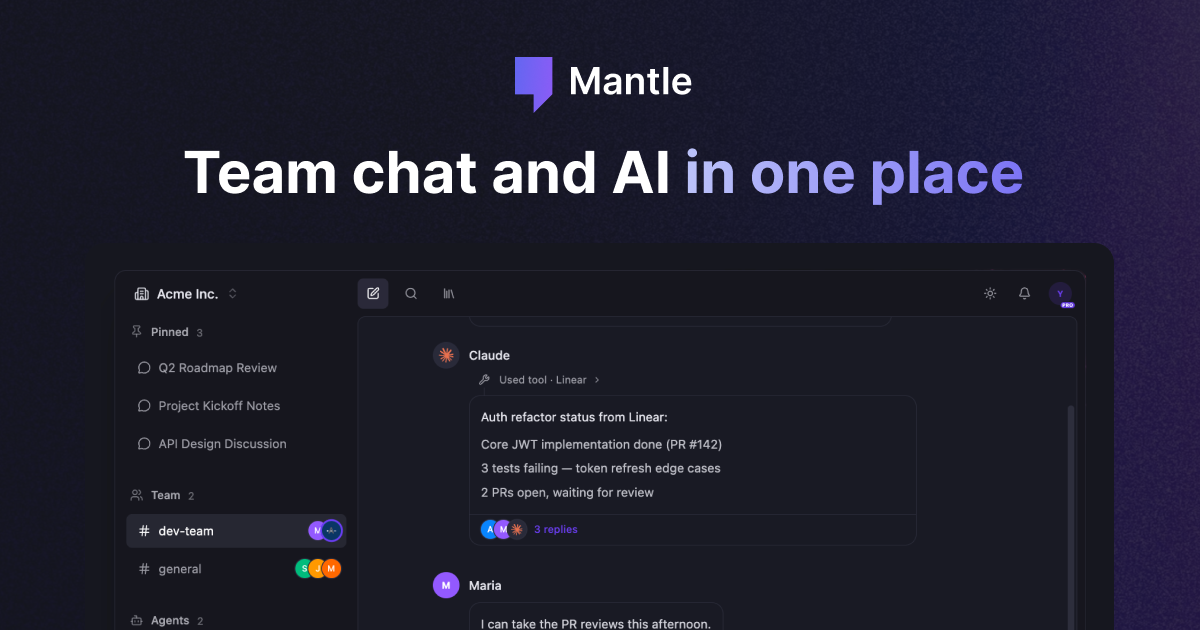
Mantle Chat is an AI collaboration platform for teams with chats, shared channels, custom agents, and task automation in one workspace.
What is Mantle Chat?
Mantle Chat is an AI collaboration platform that brings chats, shared channels, and custom agents together in one workspace. It is designed to let teams work with multiple AI models from a single interface while keeping conversations and workflows organized around shared context.
The product supports switching models within conversations and includes built-in tools for tasks such as drafting emails, reviewing pull requests, summarizing meetings, generating code, analyzing data, and creating content. It also includes task automation and integrations so teams can connect AI work to their existing tools.
Key Features
- Multi-model chat workspace: Access models such as Claude, GPT, Gemini, Grok, and DeepSeek in one place, and switch models within a conversation when needed.
- Channels for shared context: Keep AI conversations in shared channels so teams can view, follow, and build on the same thread of work.
- Custom AI agents: Create specialized agents with instructions, knowledge files, and tools for recurring workflows such as inbox management, pull request review, research, or meeting summaries.
- Task automation: Run tasks manually, on a schedule, or triggered by events, supporting repeatable workflows like reporting pipelines.
- Integrations: Connect with tools already in use, including Linear, Slack, Google Drive, and other listed integrations.
- Private and shared workspaces: Organize work across individual and team contexts, with separate spaces for direct messages, channels, and agents.
How to Use Mantle Chat
A typical workflow starts by creating or joining a workspace, then opening a chat, channel, or agent depending on the task. Users can start a conversation with one model, switch to another model for a different type of response, or route work into a shared channel when teammates need visibility.
From there, teams can set up agents for repeatable jobs, connect external tools, and configure tasks that run on a schedule or in response to events. The product is structured for ongoing collaboration rather than one-off prompts, so users can keep context, outputs, and follow-up work in the same place.
Use Cases
- Team planning and coordination: Keep project discussions, notes, and follow-up questions in a shared AI channel so multiple teammates can work from the same context.
- Document and research workflows: Use models with long context or web research capabilities to summarize materials, compare options, and produce structured notes.
- Developer support: Run a PR reviewer agent to inspect code changes, test coverage, or implementation details before merging.
- Inbox and communications management: Use an email-focused agent to draft responses, triage messages, and organize incoming work.
- Automated reporting: Build a scheduled task that pulls analytics, summarizes results with AI, generates a report, and sends it to a Slack channel.
FAQ
Can Mantle Chat switch between AI models in the same conversation? Yes. The page states that chats are model-agnostic and can switch between Claude, GPT, Gemini, and other models within a conversation.
Does Mantle Chat support shared team work? Yes. It includes channels for shared AI conversations, along with private and shared workspaces.
Can you build custom agents? Yes. The page says agents can be built with custom instructions, knowledge files, and tools for specific workflows.
Does it support task automation? Yes. Tasks can be created to run manually, on a schedule, or triggered by events.
Which integrations are mentioned? The page mentions Linear, Slack, Google Drive, and 30+ more integrations, but does not provide a full list.
Alternatives
- Standalone AI chat tools: Products focused mainly on individual prompts and single-model conversations. These are simpler, but they do not emphasize shared channels or team workflows as strongly.
- Team collaboration platforms with AI add-ons: Workspace tools that add AI features on top of messaging or docs. These may be better if collaboration is centered elsewhere, but they are not built around multi-model AI work.
- Workflow automation tools: Products that specialize in scheduled or event-based automation. These can handle orchestration well, but they usually do not provide the same chat-first AI collaboration experience.
- Developer productivity assistants: Tools aimed at coding, PR review, or research within a narrower domain. These can be strong for a specific job, but they are less suited to a general team workspace that spans multiple use cases.
Alternatives

Biji
Biji is a versatile platform designed to enhance productivity through innovative tools and features.

Ably Chat
Ably Chat is a chat API and SDKs for building custom realtime chat apps, with reactions, presence, and message edit/delete.

BotBoard
Manage AI agents like a team with a shared backlog, structured context, and human review workflow to assign, track, and approve outputs.

Lasso
Lasso is an AI-first PIM for ecommerce teams that enriches product attributes and descriptions, processes supplier data, and monitors competitors via app or API.

Tavus
Tavus builds AI systems for real-time, face-to-face interactions that can see, hear, and respond, with APIs for video agents, twins & companions.

HiringPartner.ai
HiringPartner.ai is an autonomous recruiting platform with AI agents that source, screen, call, and interview candidates 24/7, reducing time-to-hire from weeks to as little as 48 hours.