

MashuPack
MashuPack is a browser-based tool for selecting local code files and exporting them as one clean text file for ChatGPT, Claude, and similar AI chats.
What is MashuPack?
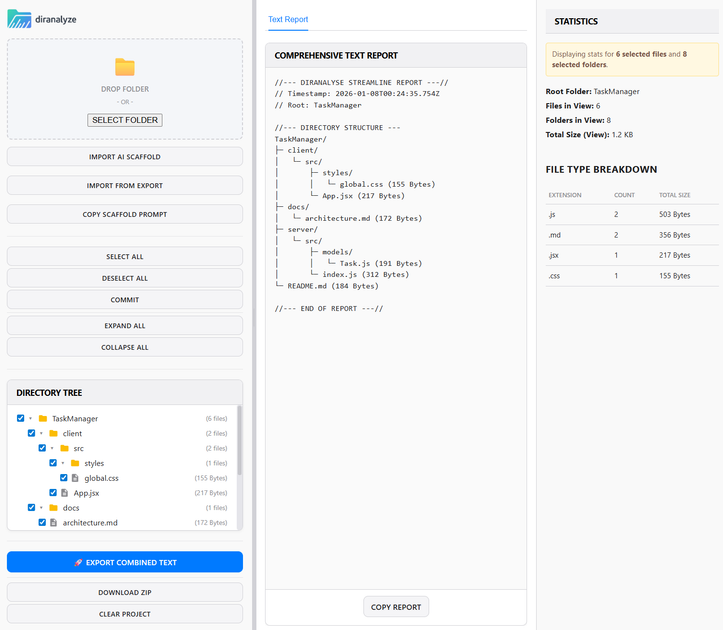
MashuPack is a browser-based code context packing tool that helps you turn selected parts of a local repository into a single clean text file for ChatGPT, Claude, and similar web-based AI tools. It is designed for situations where you want to discuss a codebase, subsystem, or set of files without manually copying fragments into chat or fighting file upload limits.
The product focuses on preserving repository structure while keeping the output text-only and easy for browser AI workflows to consume. According to the site, it runs entirely in the browser and does not require a backend, account, or repository upload.
Key Features
- Select specific files and folders from a local codebase — lets you choose the exact context you want the model to see instead of sending an entire repository.
- Export one structured text file — compiles the selected code into a single clean text output that is easier to paste into ChatGPT or Claude.
- Preserve repository structure — keeps the hierarchy of files and folders intact so the exported context is easier to review and reason about.
- Avoid binary and upload noise — produces text-focused context packing rather than scattered uploads or non-text repository contents.
- Browser-only workflow — runs in the browser with no backend, account, or repository upload required, which keeps the code local.
- Built for planning and debugging — aimed at software tasks where you need a curated slice of codebase context for analysis, architecture review, or investigation.
How to Use MashuPack
Start by opening the browser app and pointing it at a local codebase. Then select the files or folders that represent the subsystem or feature you want to discuss.
After you have chosen the relevant context, export the selection as one clean text file and paste or upload that output into your AI chat workflow. The intended pattern is to curate only the necessary repository slice, rather than copying code manually file by file.
Use Cases
- Planning a change in a subsystem — gather just the files related to one feature area before asking an AI model for implementation ideas or dependency review.
- Debugging across multiple source files — export the relevant code paths together so you can ask a model to trace behavior without uploading the whole repository.
- Architecture review — package a clean text view of the pieces that matter when evaluating how modules fit together or where boundaries are weak.
- Codebase onboarding and understanding — create a structured text snapshot of a feature area to help someone read and discuss it in ChatGPT or Claude.
- Working around file upload friction — use a single text file when the web UI makes repeated uploads or file-count limits inconvenient.
FAQ
Does MashuPack upload your repository to a backend?
No. The site says it runs in the browser and does not require a backend or repository upload.
Do you need an account to use it?
No account is mentioned; the product description explicitly says there is no account requirement.
What AI tools is it meant for?
The page names ChatGPT, Claude, and similar web UIs as the intended destinations for the exported text file.
Is the output a code archive or a plain text file?
The product description says it compiles selected repository content into one clean text file.
Can you use it without JavaScript?
The page notes that JavaScript is required for the interactive app, although the documentation and core product summary are still available without it.
Alternatives
- Manual copy-paste into ChatGPT or Claude — simplest option, but it is slower and makes it harder to keep related files organized as one coherent context bundle.
- Other repository context packers — tools in the same category may offer similar file selection and export workflows, but may differ in interface, output format, or whether they run locally in the browser.
- General code snippet sharing tools — useful for sharing isolated excerpts, but they usually do not package a structured slice of a codebase for broader architectural or debugging discussion.
- Full repository upload workflows — appropriate when a platform supports it, but they can be less targeted than selecting only the files needed for a specific question.
Alternatives

AakarDev AI
AakarDev AI is a powerful platform that simplifies the development of AI applications with seamless vector database integration, enabling rapid deployment and scalability.

Devin
Devin is an AI coding agent that helps software teams complete code migrations and large refactoring by running subtasks in parallel.

imgcook
imgcook is an intelligent tool that converts design mockups into high-quality, production-ready code with a single click.

open-codex-computer-use
open-codex-computer-use is an open-source “Computer Use” MCP server that lets AI agents run desktop GUI actions on macOS, Linux, and Windows.

Codex Plugins
Use Codex Plugins to bundle skills, app integrations, and MCP servers into reusable workflows—extending Codex access to tools like Gmail, Drive, and Slack.

Ably Chat
Ably Chat is a chat API and SDKs for building custom realtime chat apps, with reactions, presence, and message edit/delete.