

Napkin AI
Napkin AI converts pasted or imported text into editable diagrams, charts, scenes, and images for business storytelling and presentations.
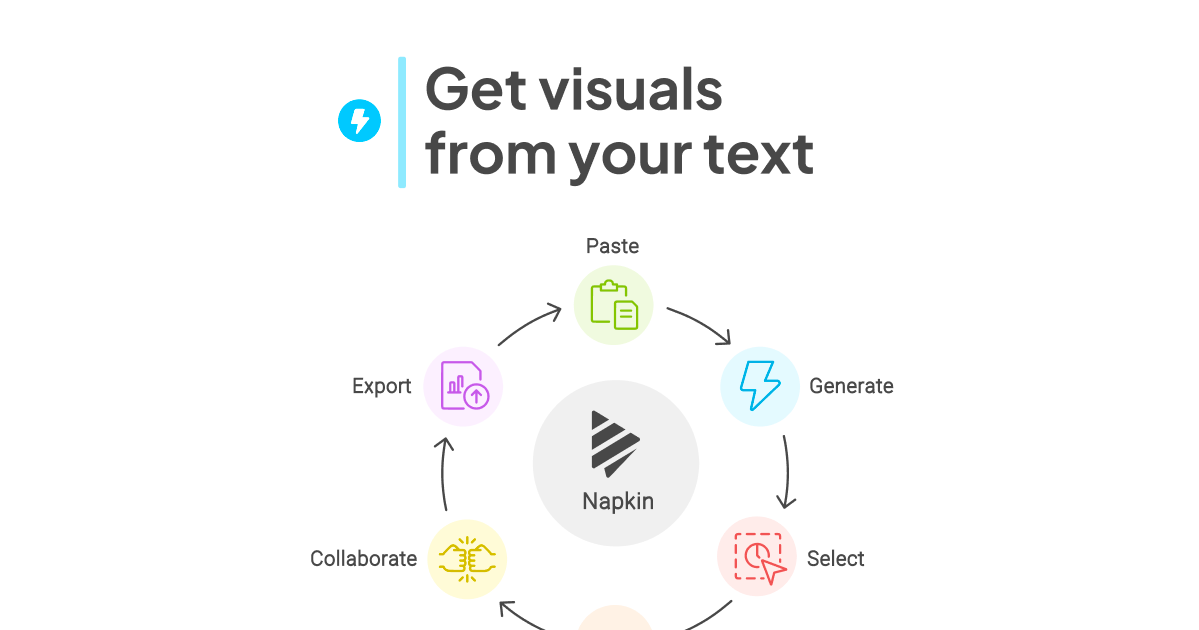
What is Napkin?
Napkin AI is a visual AI tool that turns your existing text into visuals such as diagrams, charts, scenes, and other graphic formats. Instead of starting from a blank canvas, you provide text and Napkin generates visual options you can choose from and then edit.
Its core purpose is to help people convert written ideas into shareable visuals for business communication and other contexts, while keeping the resulting graphics editable and easy to export.
Key Features
- Generate visuals from your text: Import or paste text to produce relevant visuals based on what you’ve written.
- Pick from multiple generated options: After generating visuals, you select the one that best expresses your intent.
- Fully editable visuals: Adjust content and styling after generation to refine clarity and presentation.
- Visual components and styling controls: Add or swap icons, use decorators to emphasize key points, and apply colors that work on both light and dark mode.
- Diagram and layout helpers: Use connectors for dynamic connections and choose from simple font options (casual or formal) to match your tone.
- Export for common formats: Export visuals as .ppt, .png, .pdf, or .svg for use in slides, documents, and sharing workflows.
How to Use Napkin
- Get started: Click Get Napkin Free on the website.
- Provide input: Start by importing or pasting your text (no prompting step is required per the product description).
- Generate and choose: Click to generate visuals, then select the visual that best fits your idea.
- Edit: Customize what’s on the visual using editable content, including icons, decorators, connectors, colors, and fonts.
- Export: Save your result in the format you need (e.g., PPT, PNG, PDF, or SVG).
Use Cases
- Auto-generated infographic creation from notes: Turn meeting notes, a short brief, or a written outline into an infographic-style visual for sharing.
- Business diagrams for explanations: Create diagrams and flowcharts to help explain processes when you have the text but not the diagram.
- Mind maps and diagram planning: Convert brainstorming text into mind maps or structured visuals that organize ideas at a glance.
- Slide and deck preparation: Generate a slide-ready visual, export as .ppt, and incorporate it into presentations.
- Doc and article visuals: Export as .pdf or .png to include visuals in written documentation or published materials.
FAQ
-
What is special about Napkin? Napkin AI transforms existing text content into visuals such as diagrams, charts, scenes, and images.
-
Is Napkin free to use? Yes. Napkin offers a free plan, with limitations on quotas and features.
-
Can I use Napkin on mobile? You can view existing Napkins on mobile, but creating and editing Napkins is described as available only on desktop (with a note that mobile generation/editing may be added later).
-
How do I sign up for Napkin? Sign up via the website using Google Single Sign-On or an email/password combination.
Alternatives
- Diagramming tools: Traditional diagram editors (e.g., flowchart or diagram software) let you build graphics manually. They tend to require more upfront layout work, since they don’t start from pasted text to generate options.
- Presentation and slide editors: Tools for creating slides can help you design visuals for decks, but they may require more manual construction to convert raw text into structured diagrams.
- Infographic/mind-mapping software: These focus on generating structured visual layouts from ideas. Compared with Napkin, workflows vary—some tools emphasize templates and manual customization rather than text-to-visual generation.
- File-based design/layout tools: Graphic design or layout programs can produce polished diagrams and graphics, but the workflow is typically more manual and less geared toward quick conversion from text into ready-to-edit visuals.
Alternatives

Beauty Diagram
Beauty Diagram beautifies Mermaid and PlantUML diagrams and (Pro) draw.io imports with cleaner layout and styling, exporting ready SVG/PNG.

Slidesgo
Discover free Google Slides themes and PowerPoint templates on Slidesgo. Download and customize online to create presentations.

ChatBA
ChatBA is generative AI for slides: create slide deck content fast with a chat-style workflow, turning your input into a draft.

Beautiful.ai
Beautiful.ai is an AI presentation maker that automates design, layout, and spacing as you build content—so individuals and teams create polished slide decks.

MagicSlides
MagicSlides is an AI-powered PPT maker that transforms any content source into professional presentations in seconds.

Faces
Faces: AI platform for interactive presentations. Create engaging, explorable decks beyond static slides for better audience engagement.