

Paint By JSON
Paint By JSON is a Figma plugin that maps layers to live REST API data and saves setups as reusable Palettes for populated design handoff.
What is Paint By JSON?
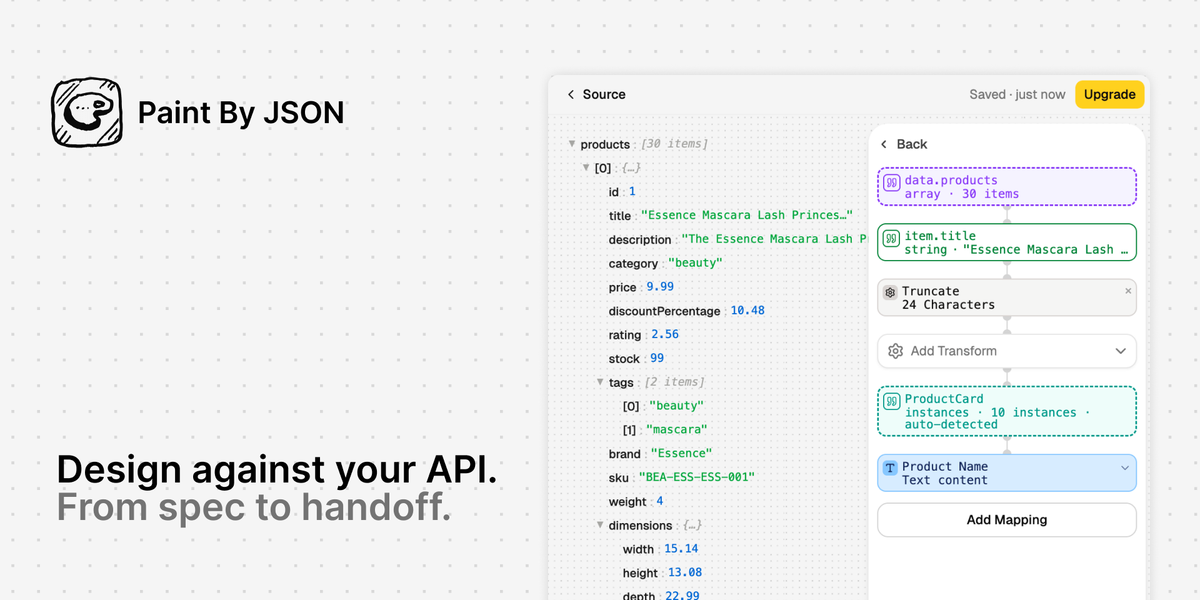
Paint By JSON is a Figma plugin that lets designers fill frames with live REST API data instead of placeholder text. It connects to an endpoint, previews the JSON response in the plugin, maps JSON paths to layer names, and stores those mappings as reusable Palettes.
The plugin is built for design work that needs to reflect real content structures. Users can apply a saved Palette to a frame or repeated component set, reuse it across files, and export the populated design as JSON, Markdown, or a Spec Frame for handoff.
Key Features
- Connects to live endpoints or mocked JSON that can be fetched with GET, so designs can be filled with actual data structures rather than static examples.
- Supports headers and authentication values when connecting to an endpoint, which makes it usable with protected APIs during design work.
- Maps JSON paths to layer names in Figma, allowing palettes to stay portable even when files, libraries, or layer structures change.
- Saves endpoint settings, headers, and mappings as reusable Palettes, so the same data recipe can be applied again without rebuilding the setup.
- Includes basic transforms such as truncation, currency formatting, date parsing, conditional branching, and chained transforms before values reach the canvas.
- Handles both single-frame population and collection mode, where an array can be iterated onto repeated component instances.
- Exports populated designs to JSON, Markdown, or a Spec Frame to support design-to-code handoff.
- Runs in the plugin iframe and keeps API responses and auth values on the user's machine rather than sending them to the product database.
How to Use Paint By JSON
Start by installing the plugin in Figma and connecting a URL for the API or JSON source you want to use. If needed, add headers or authentication, then preview the response inside the plugin.
Next, map JSON fields to the layer names in your frame and apply any transforms needed for display or formatting. Save the setup as a Palette, then apply it to one frame or a repeated set of components.
Once the frame is populated, reuse the Palette on other files or export the result as JSON, Markdown, or a Spec Frame for handoff.
Use Cases
- Designing a product screen with realistic user names, titles, prices, or dates pulled from the same API the product will use.
- Testing whether layouts hold up when data values are longer, shorter, or structurally different from the usual placeholder copy.
- Populating repeated components from an array response, such as cards, list items, or other collection-based interfaces.
- Reusing the same data mapping across multiple frames or files when a design system uses consistent layer naming.
- Preparing a handoff artifact that includes the design and the underlying data structure in JSON, Markdown, or Spec Frame form.
FAQ
Does Paint By JSON only work with live APIs? No. The page says it can connect to live API responses or mocked JSON, as long as the data can be fetched with GET.
Can it handle protected endpoints? Yes. The plugin supports adding headers or authentication values when connecting to an endpoint.
What can I export? The product page says populated frames can be exported as JSON, Markdown, or a Spec Frame.
Does it store my API data in the cloud? According to the page, the plugin runs in the Figma plugin iframe and API responses and auth values stay on your machine; they are not sent to the company database.
Is there a limit to how many palettes I can save? The page mentions plan limits, including a free tier and Pro tier, but the exact product limit details shown are two palettes on the free plan and 50 saved palettes on Pro.
Alternatives
- Manual placeholder content in Figma, which is the simplest fallback but does not test designs against real data structures.
- Spreadsheet-driven design workflows, which can help with structured content but usually require a different setup than binding JSON paths directly in Figma.
- Generic Figma data population plugins, which may fill layers with sample content but may not focus as specifically on reusable endpoint-based palettes and exports.
- Design handoff using separate spec documents, which can describe data requirements outside the canvas but does not keep the data mapping attached to the Figma frame itself.
Alternatives

imgcook
imgcook is an intelligent tool that converts design mockups into high-quality, production-ready code with a single click.

Ably Chat
Ably Chat is a chat API and SDKs for building custom realtime chat apps, with reactions, presence, and message edit/delete.

AakarDev AI
AakarDev AI is a powerful platform that simplifies the development of AI applications with seamless vector database integration, enabling rapid deployment and scalability.

DeepMotion
DeepMotion is an AI motion capture and body-tracking platform to generate 3D animations from video (and text) in your web browser, via Animate 3D API.

Arduino VENTUNO Q
Arduino VENTUNO Q is an edge AI computer for robotics, combining AI inference hardware and a microcontroller for deterministic control. Arduino App Lab-ready.

Devin
Devin is an AI coding agent that helps software teams complete code migrations and large refactoring by running subtasks in parallel.