

PDF.ai
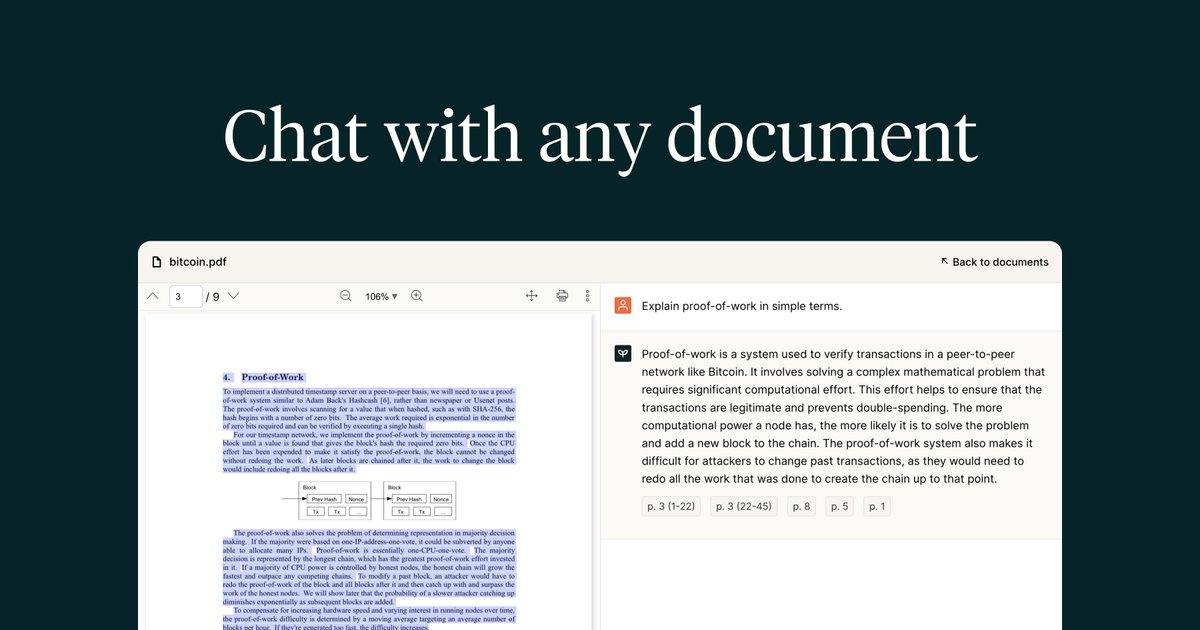
Chat with PDF.ai to ask questions, get summaries, and find specific information inside your PDF documents in an AI assistant-style app.
What is PDF.ai?
PDF.ai is an app that lets you “chat” with PDF documents. Instead of searching through a PDF manually, you can ask questions and request summaries to find the information you need.
Its core purpose is to act as an assistant for working with PDFs—helping you locate details and understand documents through question-and-answer style interaction.
Key Features
- Chat with your PDF documents: Ask questions about the contents of a PDF in a conversational format.
- Summaries on demand: Request concise overviews to quickly understand what a document covers.
- Find information by asking questions: Use questions to locate specific details rather than manually scanning pages.
- Works with “any PDF” (in scope of the app’s purpose): The app is positioned for use with PDF files as the primary input format.
How to Use PDF.ai
- Open PDF.ai and provide or upload/select the PDF you want to work with.
- Type a question about what you want to know (e.g., a summary request or a specific detail to find).
- Review the assistant’s response and, if needed, ask follow-up questions to narrow down or clarify what you’re looking for.
Use Cases
- Summarizing a long report: Ask for a summary to get a quick understanding of key points without reading the entire document.
- Answering specific questions in a contract: Search for terms or clauses by asking targeted questions about the document’s content.
- Researching from academic PDFs: Ask for explanations or locate specific information (figures, definitions, or conclusions) through Q&A.
- Reviewing meeting materials: Request a summary or ask what decisions or action items are mentioned in a PDF.
- Extracting details from documentation: Find particular instructions or requirements by asking questions instead of page-by-page scanning.
FAQ
-
What can I use PDF.ai for? You can chat with PDF documents to ask questions, get summaries, and find specific information.
-
Do I need to read the whole PDF to get answers? The app is intended to help you retrieve information through questions, reducing the need for manual scanning.
-
Can I summarize a PDF? Yes—PDF.ai supports requesting summaries as part of the question-and-answer interaction.
-
What type of files does it support? The product is specifically described as a “ChatPDF app” for chatting with PDF documents.
-
How do follow-up questions work? After receiving an answer, you can ask additional questions to refine what you want to find or understand.
Alternatives
- PDF viewer + manual search: A typical alternative is using built-in search in PDF readers. This can be faster for exact keyword matches but doesn’t provide conversational summaries or question-based retrieval.
- Document summarization tools (non-chat): Tools that generate summaries from PDFs can help with overview extraction, but may not support interactive Q&A for targeted details.
- Chat-based knowledge tools for files (general document assistants): General “chat with documents” systems can offer similar workflows, though they may support different input types or differ in how they handle PDF-specific reading and answers.
- OCR + search pipelines for scanned PDFs: If your PDFs are primarily images/scans, OCR-based approaches can enable searching and extraction, but may require more setup than a chat interface.
Alternatives

Jenni
Jenni is an AI workspace to read PDFs, draft essays and papers, and generate in-text citations in 2.6k+ styles.
司马阅
司马阅 is a leading domestic enterprise-level AI document intelligence platform, focused on activating dormant data in enterprises and helping them create serious scenario-based AI employees.

Struere
Struere is an AI-native operational system that replaces spreadsheet workflows with structured software—dashboards, alerts, and automations.

AI PDF Summarizer
An AI-powered tool that summarizes PDF documents quickly and efficiently, providing clear insights and allowing users to interact with the content.

garden-md
Turn meeting transcripts into a structured, linked company wiki with local markdown and an HTML browser view. Sync from supported sources.

Falconer
Falconer is a self-updating knowledge platform for high-speed teams to write, share, and find reliable internal documentation and code context in one place.