
QuoteCard
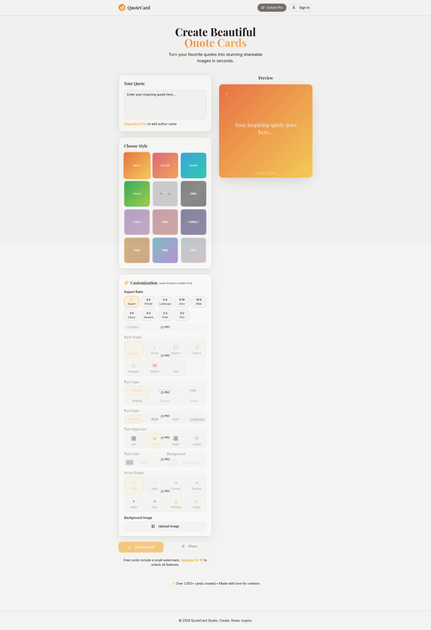
QuoteCard is a web app for creators to turn quote text into shareable quote cards—create, publish, and keep your series consistent.
What is QuoteCard?
QuoteCard is a web app for creators to turn quote text into shareable quote cards—create, publish, and keep your series consistent.
Based on the page information provided, the product is positioned specifically around “Quote Cards,” with the focus on helping creators generate the card format rather than writing or editing quotes themselves.
Key Features
- Quote-card creation for creators: generates a card-style layout designed around quote text so your content can be posted as a visual.
- Creator-oriented workflow: centers on the quote-card use case rather than general-purpose design.
- Web-based editor: runs in-browser, which typically removes the need for desktop installs.
How to Use QuoteCard
- Open QuoteCard in your browser.
- Enter or paste the quote text you want to feature.
- Use the editor to create the quote card layout.
- Export or share the resulting card from the web app.
Use Cases
- Social media quote posts: convert a written quote into a formatted card for sharing on platforms that favor visual content.
- Consistent branding for quote series: produce quote cards in a repeatable format so a series looks uniform.
- Newsletter or blog assets: create a quote card image to accompany an article or email section.
- Promotional graphics for creators: package short statements, takeaways, or mottos into a visual card for community updates.
FAQ
-
What is QuoteCard used for? QuoteCard is used to create quote cards for creator content.
-
Do I need to install software? The product is presented as a web app (“quotecard.lovable.app”), so it can be used in a browser.
-
What inputs does QuoteCard require? The page describes “quote cards for creators,” indicating you provide quote text to generate the card.
-
Where can I use the cards I create? The product is aimed at creator sharing, so the output is intended for publishing as a visual card (e.g., social or other content channels), but specific supported platforms are not listed.
Alternatives
- Generic online graphic design tools: tools that let you design cards from scratch; they’re more flexible but require more layout effort.
- Quote-generator tools with templates: services that output quote images using templates; they may focus more on automated generation than an editor-first flow.
- Social media content scheduling tools with built-in templates: platforms that help you post visually formatted content; the emphasis is broader than quote-card creation.
- Presentation or slide editors (template-based): you can design quote cards using templates and export images, but the workflow may be less tailored to quote-card formatting.
Alternatives

PXZ AI
An All-In-One AI Platform that combines tools for image, video, voice, writing, and chat to enhance creativity and collaboration.

Slidesgo
Discover free Google Slides themes and PowerPoint templates on Slidesgo. Download and customize online to create presentations.

Grok AI Assistant
Grok is a free AI assistant developed by xAI, engineered to prioritize truth and objectivity while offering advanced capabilities like real-time information access and image generation.
Creativly
Creativly is a browser-based creative tool that helps you create without writing prompts—generate creative outputs fast with a simple workflow.

AI Song Maker
Create royalty-free songs effortlessly with our AI Song Maker and Music Generator.

PaperBetterAI
PaperBetterAI is an intelligent writing tool that generates academic papers and various writing materials in both Chinese and English using advanced AI technology.