

Regent
Regent is version control for AI coding agents. Log, trace, blame, and rewind agent changes to inspect what AI changed and why.
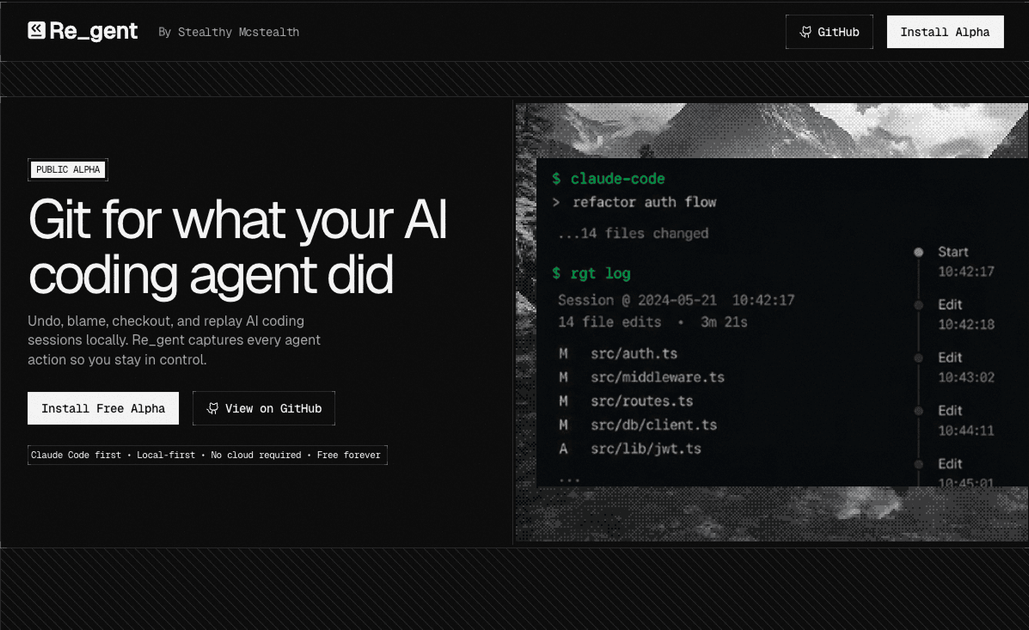
What is Regent?
Regent is version control for AI coding agent activity. It records what an AI assistant changes, the prompts and conversations behind those changes, and the sequence of actions across a coding session so users can inspect, rewind, and replay work locally.
The product is positioned as a Git-like layer for agent-driven development. Instead of only tracking file diffs, Regent is meant to preserve the agent context that produced them, helping developers understand what happened when an agent edited code, why it did it, and how to recover if something goes wrong.
Key Features
- Session logging with
rgt log: captures AI coding sessions so users can review what the agent did and the conversation that led to the result. - Blame for agent changes with
rgt blame: traces lines back to the prompts or sessions that produced them, which helps with auditing and debugging. - Checkout, undo, and replay workflows: lets users move through prior agent states and revert or re-run work locally when an agent makes an unwanted change.
- Separate sessions for parallel agents with
rgt sessions: keeps multiple conversations isolated, which is useful when several agents or prompts are working at once. - Content-addressed history: preserves the record even when an agent tool compacts or shortens its own conversation history.
- Current tool support: listed support includes Claude Code, Codex, and OpenCode, with planned support for Cursor, Cline, Continue, and Aider.
How to Use Regent
A typical workflow starts by running Regent alongside an AI coding agent while the agent edits files. As the session progresses, Regent records the conversation, the actions taken, and the resulting changes.
Afterward, a developer can use commands such as rgt log to inspect a session, rgt blame to trace a file line back to the prompt that affected it, or session controls to check out, rewind, or replay work. The product is intended for local use during agent-assisted development.
Use Cases
- Debugging unexpected changes: when an AI assistant edits several files and the result breaks something, Regent helps identify which prompt or session caused the change.
- Code review for agent output: developers can inspect the conversation and actions behind generated code instead of reviewing file diffs alone.
- Managing multiple AI agents: teams or individuals running more than one agent can keep conversations separate and reduce collisions between parallel tasks.
- Rewinding after a bad edit: if an agent takes the project in the wrong direction, a user can revert both the code and the supporting conversation history.
- Auditing AI-driven work: for teams that want a record of how a change was produced, Regent provides a trace from prompt to file modification.
FAQ
What problem does Regent solve? It fills the gap between file-based version control and AI-assisted coding by tracking the agent activity that produced the file changes.
How is this different from Git? Git tracks file history. Regent is focused on the agent conversations and actions that led to those file changes, so users can inspect prompts and session history as part of debugging or rollback.
Which AI tools work with it? The page lists Claude Code, Codex, and OpenCode as current support. Cursor, Cline, Continue, and Aider are listed as planned support.
Does Regent keep history if the agent compacts the conversation? According to the page, yes. Regent stores the record in content-addressed storage so the audit trail remains available even if the agent tool shortens its own chat history.
Alternatives
- Git alone: suitable when you only need file history and commit-based rollback, but it does not capture the prompts or conversations behind AI-generated changes.
- Manual note-taking or session screenshots: can preserve some context, but they are ad hoc and do not provide structured traceability across files and sessions.
- Standard AI coding assistants without session tracking: these tools can help generate code, but the source page positions Regent as the layer that adds logging, blame, and rewind for the agent’s activity.
- Other workflow or audit tools for development: broader developer tooling may track changes or tasks, but they are not specifically focused on AI agent sessions and prompt-to-code traceability.
Alternatives

AakarDev AI
AakarDev AI is a powerful platform that simplifies the development of AI applications with seamless vector database integration, enabling rapid deployment and scalability.

Arduino VENTUNO Q
Arduino VENTUNO Q is an edge AI computer for robotics, combining AI inference hardware and a microcontroller for deterministic control. Arduino App Lab-ready.

Devin
Devin is an AI coding agent that helps software teams complete code migrations and large refactoring by running subtasks in parallel.

BenchSpan
BenchSpan runs AI agent benchmarks in parallel, captures scores and failures in run history, and uses commit-tagged executions to improve reproducibility.

PromptScout
PromptScout tracks how your brand is mentioned, which competitors are recommended, and what sources are cited in AI answers—plus website audits.

Sleek Analytics
Lightweight, privacy-friendly analytics with real-time visitor tracking—see where visitors come from, what they view, and how long they stay.