
Complete design directions
Each entry describes a complete website art direction rather than a conventional page template, including palette, type scale, motion behavior, and section structure.

Thanor offers complete website design directions for AI tools, covering color, typography, motion, and page structure for more precise creative guidance.
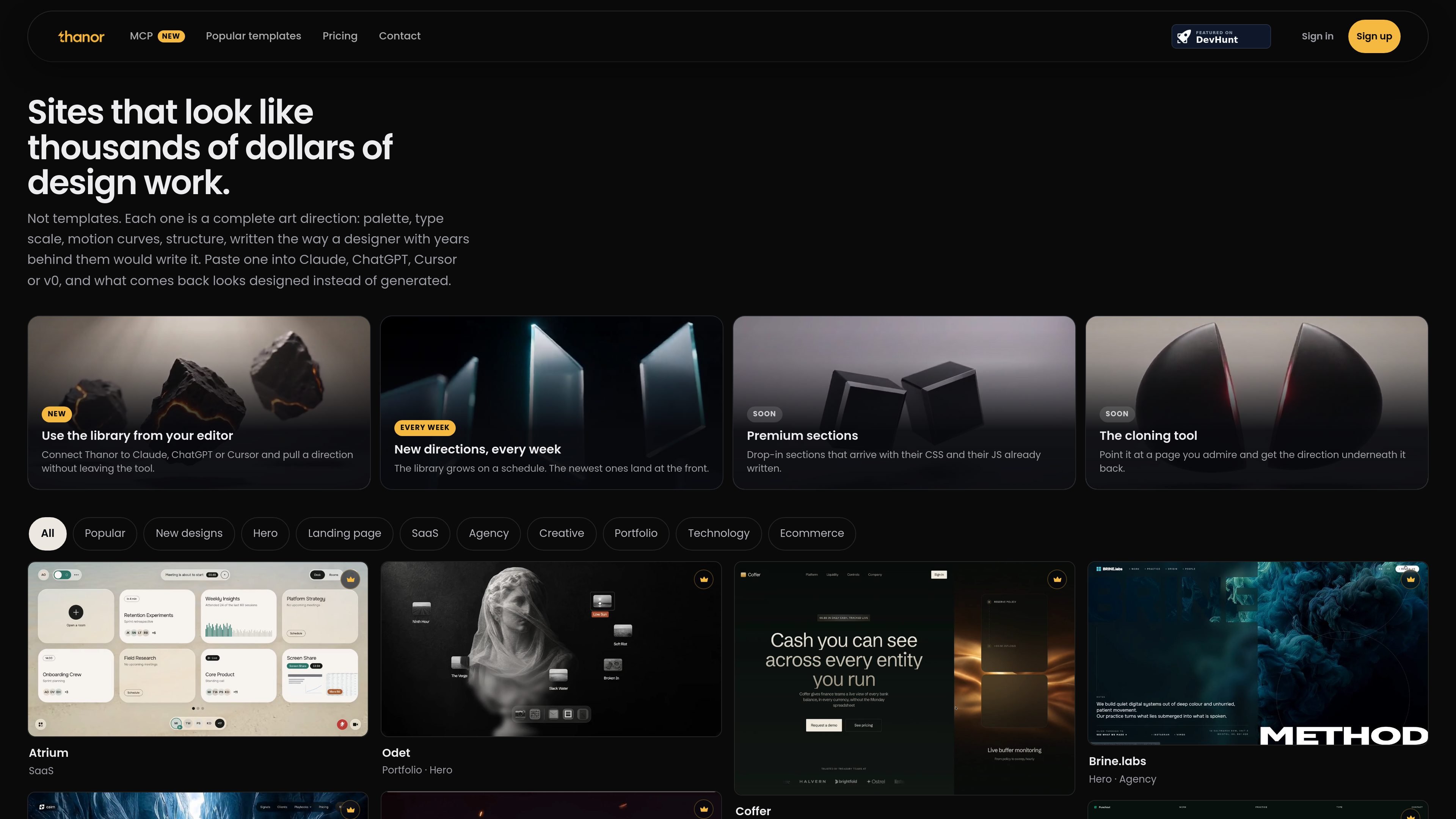
Thanor is a library of design directions for websites built with AI tools. Instead of providing editable templates, it documents a complete visual direction for each design, including a hex-color palette, type scale, motion curves with real durations, and a section-by-section structure.
A typical workflow is to browse or filter the catalog, open a design, copy its complete prompt, and paste it into an assistant or coding tool such as Claude, ChatGPT, Cursor, Lovable, Bolt, or v0. Thanor also documents an MCP server for retrieving directions from inside supported assistants and editors, although the pricing page currently marks that server as Soon.
Each entry describes a complete website art direction rather than a conventional page template, including palette, type scale, motion behavior, and section structure.
Browse by categories such as Hero, Landing page, SaaS, Agency, Creative, Portfolio, Technology, and Ecommerce, with Popular and New views available in the library.
Open a direction and copy the full prompt for use in Claude, ChatGPT, Cursor, Lovable, Bolt, or v0. The copied prompt is intended to provide design context to an AI-built website workflow.
The library adds new directions every week, with newly added work appearing at the front. Designs whose prompts are not finished are marked Soon and cannot be copied.
The MCP server provides search_designs, get_design, and get_prompt through a stateless Streamable HTTP endpoint. It supports OAuth 2.1 for Claude, ChatGPT, and Claude Code, and personal-token headers for editors including Cursor, VS Code, Zed, Antigravity, and Cline.
MCP connections are read-only: they can find designs and fetch prompts but cannot change an account, plan, saved designs, or other data. Tokens can be revoked from the Thanor connections page.
Browse directions by site type, choose a visual system, and give the complete prompt to an AI builder as a starting point for a new marketing or product site.
Use the category and section-oriented catalog to explore options for heroes, SaaS pages, agency sites, portfolios, ecommerce pages, or other focused interface directions before implementation.
Copy a direction into an existing Claude, ChatGPT, Cursor, Lovable, Bolt, or v0 workflow to add specific guidance about palette, typography, motion, and structure rather than relying on a generic generation request.
Use the prompts as a basis for personal projects or client work, then ship the resulting site under your own service or project arrangement. The prompts themselves may not be resold as a separate library, pack, or course handout.
Thanor is a library of design directions for AI-built websites. A direction includes elements such as a hex-color palette, type scale, named motion curves with durations, and a section-by-section structure. You open a design, copy its prompt, and paste it into a supported AI or coding tool such as Claude, ChatGPT, Cursor, Lovable, Bolt, or v0.
You can browse the library without an account, and designs marked Free can be copied without a card or trial. Paid designs require an active plan to copy. The MCP server is available to paying customers when the server is switched on; it is currently marked Soon on the pricing page.
The website copy flow lets you open a design and copy its complete prompt. The MCP server exposes search_designs, get_design, and get_prompt tools. Search and detail lookups do not consume copies; fetching the full prompt uses the same copy allowance as the website.
The three-month plan costs $89 every three months and allows three paid prompt copies per day. The yearly plan costs $189 per year with unlimited copies, and the lifetime plan costs $299 once with no renewal and unlimited copies. All plans provide the same library, support personal and client work, and include priority support; prices are in US dollars.
You may use the prompts to build and ship work for yourself or paying clients, but you may not resell the prompts themselves as a library, pack, or course handout. If a subscription ends, copied prompts remain usable and your shortlist remains, while paid designs close and the account returns to free access.

Refero MCP for AI agents connects an MCP-compatible agent to Refero’s curated library of web and iOS product interfaces and user flows. It helps agents research real design patterns before generating UI, with access included in the Refero Pro plan.

Wowable is an AI website builder that turns Google Maps listings, social profiles and screenshots into an editable site you can preview and publish.

Pixso is a next-generation AI-native UI design tool that allows users to generate design drafts and code with a single click, serving as a domestic alternative to Figma.

Fronty is an AI-powered web app that converts screenshots and image files into HTML and CSS, with no-code editing and hosting to refine and publish your site.

Appllama is a web-based UI and UX inspiration library for top-earning iOS apps, with screens, flows, paywalls, and app performance data.

Quarkdown is an open-source Markdown typesetting system for papers, presentations, knowledge bases and static websites, with CLI live preview, HTML output and PDF export.