

withsubtitles.com
withsubtitles.com creates subtitles for short-form videos right in your browser—free to use and private—so you can generate and refine captions.
What is withsubtitles.com?
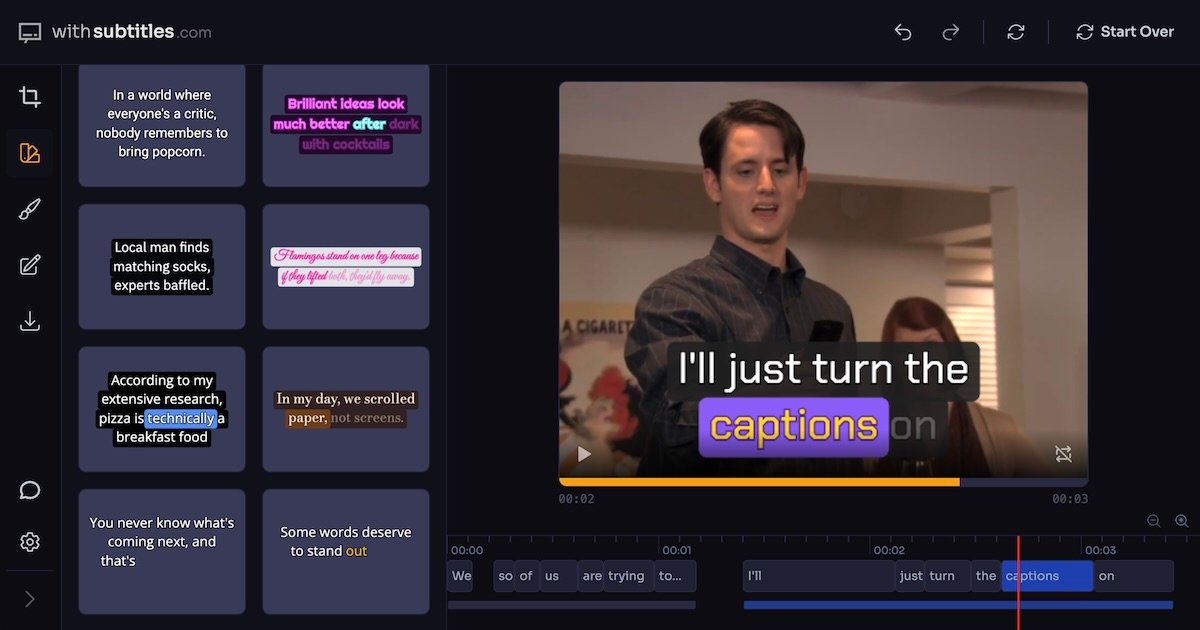
withsubtitles.com is a web-based tool for creating subtitles for video directly in your browser. Its core purpose is to help you generate subtitles for short-form videos so they’re easier to follow while you work, without requiring a separate editing app.
The site positions subtitles as both “engaging” and “beautiful,” and emphasizes that subtitles can be created right in the browser for free while keeping the process private.
Key Features
- Auto captions for short-form videos: Generates captions/subtitles automatically, reducing the manual effort of timing and text entry.
- In-browser workflow: Creates subtitles directly in the browser, so you don’t need to export to another desktop tool just to draft caption text.
- Short-form oriented: Focuses on captions for short-form video use, where quick readability and fast turnaround matter.
- Free to use (per site statement): The product is described as available “for free.”
- Private processing (per site statement): The site claims the subtitle creation is “100% private.”
How to Use withsubtitles.com
- Open the site in your browser.
- Start a new subtitle/caption creation flow for your video (the site is designed for subtitle generation).
- Use the browser-based editor to review and adjust the subtitles produced for your clip.
- Export or use the resulting captions/subtitles as your final subtitle track for the video.
Use Cases
- Re-captioning a short video for clarity: When your original footage has unclear audio, generate captions to make the dialogue or key information readable.
- Preparing videos for platforms that favor captions: Create subtitles so viewers can follow along even when watching without sound.
- Quick turnaround for social content: Generate and polish captions for short-form clips without switching to a separate desktop captioning workflow.
- Editing for readability and presentation: Adjust subtitle text in the browser to improve legibility before publishing.
FAQ
-
Is withsubtitles.com a desktop app? No. The site describes a right-in-the-browser workflow.
-
Do I need to pay to use it? The meta description states it’s “for free.”
-
Is the subtitle creation private? The meta description claims subtitles are “100% private,” but the specific details of what is private are not provided in the supplied text.
-
What kind of videos is it for? The page title indicates it’s for short-form videos.
Alternatives
- Desktop or web subtitle editors: General-purpose caption editors that let you import a transcript/audio and then manually adjust timing and styling; these may require more manual work than auto-captioning.
- Video editing software with caption tools: NLEs (non-linear editors) that include caption generation and styling; typically broader video editing capabilities but more setup.
- Auto-caption features inside social media upload workflows: Platforms that add captions during or after upload; workflow may be less controllable than a dedicated subtitle tool.
- Transcription-to-captions tools: Tools that focus on transcription first, then convert text to subtitle formats; the difference is whether you’re editing subtitles directly vs. building them from a transcript first.
Alternatives

Pewbeam
Pewbeam listens as you preach, detects Bible verses in real time, and displays them instantly on screen—no typing or clicking for pastors.

Stage Captions
Stage Captions is professional, browser-based software delivering production-ready, real-time closed captioning for live events, broadcasts, and conferences with minimal latency.

Tactiq
Tactiq is an AI meeting assistant that provides live transcription, AI summaries, action items, and custom AI prompts for Google Meet, Zoom, and Teams.

CAMB.AI
Turn a single live stream into a multilingual broadcast with real-time AI audio dubbing for YouTube, Twitch, X and more.

Scripta
Scripta is a privacy-first AI notetaker that records, transcribes, and summarizes your meetings directly on your device, without requiring bot access.

Captions.ai
Captions.ai is an online video editor and app with AI-powered editing, automatic captions, music, and AI avatars for faster video creation.