
Physical control surface on mobile
The iPhone or iPad app provides keys, a dial, a joystick, and a touch panel, letting the controller feel more like a physical deck than a standard remote app.

CTRL Micro is an iPhone or iPad controller for a Mac Host app that can control your Mac, Codex, Claude, Cursor, and custom clients. It focuses on local pairing, local dictation, and one-time purchase options rather than a subscription.
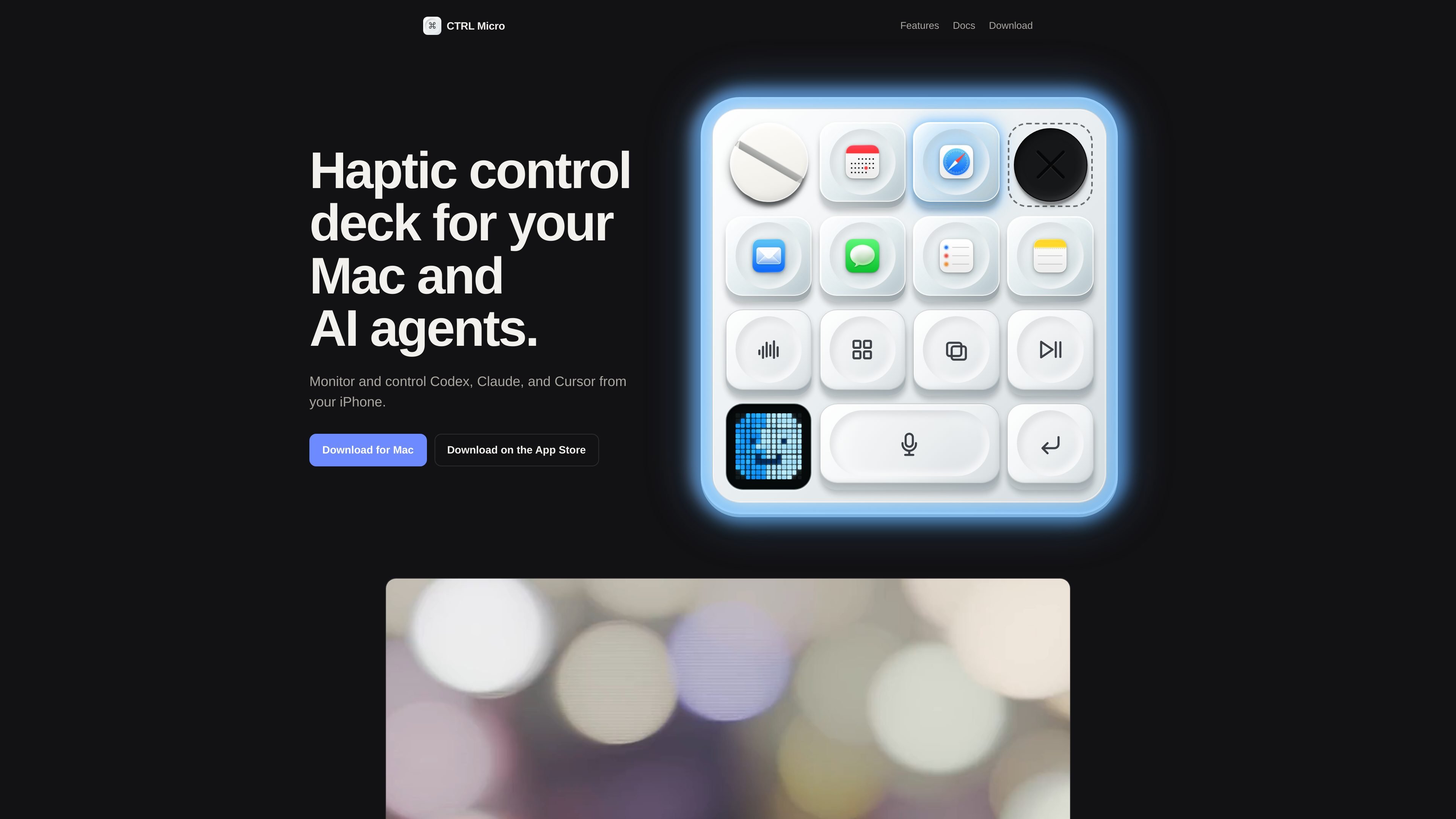
CTRL Micro is a haptic control deck for an iPhone or iPad paired with a Mac Host app. It is designed to let you control your Mac and supported AI clients from a mobile controller with keys, a dial, a joystick, and a touch panel.
According to the site, the controller sends neutral input to the Mac Host rather than talking directly to desktop apps or AI providers. The Host then routes that input to the selected client, which can be your Mac, Codex, Claude, Cursor, or a custom client you build yourself.
The product emphasizes local operation: pairing happens between the controller and Host, dictation is transcribed on the Mac, and no account is required for use. The download page also separates Mac controls from paid options for local, nearby, and outside-network access.
The iPhone or iPad app provides keys, a dial, a joystick, and a touch panel, letting the controller feel more like a physical deck than a standard remote app.
The Mac Host receives controller input, maps it to the selected client, performs the action on the Mac, and reports what happened back to the controller.
The product can switch between clients such as your Mac, Codex, Claude, Cursor, or a custom client, with only one selected client active at a time.
Voice input is handled on the Mac, where the audio is transcribed locally and sent either to the selected client or to the field that was focused when dictation began.
Custom clients can use live items, commands, the dial, the joystick, the wide key, and the pixel panel to match a workflow built by the user.
Pairing is local and one-to-one between the controller and an active Host, with optional encrypted background notifications for task completion, attention, or failure.
Use the controller to keep Mac controls and supported AI clients within reach on your phone, especially when you want tactile buttons and a dial instead of switching back to the keyboard and trackpad.
Use voice dictation when you want text entered on the Mac without cloud transcription, since the site says audio stays on the Mac and is transcribed locally.
Build a custom board for notes, jobs, devices, or other changing items when you want the six acrylic keys and the rest of the controls mapped to a specific workflow.
Pair a Mac and then select exactly one active Host when you need the controller to target a single machine rather than every paired device at once.
Use encrypted background notifications if you want optional status updates for task completion, attention, or failure without sending task content in the notification itself.
CTRL Micro uses an iPhone or iPad controller paired with a Mac Host app. The controller sends neutral input to the Host, and the Host decides what the selected client should do.
The download page says the controller requires iOS 17 or later, and the Mac Host requires macOS 14 or later. The docs also state that custom clients need macOS 14 or later plus the Host app.
The docs describe Codex, Claude, Cursor, your Mac, and custom clients you build yourself as supported clients. The download page also lists Mac controls, Codex, Claude, Cursor, custom clients, and local or nearby connections for the Local plan.
The download page says Mac controls are free with no account or payment required, and it offers separate one-time purchases for Local, Anywhere, and Anywhere Max. The pricing page itself was not available.
The docs say the controller and Host pair locally with a one-time pairing code, and notifications are optional. For custom clients, CTRL Micro shows a full-trust warning before enabling a client and requires approval again if the installed bundle changes.

Redline is a budgeting tool for Claude Code that paces sessions to stay within time, token, cost, or plan-percentage limits. It uses Claude Code’s native hooks and statusline to help sessions finish with a usable result instead of stopping abruptly.

Macuse is a macOS app that lets AI assistants control native Mac apps through MCP and use Computer Use for any app. It works with clients like Claude Desktop, Cursor, and Raycast, and keeps automation on-device.

ByteAsk is a terminal-first AI coding agent for C and C++ that edits repositories and verifies changes with the real compiler, debugger, sanitizers, and tests before showing a diff. It offers a free tier plus paid plans, with editor connectors and zero-retention handling described in the source.

Goldfish is an AI memory app for macOS that helps you reply, write, summarize, and continue using the context already on your Mac. It stores memory locally and writes in your tone.

MeetStream is a meeting bot API for Zoom, Google Meet, Microsoft Teams, and Webex. It helps developers record, stream, and analyze meetings programmatically, with usage-based pricing and a $5 free credit to start.

CreateOS Sandbox is an isolated compute environment for running code and agent workloads inside Firecracker micro-VMs. It is designed for workflows that need machine-level isolation, private networking between sandboxes, and programmatic control through SDK, CLI, or MCP.