a1.art icon

a1.art

A1.art is a web-based AI image and video generator built around reusable filters and preset visual effects. It helps users create stylized portraits, themed images, and quick AI art from a simple run-based workflow.

a1.art

Overview

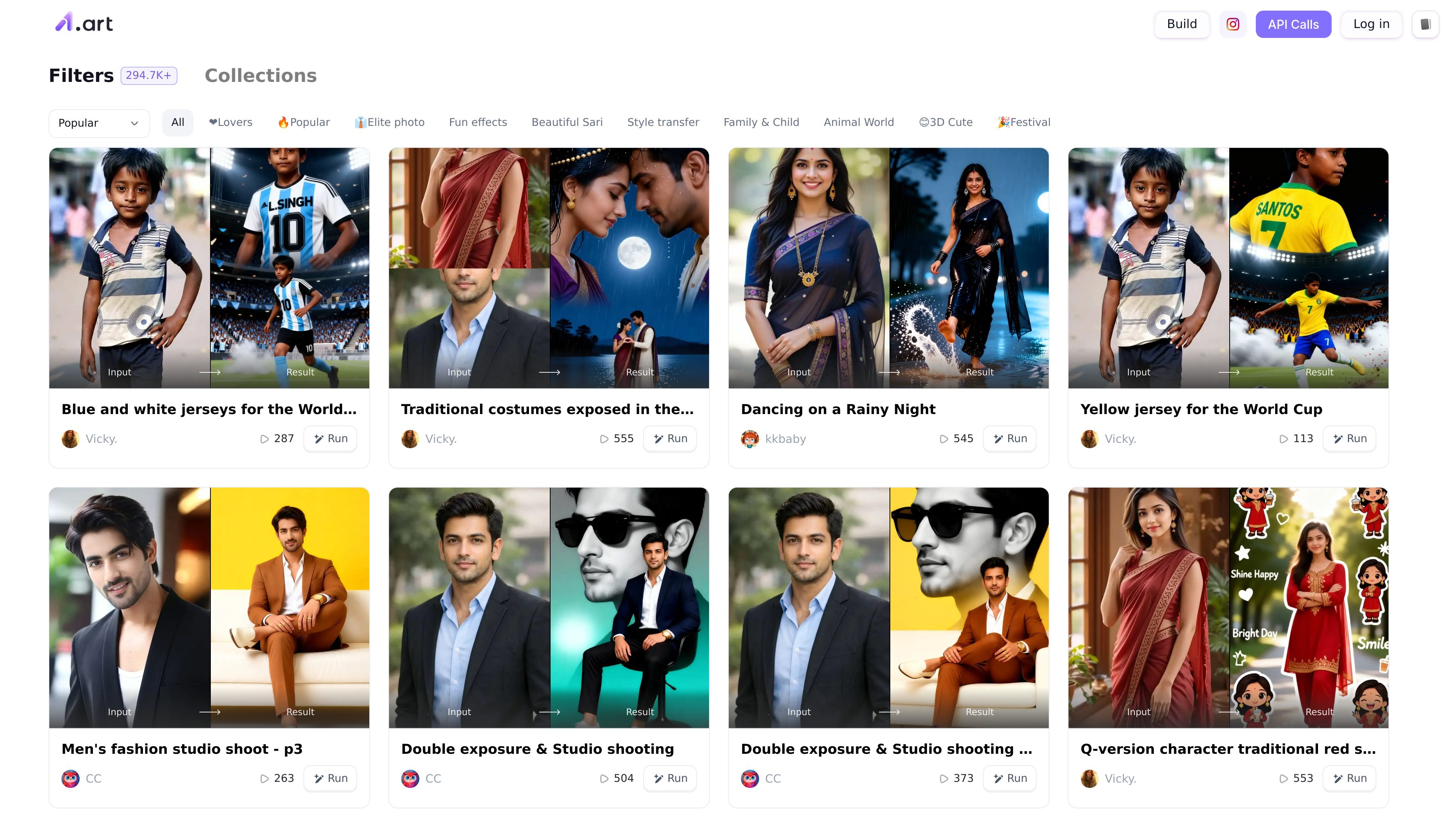
A1.art is a web-based AI image and video generation platform built around a large library of reusable filters. The homepage positions it as a free online tool for building and discovering image and video filters, while the collection pages show examples across portraits, fashion, cartoons, group photos, and style-transfer effects.

The product is organized for quick reuse rather than manual editing from scratch: users choose a filter, provide an input, and run it to see a result. That makes it a fit for people who want to create stylized AI artwork, profile images, themed portraits, or other preset transformations without needing a complex editing workflow.

Core features

Large filter gallery

Browse a large catalog of preset filters and collections, with the home page showing hundreds of thousands of filters and category groupings such as Popular, Elite photo, Fun effects, Beautiful Sari, Style transfer, Family & Child, Animal World, 3D Cute, and Festival.

Run filters from a prompt or image

Create results from an input-and-output workflow. The public pages repeatedly show an Input field, a Result preview, and a Run action, indicating a simple generation flow.

Curated collections by use case

Explore specialized collections for common portrait and composition tasks, including ID photo, anime, cartoon, art photo, material, clothes, and group photo.

Image and video generation

Work with both image and video generation according to the homepage description, which positions A1.art as an online AI video and image generator.

Community filter browsing

Discover and reuse community-made examples, with each filter listing a creator name and visible popularity counts on the site.

Web access and API support

Access the service on the web and, according to the privacy policy, through an API used by third-party websites and applications.

Common use cases

  • Stylized portrait creation

    Use preset portrait and style filters to turn a photo into a themed image, such as an anime, cartoon, or art-photo look.

  • Profile and business photos

    Generate ID-style or business-facing images using collections labeled for ID photo, LinkedIn business image photo, workplace photos, and professional portraits.

  • Group and family images

    Create couple, family, or group compositions using the group-photo and family-focused filters shown on the site.

  • Themed fashion imagery

    Apply fashion, sari, clothes, or festival-themed filters to create culturally styled or outfit-focused visuals.

  • Filter discovery and reuse

    Explore community-published filters and examples when you want a quick starting point instead of building a custom effect from zero.

Pros and Cons

Pros

  • Large catalog of filters and collections makes it easy to find a starting point for common image styles.
  • Simple Run-based workflow lowers the barrier for users who want quick results.
  • Covers a wide range of visual themes, from ID photos and professional portraits to anime, cartoon, and group-photo styles.
  • The site presents both image and video generation in its homepage positioning.
  • A privacy policy is published and explicitly references account data, payment handling, and API usage.

Cons

  • The pricing pages in the provided source do not show clear plan names or price points, so the paid/free structure is not fully transparent from the public pages alone.
  • The available pages emphasize preset filters more than advanced editing controls, so it may be less suited to users who want a fully manual workflow.
  • The public site content does not document platform apps or a detailed integrations list beyond a mention of an API in the privacy policy.

FAQ

What is A1.art used for?

A1.art is a web-based AI art platform for generating and discovering image and video filters. The site also shows an API mentioned in its privacy policy, but the public pages provided do not document setup details or third-party integrations beyond that.

Is A1.art free to use?

The source pages describe A1.art as a free online AI image and video generator, with pricing pages that currently repeat the free-product messaging. They do not expose clear plan names or price points in the provided content.

How does the workflow work?

The public pages emphasize browsing filters, opening a filter, entering an input, and running it to produce a result. The collection page shows categories such as ID photo, anime, cartoon, art photo, material, clothes, and group photo.

Does A1.art support integrations or apps?

The source content points to browser use through the website and mentions an API in the privacy policy. No mobile app, desktop app, or external integration list is clearly documented in the provided pages.

Who is A1.art best suited for?

The site presents a large gallery of filters and examples for portraits, couples, groups, and style transformations. That makes it suitable for creating stylized AI images and exploring preset effects rather than building a blank-canvas editor from scratch.

Quick Facts

Category
AI image and video generator
Platform
Web app
Primary workflow
Choose a filter, provide input, and run it
Source domain
a1.art
Pricing shape
Free online access is advertised; detailed plans are not shown in the provided pages
API
Referenced in the privacy policy