
AnythingLLM
AnythingLLM is an all-in-one desktop AI app to chat with documents and use AI agents—local-first, private, and supports multiple LLM providers.
What is AnythingLLM?
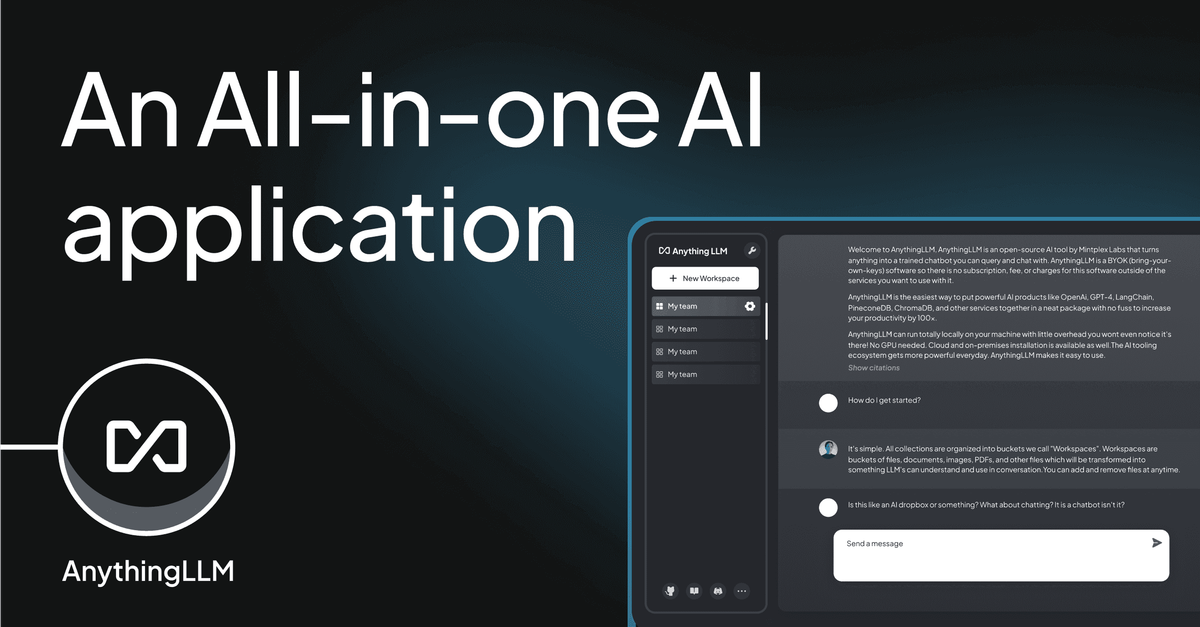
AnythingLLM is an all-in-one desktop AI app to chat with documents and use AI agents through a single interface. The core purpose is to let you connect to an LLM of your choice and work with multiple document types while keeping the experience focused on local, private use.
According to the site, AnythingLLM can run with a built-in locally running provider and can also connect to local or enterprise LLM engines. It supports importing documents from online locations, and it is described as private by default, with documents and chat activity stored locally.
Key Features
- Chat with documents (local-first): Use the app to work with your documents through a unified UI, with storage described as local to the machine running AnythingLLM.
- Any document types: The site lists support for PDFs, word documents, CSV, and codebases, plus other business document formats.
- Use AI agents from within the app: In addition to document chat, AnythingLLM includes “AI Agents” as part of its built-in capabilities.
- Choose your LLM provider/model: The app can use its built-in locally running provider to run “any model you want,” or connect to enterprise models from OpenAI, Azure, AWS, and more.
- Privacy-focused local storage: The site states that nothing is shared unless you allow it, and that the defaults cover the LLM, embedder, vector database, storage, and agents.
- Multimodal support: AnythingLLM is described as supporting both text-only and multi-modal LLMs, including the ability to work with images or audio.
- Open source and extensible: AnythingLLM is open source and MIT licensed, and it supports extension with custom agents and data connectors.
- Developer API usage: The site notes that AnythingLLM can be used as a “powerful API” for custom development or features in existing products.
- Desktop experience (one-click install): AnythingLLM Desktop is described as not SaaS (no signup) and includes one-click installation with everything stored locally.
How to Use AnythingLLM
- Install AnythingLLM Desktop using the one-click download/run process mentioned on the site.
- Start with local use: set up and run the built-in local provider so you can chat with documents without additional accounts.
- Add or import documents (including importing from online locations, as described) and then use the interface to chat with that content.
- Select an LLM option: run a model locally via the built-in provider, or connect to a preferred local or enterprise LLM engine.
- Extend if needed: add custom agents and data connectors, or use the built-in Developer API for embedding AnythingLLM into other workflows.
Use Cases
- Answer questions from business documents (local/private): Load PDFs, word documents, CSV, and codebases and ask questions through the document chat workflow.
- Automate tasks with AI agents: Use the built-in agent functionality to support workflows beyond straightforward Q&A while keeping runs local by default.
- Work with mixed content for analysis or assistance: Use multi-modal LLM support to incorporate images or audio alongside text in a single interface.
- Bring external documents into your workspace: Import documents from online locations and then use the app to chat with and leverage those documents.
- Developer or product integration via API: Use AnythingLLM as an API for adding AI-driven document interactions or agent-driven features to other software.
FAQ
-
Does AnythingLLM require an account? The site states that AnythingLLM Desktop is not SaaS and that no signup is required to run locally.
-
Can it run fully offline? The page describes the application as supporting “full locally and offline” use.
-
What LLM options are supported? The site says you can run with AnythingLLM’s built-in locally running provider (to run models you choose) or connect to local or enterprise LLM providers including OpenAI, Azure, and AWS.
-
What document types can I use? The site explicitly mentions PDFs, word documents, CSV, and codebases, and also notes that many other business document types are supported.
-
Is AnythingLLM open source? Yes. The site states it is open source and MIT licensed.
Alternatives
- Local RAG/chat applications (open-source): Tools that let you index your documents locally and chat over them can serve a similar purpose, though they may require more configuration.
- General-purpose LLM chat clients with document upload: Apps that provide a chat UI and document ingestion can overlap with document Q&A, but may differ in how they handle local/offline execution and agent workflows.
- Vector database + embedding + app stack: Building your own retrieval setup (vector database, embeddings, and a chat UI) is an alternative for teams that want full control, but it typically shifts more setup work to the user.
- Hosted enterprise AI platforms: If you prefer managed services rather than local storage, enterprise platforms that provide LLM access may fit, with the tradeoff that the deployment model differs from “local by default.”
Alternatives

BookAI.chat
BookAI allows you to chat with your books using AI by simply providing the title and author.

Struere
Struere is an AI-native operational system that replaces spreadsheet workflows with structured software—dashboards, alerts, and automations.

garden-md
Turn meeting transcripts into a structured, linked company wiki with local markdown and an HTML browser view. Sync from supported sources.

Falconer
Falconer is a self-updating knowledge platform for high-speed teams to write, share, and find reliable internal documentation and code context in one place.

AakarDev AI
AakarDev AI is a powerful platform that simplifies the development of AI applications with seamless vector database integration, enabling rapid deployment and scalability.

Nolain OCR
Nolain OCR is an advanced Optical Character Recognition solution designed to accurately extract text and data from various document formats, streamlining document processing workflows.