
One upload to multiple outputs
Upload a raw video or audio file, then let Clipo identify useful moments and generate multiple content outputs from the same source.

Clipo AI turns one video or podcast into clips, thumbnails, carousels, images and posts for creators who want one workflow.
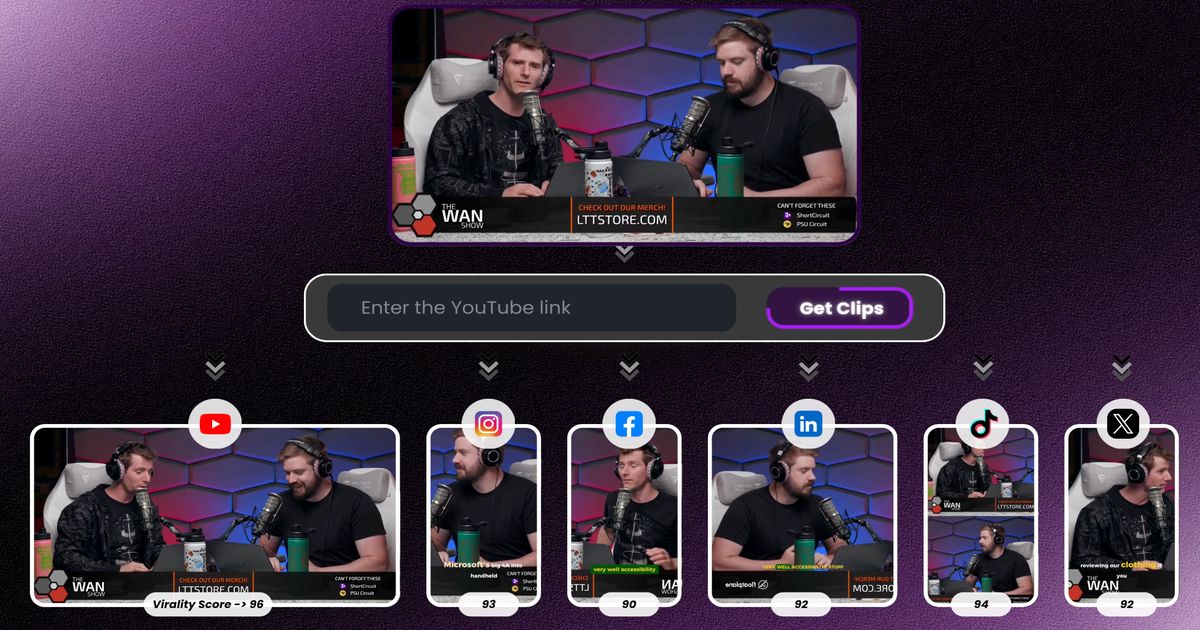
Clipo AI is an AI content repurposing platform that turns one long-form video or podcast into multiple pieces of publishable content. The site positions it as a single workflow for clips, thumbnails, carousels, images, written posts, subtitles, and scheduling, rather than a standalone clipping tool.
The workflow starts with uploading raw video or audio. Clipo then identifies usable moments, creates outputs automatically, and lets users refine subtitles, crops, templates, and edits before exporting or publishing. The pricing page shows a Free plan and paid tiers that add higher resolution, transcripts, brand kits, scheduling, analytics, and bulk publishing.
Upload a raw video or audio file, then let Clipo identify useful moments and generate multiple content outputs from the same source.
The site shows clip discovery methods such as keyword-based clipping, visual description search, screenshot navigation, and chat with video.
Clipo includes auto-reframe and manual reframe controls, plus subtitle styling, text-based editing, overlays, music, and background replacement in the editor.
The product generates carousels, thumbnails, AI images, and image enhancements, extending beyond video clipping into static content production.
AI Writer tools produce articles, captions, summaries, LinkedIn posts, Twitter/X threads, and voice-aligned writing based on previous content.
Premium features add scheduling across 13 platforms, multi-platform and bulk publishing, analytics, and higher render limits.
Turn a podcast, webinar, interview, or recorded talk into short clips and supporting assets for social channels.
Use keyword prompts, visual descriptions, or chat with video to find specific moments without manually scrubbing through the timeline.
Produce carousels, thumbnails, images, and voice-aligned posts from the same source recording to support a fuller content calendar.
Refine subtitles, crops, templates, and edits before export when you want more control over the final output.
Use scheduling, bulk publishing, and analytics on higher tiers when you manage recurring content across multiple social platforms.
Clipo AI is an AI-powered content repurposing platform that turns a single long-form video or podcast recording into multiple outputs such as clips, thumbnails, carousels, posts, and images.
The pricing page shows a Free plan, plus Starter, Pro, and Premium paid tiers. The Free plan includes 75 credits per month and basic creation tools, while higher tiers add more credits, higher render quality, transcripts, scheduling, analytics, and larger storage limits.
The source shows outputs including short clips, thumbnails, carousels, images, AI-written posts, subtitles, and faceless shorts. Publishing and export options include one-click publishing, bulk publishing, and scheduling across 13 platforms on the Premium plan.
Clipo's comparison pages and pricing details show features that support individual creators and teams, including saved brand kits, analytics, scheduling, bulk publishing, and priority email support. The source does not list explicit collaboration roles or permissions.
Clipo supports uploads of raw video or audio and is presented as a workflow for repurposing long-form content. The site highlights use with podcasts, videos, interviews, tutorials, webinars, and event recordings.

Virvid is an AI shorts generator for faceless TikTok, Instagram Reels, and YouTube Shorts, with manual creation and automated daily posting.

topple.lol is a public pay-to-rank leaderboard where listings start at $1 and bid balance decays over time and clicks for short-term visibility.

Video Effects SDK adds real-time webcam effects like background blur, replacement or removal, denoising, framing, beautification, and color grading for live video apps.

DeepMotion is a web-based AI motion capture and 3D animation platform with Animate 3D for video-to-animation and SayMotion for text-to-animation.

Radar is a self-hostable media intelligence and social listening app for monitoring public sources, analyzing mentions, and generating briefs or content outputs with optional Claude AI.

Frames helps you create launch posters and social media marketing graphics fast with premium device frames and templates for Instagram, Twitter, and Product Hunt. Free to start.