

Claude Code
Claude Code by Anthropic is an agentic AI coding tool that understands your codebase, edits files, and runs commands across terminal, desktop, IDEs, web, and Slack.
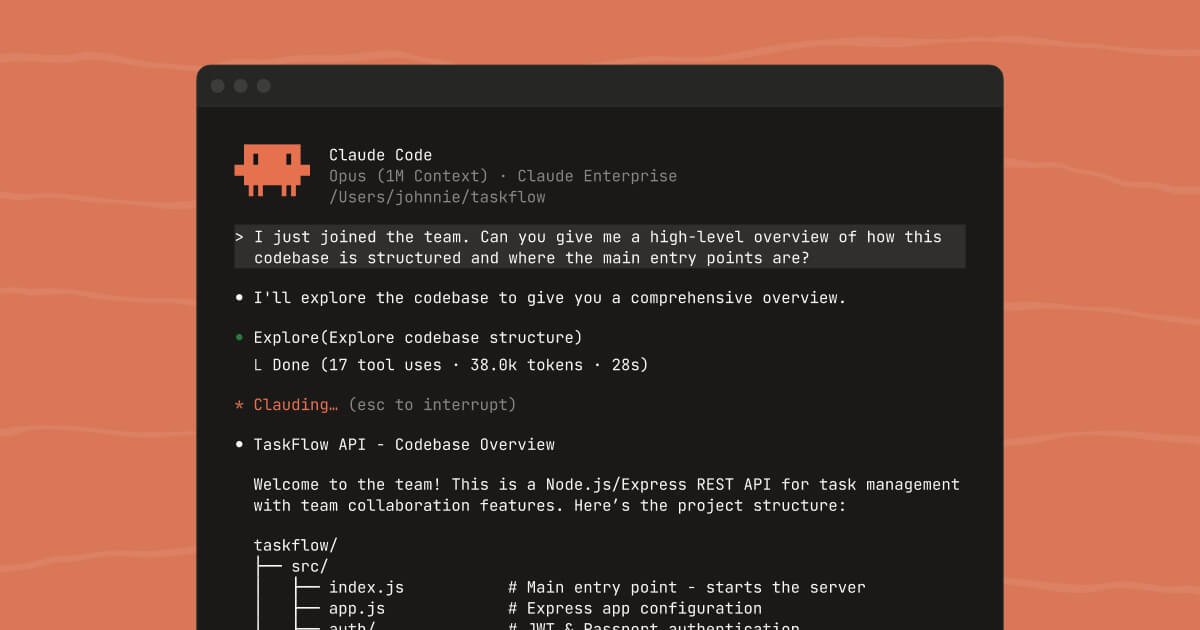
What is Claude Code?
Claude Code by Anthropic is an AI coding agent that helps developers work directly with their codebase. It can understand existing project context, edit files, and run commands so you can debug, build, and ship from the tools you already use.
You can access Claude Code across multiple environments—terminal, desktop app, IDE extensions, web, and Slack—so your workflow stays consistent whether you’re starting from an issue, reviewing changes, or delegating routine tasks.
Key Features
- Codebase-aware assistance in existing tools: Claude Code is designed to work with your codebase context so it can answer questions and make changes rather than acting only as a standalone chat.
- File edits and change review: In the desktop app, you can review visual diffs while Claude proposes or applies updates.
- Command execution via the terminal: In terminal workflows, Claude can explore your codebase and run through tasks using your CLI tools.
- IDE integration with visual diffs: Native extensions are available for VS Code (including forks like Cursor and Windsurf) and JetBrains, allowing you to see Claude’s changes as visual diffs inside your editor.
- Task delegation from web and iOS (research preview): You can delegate tasks from the browser or the Claude iOS app, which is positioned for routine work, bug fixes, and starting tasks while away from your desk.
- Slack workflow (beta): A Slack app is available (admin approval required via the Slack App Marketplace), enabling you to use Claude Code from Slack.
- Desktop project management: The desktop beta supports managing multiple parallel tasks, previewing servers, and monitoring PR status from one place.
How to Use Claude Code
- Get started by installing or accessing Claude Code: Use the provided install commands for terminal (shell or PowerShell), or try Claude Code in the desktop app, IDE extension, web, or Slack.
- Work from where you already code: In terminal or your IDE, describe what you need (for example, how to debug an issue or what files to update), and Claude will use codebase context to propose changes.
- Review diffs and verify behavior: When changes are made, use the visual diffs in desktop/IDE to review before merging.
- Delegate ongoing tasks: For longer-running or routine work, you can delegate via desktop, web, or iOS, and monitor progress (including PR status in the desktop app).
Use Cases
- Debug and update a project from the terminal: Ask Claude Code to explore your repository context, answer targeted questions, and make required edits while also using your existing CLI tools to complete tasks.
- Review and merge changes with visual diffs: Use the desktop app (or IDE extensions) to review Claude’s proposed file changes as visual diffs before applying them to your branch.
- Run parallel development tasks: Manage multiple simultaneous tasks in the desktop beta, preview servers, and keep track of PR status in one place.
- Delegate routine work from browser or iOS: Start bug fixes or routine coding tasks while using the web interface or the Claude iOS app (research preview), then return to review the results.
- Use Slack for issue-driven coding requests: After your Slack workspace admin approves the Claude app from the Slack App Marketplace, delegate and track coding requests directly from Slack using your existing Claude account.
FAQ
-
Where can I use Claude Code? Claude Code is available in the terminal, desktop app (beta), IDEs (VS Code and JetBrains), web and iOS (research preview), and Slack (beta).
-
Does Claude Code just chat, or can it make changes? The product is described as an agentic coding tool that understands your codebase and can make file edits and run commands.
-
How are changes presented for review? The desktop app and IDE integrations show changes as visual diffs so you can review what Claude intends to modify.
-
What do I need to use Claude Code in Slack? The site notes that a workspace admin must approve the Claude app from the Slack App Marketplace, and you then use your existing Claude account.
-
Is there a cost shown on the page? The page includes plan information indicating Claude Code is included in Pro and Max plans, with specific monthly prices shown for each tier.
Alternatives
- General-purpose AI coding assistants (chat + patch suggestions): Tools that focus on code Q&A and proposed edits can be an alternative, though they may not integrate as tightly with running commands, PR status, or visual diffs inside your existing workflow.
- Code editor-integrated AI assistants: IDE-focused assistants (built for VS Code/JetBrains-style environments) can replace the IDE extension workflow, but may differ in how they handle multi-step tasks like running commands or delegating work across platforms.
- Agentic task runners and automation tools: Platforms that automate development steps through scripts and terminal execution can serve a similar role for delegating work, but typically require more manual scripting rather than describing tasks in natural language.
- Team collaboration workflows with issue management: If the goal is delegating coding requests to a team, alternative collaboration patterns (issue trackers + code review tooling) may cover part of the workflow, though without Claude Code’s codebase-aware editing and command execution.
Alternatives

Devin
Devin is an AI coding agent that helps software teams complete code migrations and large refactoring by running subtasks in parallel.

Claude Opus 4.5
Introducing the best model in the world for coding, agents, computer use, and enterprise workflows.

Codex Plugins
Use Codex Plugins to bundle skills, app integrations, and MCP servers into reusable workflows—extending Codex access to tools like Gmail, Drive, and Slack.

Falconer
Falconer is a self-updating knowledge platform for high-speed teams to write, share, and find reliable internal documentation and code context in one place.

OpenFlags
OpenFlags is an open source, self-hosted feature flag system with a control plane and typed SDKs for progressive delivery and safe rollouts.

AakarDev AI
AakarDev AI is a powerful platform that simplifies the development of AI applications with seamless vector database integration, enabling rapid deployment and scalability.